2026 ውስጥ የየይዘት ደህንነት ለማሻሻል የሚሆኑ 10 ታላቅ ተግባራት
2026 ውስጥ የይለፍ ቃል security የሚሆኑ 10 የተመረጡ ተግባራትን ይፈልጉ። ኃይለኛ የይለፍ ቃል ማዘጋጀት፣ MFA እንዴት መጠቀም እና የዕውቀት አደጋዎች ከአካውንቶችዎ መከላከል ይማሩ።
የተመነጨ ማስተካከያዎች

የአንድ ዘመን ውስጥ ፋይናንስያዊ መረጃ እስከ ሰላማዊ ልውውጥ ድርጅት ድርሰት ድርሰት ያለው የቃል ምልክት እንኳን በመጀመሪያው ጋርድ ሆኖ ነበር። በሆነውም አብዛኛው የተለያዩ መረጃዎች እና የተለያዩ የመረጃ መሬት መሬት በማሰሪያ የተሠሩት እና የማይችሉት በመሆኑ በአንድ ዘመን ውስጥ አብዛኛው ያለው የቃል ምልክት ነው። የማይችሉት እና የማይችሉት በሆነው አብዛኛው ያለው የተለያዩ መረጃዎች እና የተለያዩ የመረጃ መሬት መሬት በማሰሪያ የተሠሩት እና የማይችሉት በመሆኑ በአንድ ዘመን ውስጥ አብዛኛው ያለው የቃል ምልክት ነው። የማይችሉት እና የማይችሉት በሆነው አብዛኛው ያለው የተለያዩ መረጃዎች እና የተለያዩ የመረጃ መሬት መሬት በማሰሪያ የተሠሩት እና የማይችሉት በመሆኑ በአንድ ዘመን ውስጥ አብዛኛው ያለው የቃል ምልክት ነው። best practices for password security
በይለፍ ሚስጥር ጥንቃቄ ምርመራ ወደ ድជট ህይወትዎን ለመጠበቅ ወሳኝ ስልቶችን እንመልከታለን። ይህ አስተማማኝ ፣ ልዩ ፣ በእርግጥ ጠንካራ የይለፍ ቃላትን ለመፍጠር አይniko ብቻ ሳይሆን በብලክ በመልኩ ለመከላከል አስፈላጊ የሆኑ ልምዶችንም ያካትታል።ከMulti-Factor Authentication (MFA) ትክክለኛ ተግባር ማድረግ፣ የፓስወርድ መናጮዎች ኃይል መጠቀም፣ እና እንደ phishing እና credential stuffing ያሉ ወሰኝ አደጋዎችን ማስተንፈቅ እና መ避开 ይማራሉ። በተጨማሪም፣ ለተደብቀ ምልክቶች ምንጭ መርምርልኩ የሆኑ መለያዎችን እንዴት እንደሚቆጠሩ እና ደህንነቱ የተጠበቀ የመመለሻ ዘዴዎችን እንዴት እንደሚያወጡ ያስሬዳለን.
በዚህ ዝርዝር በማጣቀሻ ውስጥ፣ ወደ እርምጃ የሚወስድ ምሳሌዎችንና ተወቁ የተግባር ዝርዝሮችን እንስጥልሃለን። ከShiftShift ቴንሽኖች እንደ የሚቃወም መሣሪያ ቡድን ያሉ ዘመናዊ የብራውዝር መሣሪያዎች እንዴት ይህን የደህንነት እርምጃ ሊቀላቅሉና ሊያብራሩ ይችላሉ ብለን እንጋብቃለን። ደህንነቱ የተጠበቀ የየይስት መብራት እና ብቻ በአካባቢ ላይ የሚሆን ሂደት እንደ መሣሪያዎች በመቀላቀል ጥንታዊ የደህንነት ተሞክሮ ከውስብስብ ሥራ ወደ ምርጥና በጣም ቀላል በሆነ መልኩ የዕለት ተዕለት ዲጂታል ወግ አካል ማድረግ ይችላሉ። ይህ መመሪያ ከተከላከላ ቀንድ ቀጥታ መድረስ ከመጠበቅ ጋር ለመመርኮዝ የሚያስፈልግ አቀባበላንና የሂደት ሥርዓትን ይሰጥሃል።
1. ለእያንዳንዱ መለያ ጥንታዊና ድርቅ ያለው የይስት መብራት ይጠቀሙ
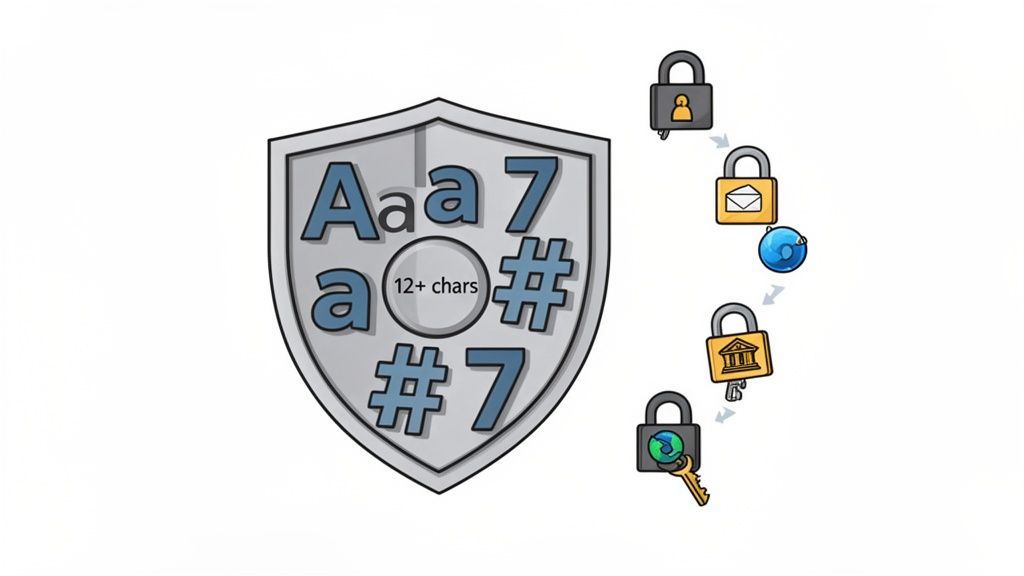
ለእያንዳንዱ የመስመር ላይ መለያ በየሰዓቱ ልዩና ድርቅ ያለው የይስት መብራት ማቅረብ የይስት ደህንነት ምርጥ ልምዶች ውስጥ ረዥም የሆነው መሠረተ ቁም ነገር ነው። ጥንታዊ የይስት መብራት የመጀመሪያ ተከላከላ መሆን አለበት፣ የላይኛውን ሁለት ፊደሎች፣ የታችኛውን ሁለት ፊደሎች፣ ቁጥሮችንና ልዩ ባህሪዎችን በዘዴ ተከታይ ስርዓት ያዋህዳል። ይህ ድብቀት በተግዳሮቶች እንደ አንድ ላይ ተቃውሞ እና መዝገብ ጥቃት እንደ ያሉ በራስ-ሰር ዘዴዎች በመጠበቅ ወይም በመቁረጥ ለ攻擊者ዎች በከፍተኛ ደረጃ ድንቅ ይሆናቸዋል።
"ነጠላ" በሆነ ሁኔታ መሆኑ በተመሳሳይ ሁኔታ ወሳኝ ነው። በተለያዩ አገልግሎቶች ላይ ተመሳሳይ የይለፍ ቃል መጠቀም በስለላ ሊከፍት ይችላል። አንድ አገልግሎት ከተጓጠመ፣ ጥቃት አደረጋቸው ሰዎች የተለፏቸውን ማረጋገጫዎች ተጠቀም በማድረግ ሌሎች መለያዎችን ሊጠቁ ይችላሉ፣ ይህም የ ማረጋገጫ ጥቅል ጥቃት (credential stuffing attack) ተብሎ የሚጠራው ነው። Microsoft የምርምሩ ሥራ ይህን አደረగ乡土 ያጋላል፣ ከሚከተሉት በጣም የተጠሸው መለያዎች 99.9% በተሳሳቱ ወይም ተደጋጋሚ የይለፍ ቃላት መነሳታት እንደሆነ በማሳወቅ ነው።
ይህን ሥራ እንዴት ማከፋፈል እንደሚችሉ
ትርጉሙ ከማሽኖች ለመተOLA ከባድ ሆነው በተጨማሪም ለእርስዎ ተደራሽ በሆነ ሁኔታ የይለፍ ቃላት መፍጠር ነው (ያም የይለፍ ቃል ማስተዳደሪያ መረዳత ነው)።
- መጠንን ይጨምሩ ከውስንነት በላይ፡ ዋናው ትልቁ ነገር ሲሆን ብርሀንነቱ ደግሞ ይወዳደራል፡ ረጅም የሆነ የይለፍ ቃል ቀላል ቢሆንም ከአጭር እና ውስን ባለው ይልቅ ጊዜ ይወስዳል፡ ለጠቃሚ መለያዎች ቢያንስ 12-16 ቁምፊዎች ይጠቅሙ::
- የillance የይለፍ ቃሎችን ይጠቀሙ፡ ከዘፈነ ቁምፊዎች በ במקום ማስታወስ የሚችል ዓረፍተ ነገር ይፍጠሩ እና ያሻሽሉ፡ ለምሳሌ፣ "Coffee makes my morning great!" ይችልል::
C0ffeeM@kesMyM0rn1ngGr8!። ይህ ማስታወስ ቀላል ነው ግን በጣም ደህንነቱ የተጠበቀ ነው:: - የይለፍ ማመንጫ ይጠቀሙ፡ በጣም ደህንነቱ የተጠበቀው ዘዴ ትክክለኛ በሆነ መንገድ የሚሰጥ መሳሪያ መጠቀም ነው፡ ይህ የሰው አድልዎን ያብላል እና የፍጥነት ዕውቀት ያረጋግጣል፡ ለተመረጠ እና ምቹ ምርጫ፣ ShiftShift's tool በኋላ 强劲随机密码.
ለShiftShift Extensions ተጠቃሚዎች ማስተዳደር የሚችሉ ስለሚሆን ብርሀን መረጃ ማይጻፍ ይችላል፣ ይህንን መመሪያ መከተል ግድ የለትም፡ ያንን ብቻ መለያዎች ሳይሆን የዲጂታል ተግባራትን ማዕከል ከተፈ�ፈሰ ተደራሽነት ይጠብቃል::
2. ተለያዩ ማረጋገጫ ተግባራትን ይተግብሩ (MFA)
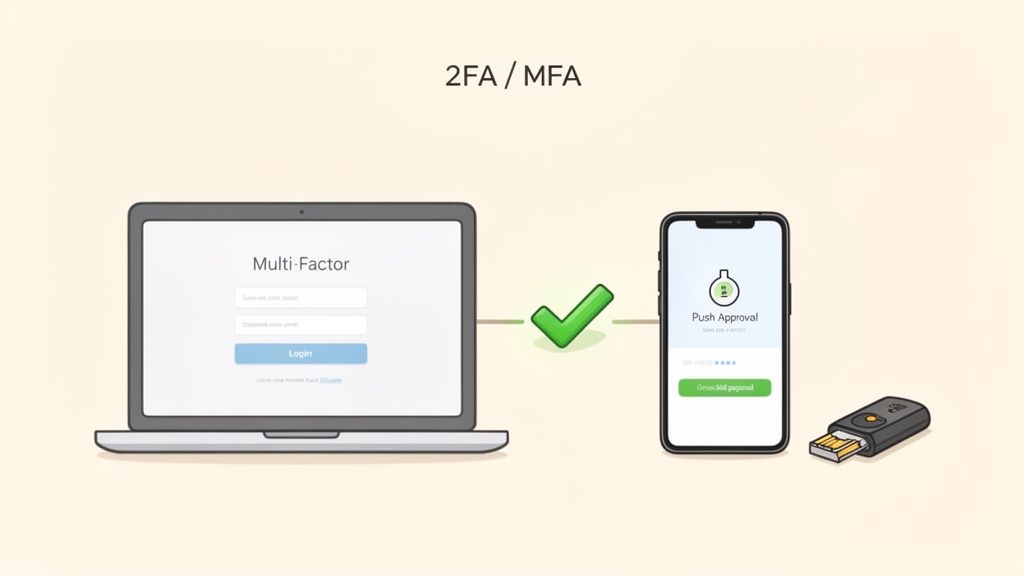
ጠንካራ የይለፍ ቃላትን ብቻ አይደለም፣ የብዙ ማረጋገጫ ማዕረግ (MFA) በመተግበር አስፈላጊ ሁለተኛ የመከላከል ደረጃ ታክሎዋል። MFA ወደ ሀብት ለመድረስ ሁለት ወይም ከሁለት በላይ የማረጋገጫ ተሟላቂዎችን ማቅረብ ይጠይቃል፣ ለምሳሌ የእርስዎ ያውቃቸው (የእርስዎ የይለፍ ቃል)፣ የእርስዎ ካለው (ስልክዎ ወይም የደህንነት ቁልፍ) እና የእርስዎ የሆነው (ጣት አስርያ)። ይህ ተደራሽ ዘዴ ተโจርሷል ዘሮ እና ይ嘬ክሮት ዘሮ ቢሰርቁትም ቢሆን ቢሆን ቢሆን ቢሆን ቢሆን
የባለብ䀮 መንግስት በቂ ሆኖ ተመስርቶ ነው። የማይክሮሶፍት መረጃ በ99.9% በላይ የሚሆኑ የመለያ መያዣ ጥቃቶችን ይከላከላሉ ሲለውም፣ የጎግል ሰዎች በሰላመኛ ቁልፍ ተጠቃሚዎች ላይ ከፋሽንግ የተነሳ ምንም ያልተሳካ የመለያ ማስረከቢያ በመኖሩ ተገልጿል። ይህ የህብረት ሥራ ማድረግ በጣም ያስፈልጋል፤ ከባንክ እና ኢሜይል ጀምሮ እስከ የደመና አገልግሎቶች እና እንደ GitHub ያሉ ለ开发人员 መድረክ ለማንኛውም ሚስጥራዊ መለያ የሚከላከለው የኢንዱስትሪ ደረጃ ሆኖ ተቀምጧል።
ይህን ሥርዓት እንዴት ማስኬድ እንደሚቻል
ትክክለኛው ማስኬድ የMFA የአስተዳደር ተጠቃሚነትን ያሳድጋል፤ በተጨማሪም የመጫወቻ ችግሮችን ያቀንሳል። ቁልፍ በሆኑ ዘዴዎች መምረጥ እና በደህንነት ማስተዳደር ነው።
- ጠንካራ ማጥፋት የሚችሉ ምክንያቶችን ያስበልጡ፡ ማንኛውም MFA ያልሆነውን ያሻሻላል፣ ምንም ያልሆነው ዘዴዎች እኩል አይደሉም። የሃርድዌር የኔትሰcurity ቁልፎች (ለምሳሌ፣ YubiKey፣ Titan) ከፋሽንግ ጋር ለመከላከል ከፍተኛውን ደረጃ ይሰጣሉ። እንደ Authy ወይም Google Authenticator ያሉ መረጠኛ መተግበሪያዎች ከSMS በጣም ያሻሻላሉ፣ SMS ደግሞ ለSIM-መቀየሪያ ጥቃቶች ዕርስ ነው።
- በመጀመሪያ በኢሜይል ያስቧል፡ ዋና የኢሜይል መለያ በብዛት ለሁሉም ሌሎች አገልግሎቶች የይለፍ ቃል መቃጠል ቁልፍ ነው። መጀመሪያ ማስተካከሉ ጠቃሚ እርምጃ ነው። በይልቃን ይህን ለማብራራት እባክዎ ለኢሜይል ደህንነት ለብዙ ምክንያቶች መረጃ መመሪያ.
- የመተግበሪያ ቁልፎችን በደህንነት ያስቀምጡ: MFA ሲያዋቅሩ፣ ዋና መሣሪያዎ ከጠፋ ለመጠቀም የሚያገኙ የውድድር ቁልፎች ይሠጣችኋል። እነዚህን ቁልፎች ከመለያ ቃል ከሚያስቀምጥ ቦታ ጋር የተለየ፣ በደህንነት የተጠበቀ እና የተመሰጠረ ቦታ ላይ እንደ የ passwords ማሰሪያ አይነት ያስቀምጡት።
ለShiftShift Extensions ተጠቃሚዎች፣ በዋና መለያዎችዎ ላይ (እንደ ከ浏览器 ጋር የተሳሰሩት የእርስዎ Google ወይም Microsoft መለያ) MFA ማስቻል አስፈላጊ ነው። ይህ የምርጡ ጥበቃ ነው፣ ብራውзер ተጨማሪዎችን እና መረጃቸውን የሚያስተዳድር ማዕከል ሙሉ በሙሉ የእርስዎ መሆኑን ያረጋግጣል።
3. የታወቀ የመለያ ቃል ማሰሪያ ይጠቀሙ
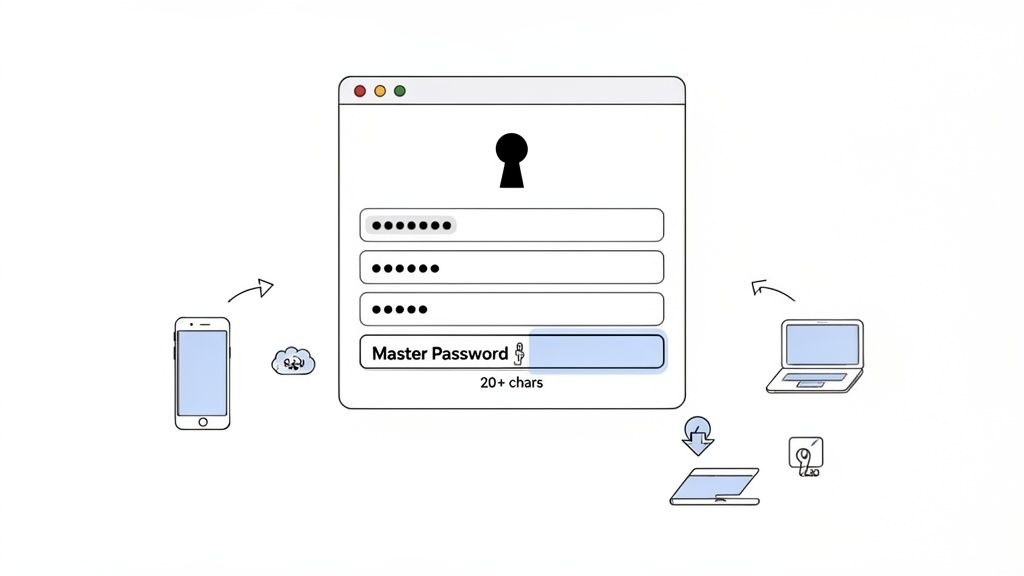
ለእያንዳንዱ መለያ ጠንካራ፣ ልዩ የሆነ የመለያ ቃሎችን መጠቀም የመለያ ቃል ደህንነት ዋና መሰረት ነው፣ ግን የሰው አዝናኝ አይችልም። የመለያ ቃል ማሰሪያ ይህንን ችግር በደህንነት ብቃት ቁልፎችን ለመፍጠር፣ ለማስቀመጥ እና ለማስቀመጥ በመልቀቅ ማድረግ ይፈታል። እነዚህ መሳሪያዎች የተመሰጠረ ዴጋታዊ ዘጋቢ ሆኖ ይሠራሉ፣ ሁሉንም ሌሎችን ወደ መድረስ ለማድረግ አንድ ጠንካራ ዋና የመለያ ቃል ማስታወስ ብቻ ያስፈልግዎታል፣ በደህንነት እና በተመቻቸነት መካከል ያለውን ግጭት በትክክል ያስተካክላል።
ይህ አቀራረብ ለዘመናዊ ዲጂታል ህይወት ስለሆነ በተለይ በተለያዩ አገልግሎቶች እና የአከባቢ አቀራረቦች ውስጥ ከዚህ በላይ ወይም መቶዎች በሚሆኑ መለያዎችን የሚያስተዳድሩ ሴፍት እና ቴክኒክ ባለሙያዎች ላይ አስፈላጊ የሆነ መሠረታዊ ል.Normalize ነው። ከሰንጠረዥ ወይም በ浏览器 based storage ያሉ ያልደረጉ ዘዴዎች ላይ በመመሥረት ባይሆን አንድ ልዩ የይለፍ ቃል ማስተዳደሪያ ለመከላከል ጥንካሬ አለው፣ ማንኛውንም የምስረታ መረጃዎችን የመጠበቅ የ零知识 encryption ይጠቀማል። ይህም ማለት በስርዓቱ ውስጥ ያሉ መጠቆሚያዎች ለውጤቱ ደንበኛው እንኳን አይደርስም ማለት ነው።
ይህን ሥርዓት እንዴት መተግበር እንደሚችል
የተጠያቂ የዲጂታል መሠረት ለማቋቋም አንድ የይለፍ ቃል ማስተዳደሪያ ማረጋገጥ እና ትክክለኛ ማቀናበር አስፈላጊ ነው።
- ተ信赖提供商 ምረጥ: ጥንካሬ ሰጪ ሥም እና ግልጽ የደህንነት ዘዴዎች ያላቸውን ማስተዳደሪያዎች ይፈትሹ። አማራጮቹ ከ Bitwarden ያሉ ክፍት ምንጮች እስከ 1Password ያሉ የድርጅት ደረጃ መፍትሄዎች፣ እና KeePass.
- ምንም አለመተረር የሚችል ዋና የይለፍ ቃል ይፍጠሩ፡ ይህ ያላችሁት ብቸኛ እና በጣም ወሳኝ የይለፍ ቃል ነው። ከ20 በላይ የሆኑ እንደምንም የለማዕበት የሆኑ በመካከል ልዩ የሆኑ የፊላ የምስላ ቃላት አሁኑኑ ይፍጠሩ፡
- ባለብዙ ማረጋገጫ ማረጋገጫ (MFA) ያንቁ፡ ቦታዎን በመፈጠር ለመድረስ ሁለተኛ የማረጋገጫ ደረጃ እንዲኖር ያስቀምጡ፣ የመሳሰሉት የማረጋገጫ መተግበሪያ ወይም አካላዊ የደህንነት ቁልፍ። ይህ በጣም ወሳኝ የጠበቀ ጥቅስ ይጨመራል፡
- የ内置 ማመቻቸያውን ይጠቀሙ፡ ለመደመሪያ ማመቻቸያ ለማድረግ የይለፍ ቃሎች በክሪፕቶግራፊክ የሚመጠጡ እንዲሆኑ ይፍትዱ። ይህ ሰውነታዊ ማመልከቻን ያርቃል እና ከፍተኛ ጠንካራ እንዲሆን ያረጋግጣል፣ እና ባህሪው በቀጥታ በShiftShift's Password Generator የመሳሰሉ መሳሪያዎች ውስጥ የተገነባ ነው፡
የይለፍ ቃል ማመቻቸያ በመምረጥ በኋላ፣ ደህንነቱን ለማጨደስ የይለፍ ቃል ማመቻቸያ ምርጥ ሥራዎች በማቋቋም ተነጣጥረን ተወወስ። ቦታዎን በደረጃ ችላ ያሉ፣ የተጠቀሙትን ወይም አሮጌ የይለፍ ቃሎች በመረምራት በየጊዜው ይፈትッシュ እና ወዲያውኑ ያዘምኑ፡
4. ለኢሜል መለያዎች ሁለት-ደረጃ ማረጋገጫ ያንቁ
የኢሜል መለያዎ ወደ ድጅታል ህይወትዎ ሺህ መቅዳት ነው። ለየትኛውም የየትኛውም መለያ ቁልፍ ማስቀመጫ ማገናኛ ቁሮች፣ ደህንነት ማሳወቂያዎች እና ስለ ተወዳዳሪዎች ተሳትፎ ቁልፍ ማገናኛ ማድረጊያ ነው። ከመለያ ብቻ በላይ ከመልካም ሥራ አከራካሪዎች ውስጥ አንዱን በትልቅ ደረጃ ተፅዕኖ ማድረግ የሚችለው በመለያ ደህንነት ላይ ለመስራት ከተቻለ ከሁለት ዓይነት ተረጋግጠኛ ማረጋገጫ (2SV) ወይም ሁለት ተገበሮ ተረጋግጠኛ (2FA) በመገኘት ተጨማሪ ሁለተኛ የመከላከያ ንብርብር ያከል ነው፣ የሚያደርገው መለያዎ ቢሰረቅ ቢሆንም መለያዎ ባይደረግ እንደሚቆርጥ አድርጓል.
ይህ ዘዴ መለያዎን ባለው በተጨማሪ መረጃ እንዲያገኙ ያስፈልጋል። ይሄ ከማሳተፊያ መተግበሪያ የመጣ ቁጽር፣ የPhysical ደህንነት ቁልፍ ወይም ወደ ተያዙ መሣሪያዎ ተላላፊ ማንቀቃቂያ ሊሆን ይችላል። ዋጋ ያላቸው መናፈሻዎችን እንደ ዋና Gmail ወይም Microsoft መለያዎ ማለትም ለመላ ሌሎች አገልግሎቶች መለያ ለማስቀመጥ ሊሆን የሚችለውን፣ 2SV በመተግበር በቀላል የመለያ ማስተላለፍ ወሰን በቀላሉ ያስወግዳል.
ይህ መስራት መቼ እንደሚከሰት
2SV መያዝ ቀላል ሂደት ሲሆን ደህንነትን በጣም ያሻሽላል። ዓላማው ተISTA出击者 አዲስ ተጨማሪ ሲሆንም በአንድ መሣሪያዎ ላይ physical access ሳይኖረው መግባት እንደማይችል ማድረግ ነው.
- ለመረጋጋት አፕሊኬሽኖችን ከSMS በላይ ያስበዱ፡ በSMS ላይ የተመሰረተው 2SV ከየτኛው ማስተንፈቁም ይሻላል፣ ነገር ግን ለSIM-መቀየር ጥቃቶች ተፈጥሯል። ከጋር ያሉትን የማረጋገጫ ዘዴ ለማድረግ ቴክኒካዊ እና ጥቅማቸት በጎ በሆነ አፕሊኬሽን እንደ Google Authenticator ወይም Authy ያውቀውን ወደ ጊዜ ላይ የተመሰረተ ነጠላ የአስታወሻ ቁጥር (TOTP) ይጠቀሙ። ከGoogle እና Microsoft እንደዚህ ዓይነት ቡድኖች ይህን አይነት ያጽንኦች ያስተናግዳሉ።
- የተከፋፈለ ዘዴዎችን ይመዝገቡ፡ ሁልጊዜ ከአንድ በላይ የማረጋገጫ ዘዴ ያስቀምጡ። የተጠቀም የተከፋፈለ ስልክ ቁጥር ይመዝገቡ እና ለማጠፍ የሚሆኑ የአንድ ጊዜ ማስታወሻ ቁጥሮች ያስቀምጡ። እነዚህን ቁጥሮች የየሁሉንም ከቅርጽ ቁልፍ በተለየ የተጠበቀ የተመስጥር ቦታ ላይ ይያዙ፣ እንደ ተመስጥር ፋይል ወይም ሬዲዮ ሳፍ ያሉ ቦታዎች።
- የማጠፍ ሂደትዎን ይሞክሩ፡ ከከፍተኛ ማስፈላጊነት በፊት ይሞክሩት። 2SV እና የማጠፍ ዘዴዎችዎን ይሞክሩ። የተጠቀም ስልክ ቁጥርዎ መሄድ እንደሚችል እና የማጠፍ ቁጥሮችዎ የት መሆናቸውን ይረዱ። ከጊዜ ወደ ጊዜ ወይም መሣሪያዎችን በሚቀይሩበት ወቅት ይህን መረጃ ያዘመኑ፣ በእራሳችን መለያ ለመከልከል ይከላከላሉ።
5. መተግበሪያዎችን በጊዜ ያዘመኑ እና አድርጉ
ጠቃሚ የይለፍ ቃል ደህንነት ከይለፍ ቃሉ ራሱ በላይ ሲሆን፣ ማስረጃዎችን የሚያስተናግድ ሶፍትዌር እምነት ላይ ይመጣል። የሶፍትዌርዎን በየጊዜው ማ Notícting እና ማሟከት ለይለፍ ቃል ደህንነት ቁልፍ፣ በገዢ ጊዜም የሚተいらっከል ምርጥ አጋሩ ነው። በኦፕሬቲንግ ስርዓቶች፣ በብራውዘሮች እና በመተግበሪያዎች ያሉ ድো饸ንነቶች ሰዎች በሰዎች የተቀመጡ ማስረጃዎችን ለመስረቅ፣ ቁልፎችን ለመቀረፍ ወይም የማረጋገጫ እርምጃዎችን ሙሉ በሙሉ ለማለፍ መጠቀም ይችላሉ.
የሶፍትዌር ማስከበርዎች እነዚህን ያሉ ማስታወቂያ ዝርዝሮች ከተሰ rộng በፊት ለመዝጋት ወሳኝ የደህንነት ፓችሎችን ያካትታሉ። ለምሳሌ፣ በ2021 ዓ.ም. የተከሰተው ታዋቂ የLog4Shell ድো饸ንነት ሚሊዮኖች መተግበሪያዎችን ተጠቅሞ ሰዎች በርቀት ኮዶችን ለማድረግ አድርጓል፣ ነውር ባልተጻፈ አደን እንዴት አባሪ ውጤቶችን ሊያስከትል ይችላል ብሎ ያሳያል። የሶፍትዌርዎን አሁን ያስተካክሉ እና ቆይታችሁ የሚያድርጉት እንዲሆን ያረጋግጣል::
ይህን አጋሩ እንዴት መተግበር እንደሚችል
የሶፍትዌር ማስከበርዎችን ወደ መንቀሳቀስ መንገድ ማከፋፈል ቀላል ግን ጥንቅቅ ያለ የደህንነት ልማት ነው። ቀመስ ነው የሆነው ለሰዎች ያሉ ዝርዝሮችን እንዲያገኙ የሚሰጡ ዕድሎችን በተፈጥሮ ለመቀነት ነው::
- የራስ-አስተዳደር ማስከበርዎችን ያስተቻሉ: ይህ ከመጠን በላይ ለመሆን ቁልፍ መንገድ ነው። የኦፕሬቲንግ ስርዓቶችን (እንደ Windows እና macOS) እና ዋና መተግበሪያዎችን ማስከበርዎች በራስ-ተቋቋም እንዲጫኑ ያዋኙ። Chrome እና Firefox ያሉ ዘመናዊ ብራውዘሮች በኋላ ት⊊ም እንዲያስተካክሉ ተነስተዋል፣ ይህም የደህንነት መከላከል ቁልፍ ባህሪ ነው::
- የአ覽ህራዎችን በማብራት ይፈትሹ አ览ህራዎች የአ览ህራዎ ደህንነት አውታረ መረብ ውስጥ ይሠራሉ እና ለጠቃሚ ፈቃዶች ሊኖራቸው ይችላል። በሳምንት አንድ ጊዜ የአ览ህራዎ � የአ览ህራ አስተዳደር ገጽ በመጎብኘት (ለምሳሌ፣
chrome://extensions) የአ览ህራዎችን ለማዘመን ይፈትሹ። ይህ ማንኛውም ተገለጠ የተገኘ ድርieties በፈጣን ሁኔታ እንዲያሻሽል ያረጋግጣል - የሶፍትዌር ማዘመኛዎችን ያመልኩ የᴼየሶፍትዌርዎ የመሣሪያዎ ደህንነት መሠረት ነው። ከᴼየሶፍትዌር አቅራቢያ የሚመጡ የደህንነት ማዘመኛ ማሳወቂያዎችን ወዲያውኑ ትኩረት ይስጧ እና ወዲያውኑ ያስቀምጡ። እነዚህ ማዘመኛዎች ብዙ ጊዜ የመሣሪያዎ ላይ ያሉ ሁሉንም መተግበሪያዎች ሊያወቅ የሚችል የስርዓት ደረጃ ስለሆነ ተናጋሪ ይሆናሉ
ለShiftShift አ览ህራ ተጠቃሚዎች፣ ያዘመነ አ览ህራ መኖር ያህል ጠቃሚ ነው። አ览ህራው በChrome አንviron ውስጥ ቢሠራም እርሱ ደህንነቱ ከአ览ህራው ትክክለኛነት ጋር በቀጥታ ተያይዞ ነው። የተያዘ አ览ህራ የShiftShift ተጽፎ የሚሠራው ደህንነቱ የተጠበቀ ሳንድبوك እንዳይያዝ ያረጋግጣል፣ የአ览ህራ ውስጥ የሚሠሩ ተግባራትን እና መረጃን ይሠራል
6. ፊሺንግ እና ሶሲዮ ኢንㅈিনering ጥቃቶችን ያስወግዱ
የፊሽን ጥቃቶች እና ማህበራዊ ጥንዶች በኩል በቃል ተጠቃሚ ንዑስ በሰዎች ላይ በዕርጋታ የሚደረጉ እና ቴክኒካል መከላከያዎችን የሚያቋቋሙ አስከፊ የሆኑ ዝርዝሮች ናቸው። ጠንካራ የይለፍ ቃል ለመፈረጅ ስንት ጥረት ቢያደርጉ ያልተሳካ ቢሆን፣ ጥቃተኛዎች እናንተን በርስት ፍቃድ ለመስጠት ይያዙናል። እነዚህ ስኬታማ ጥናቶች ብዙ ጊዜ የተንኮል ወይም ተወዳጅ ቋንቋ ተጠቀም በፍርሃት ወይም ዕድል ስሜት ይፈጥራሉ፣ ስለዚህ እናንተን ከእንቅፋት ጠቃሚ ማገናኛዎች ወይም ሰውነት ባለነጋረት ለማድረግ ይቀትላሉ። ትልቁን ጠንካራ የይለፍ ቃል እና ለብዛት ማረጋገጫ ተግባር ሳይሆን በማንኛውም ቀለል ያለ ፊሽን ጥቅስ ሊያቋድጥ ይችላል።
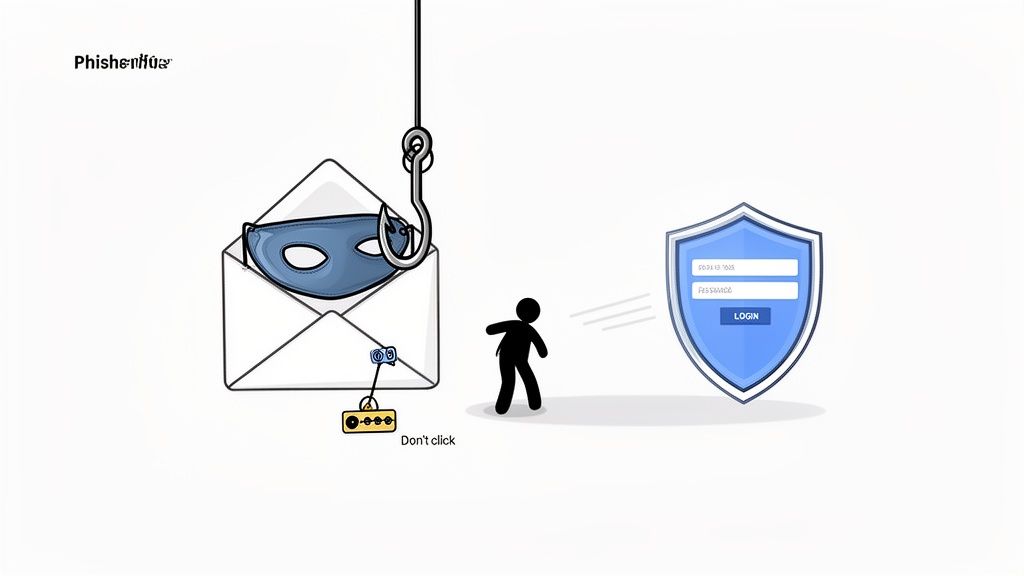
የዚህ ስልṭልት መንገድ የሚታወቀው ብዛት ድንቅ ነው። የIBM ምርምር በትልቁ የውሳኔ ስንኩሎች ውስጥ የሰው ስህተት አንድ ተጽዕኖ እንደሆነ ያሳያል፣ እነዚህ የድንብርት መንገዶች ምን ያህል ተፅዕኖ እንዳላቸው ያመለክታል። ትልልቅ ቴክ ቴክኖሎጂ ተቋማት ላይ የተሳኩ ስፌር-ፊሽን ዘመቻዎች እና በየዓመቱ ቢሊየን ዶላር የሚያስከፍሉ የ"CEO fraud" ጥቅሶች ማንኛውም ሰው ከነጻነት አይፈልግም በማየት ያስረዱናል። ስለዚህ፣ የጤና እምነት ማድረግ ለይለፍ ቃል ደህንነት ከምርጥ ተሞክሮዎች አንዱ ነው።
ይህን ልምድ እንዴት እንድንተግብር
በነዚህ ጥቃቶች ላይ ለመከላከል ቁልፍ ቁልፍ ለመረዳት እና ከማይጠበቃ ማኑከል ጋር በቂ ጥንቃቄ ያለው አቀራረብ ነው። በመረጋገጣት ልማት ለመፍጠር ልምድ በመፍጠር ሳይሆን አደጋው ከመጨመሩ በፊት አጥንቶ ይችላል::
- አስተላይፉን እና ማገናኛዎችን በጥንቃቄ ያስሱ:: ሁልጊ즈 በተጠቃሚው ሙሉ የኢሜይል አድራሻ ያረጋግጡ፣ በቀላሉ የተቀራረበ ስም ብቻ ሳይሆን። ማንኛውንም ማገናኛ ከመጠቀምዎ በፊት፣ የውሂብ መድረክ ማንሳት በመሠረት በመስኮት ላይ አለቀልል ለመቀልቀል እና እውነተኛው አድራሻ URL ከትክክለኛው ዴመን ጋር እንደሚስማር ያረጋግጡ::
- ወዲያውኑ ወደ ድረ ገጾች ይሂዱ:: በኢሜይል ውስጥ ከሰጥዎ ማገናኛ ወዲያውኑ መክፈት ያልቻሉት የተለየ በሆነ አማራጭ መንገድ (እንደ ቴለโฟን ድምጽ ወይም አዲስ መልእክት) በመጠቀም ያግኙ::
- ችግሩን ያስቀምጡ:: ጥቃት የሚፈጽሙት በልበ ሙሉ ሳይሆን በፍጥነት እንድንሠራ ነው። ማንኛውንም ወዲያውኑ የሚፈልግ ድርጊት፣ የመለያ ማጥፋት አድርጎ የሚ威胁 ወይም ከእርስት የተለየ ለመስጠት የሚያስበ ማንኛውንም መልእክት ወዲያውኑ ተጠንቀቅ::
- በተለየ በሆነ መንገድ ያረጋግጡ:: ከ עמि�ድ ወይም ከአገልግሎት ጥርጥር የተፈጠረ ጥያቄ ካጋጠማችሁ፣ ይህ እውነተኛ እንደሆነ ለማረጋገጥ በታዋቂው በተለየ በሆነ የማኑከል መንገድ (እንደ ቴለโฟን ድምጽ ወይም አዲስ መልእክት) ያግኙ::
- የአሳይവና ደህንነት ምክርን ያስቀምጡ: ዘመናዊ አሳይவናዎች ግልጽ የደህንነት ምልክቶችን ያቀርባሉ፣ ለምሳሌ ለ HTTPS የተወሰነው የፍርምጣ አይኮን። በተጨማሪም የተመስጥረ ዲኤንኤስ (DNS) በመጠቀም ደህንነትዎን ማሳደግ ትችላል፣ እንዲሁም ስለ በ HTTPS ላይ የተመሰጠረ ዲኤንኤስ (DNS over HTTPS) የግል መብትዎን እንዴት እንደሚጠቅም እና ከተወሰኑ ጥቃቶች እንዴት እንደሚ보호 ተጨማሪ መረጃ ማግኘት ትችላል።
7. ለዕtéri ማስታወቂያ እና ለጠቃሚ እንቅስቃሴ መለያዎችን በማጣቀሻ ይከታተሉ
በቂ ያልሆነ መረጃ ከተሰጠው ማሰሪያ ስለተከሰተ ቢሆንም፣ ብলፅ ማድረግ የሚችልበት ነው። ቅድመ ምርመራ የመከላከያ ወሳኝ ንብርት ሲሆን፣ ማስረጃዎችዎ ሲገለጽ በፍጥነት እንዲWebResponse ያደርጋል። ይህ ሥራ በታዋቂ ብልጭታዎች ውስጥ ለመረጃዎችዎ የመመርመርና ለማይፈቀድ ማስዋብስ ምልክቶች የመረጃ እንቅስቃሴዎን ለመከታተል ያካትታል.
ይህ ድንቅ ጥንቃቄ የደህንነትዎን አቀማመጥ ከተከላከይ ወደ ተነሳሽ ይቀይራል። መረጃዎ እንደተቀኘ ማስታወቂያ እንዲደርስ በመጠበቅ ይልቅ፣ የመጀመሪያውን ግልጽነት ማወቅና ከፍተኛ ጥፋት ከመከሰት በፊት ይልቁንም የይዝታ እንደመቀየር ወይም ይልቁንም የተፈጥረ ጥፋት እንደማይደርስ በቅጽበት እርምጃ መውሰድ ይችላሉ.
ይህን መተግበሪያ እንዴት መተግበር እንደሚችል
ብλ ያለው መከታተል የመሳሰሉት አውቶማቲክ መሣሪያዎችን ከእርስዎ በጣም አስፈላጊ መለያዎች ላይ የሚሄዱ የእጅ ማረጋገጫዎች ጋር ያጠናልቃል። ዋናው ዓላማ ማንቸውም ስለ አደጋ ባስተካከሉት ጊዜ ይንerosis ያልሆነ ማንቂያ የሚሰጥ ስርዓት መፍጠር ነው።
- የጥፋት ማሳወቂያ አገልግሎቶችን ይጠቀሙ፡ ኢሜል አድራሻዎችዎን በታዋቂ ጥፋቶች ዳታበይዞች ላይ በመደበኛነት ያረጋግጡ። የመሳሰሉት የTroy Hunt "Have I Been Pwned" ያሉ አገልግሎቶች ለዚህ ከፍተኛ ጥቅም ይሰጣሉ። ብዙ ዘመናዊ የপስዕር መሪዎችም ይህን ተግባር ያቀርባሉ፣ የተቀመጠውን የፓስወርድ በታIENTI ማፍሰስ የታየበት ጊዜ በራስ-ሰర ይንግሣሉ።
- የግባት እና ደህንነት ማንቂያዎችን ያንቁ፡ ዋና መለያዎችዎን (እንደ ኢሜል፣ ባንኬንግ እና ማህበራዊ ሚዲያ) ለአዲሶች ግባቶች ወይም ጥርጥር የሚጠቁም እርምጃዎች በኢሜል ወይም በፅሁፍ መልዕክት ማንቂያ የሚሰጥ ሁኔታ ያዋቅሩ። ይህ ለተቃውሞ መደበኛ መድረስ ዕውቀት በእውነተኛ ጊዜ ይሰጣል።
- የመለያ እርምጃ ሎጎችን ይመልከቱ፡ ለዋና ኢሜል እና ለፋይናንስ መለያዎችዎ የግባት ታሪክን እና የመጨረሻ እርምጃ ሎጎችን በመደበኛነት ያረጋግጡ። ያልታወቁ መሣሪያዎችን፣ ቦታዎችን ወይም የመድረሻ ሰዓቶችን ይፈትሹ። ጥርጥር የሚወሳ ነገር ካገኙ፣ ያልተፈቀደውን መድረስ ለዚህ መሣሪያ ወዲያውኑ ያዝዎትን እና የፓስወርድዎን ይቀይሩ።
- የእርስዎን መሳሪያዎች ማመቻቸት ይወዱ፡ በቃኝ መ扩充 (browser extensions) እንደ ShiftShift እንደዚህ አይነት ሌሎች ተግባራትን በብሔራዊ ሁኔታ የሚያስተናግዱ መሳሪያዎችን ሲጠቀሙ፣ የእርስዎ መረጃ ደህንነት ከፍተኛ ጥቅም አለው። እነዚህ መሳሪያዎች በእርስዎ ቃኝ ውስጥ በሚሄዱበት ጊዜ፣ ምንም አይነት ያልተፈቀደ እንቅስቃሴ እንዳይፈጸም ማረጋገጥ አስፈላጊ ነው። ShiftShift እንዴት የተጠቃሚ መረጃን እንደሚያስፈልግ ለማወቅ ለምትችሉት በ ሁሉን አቀፍ የግላዊነት ፖሊሲ . ላይ ጉብኝት ማድረግ ይችላሉ።
8. ደህንነቱ የተጠበቀ የ密碼 ማስተካከያ ዘዴዎች እና የኩባንያ ቆደኖች
ምንም ያህን ጠንካራ የ密碼 ቢኖርም፣ ከራስዎ መለያ ቢቃ臓 ሆኖ ቢተወው፣ ምንም ጥቅም የለውም። የ Password ማስተካከያ ዘዴዎች፣ እንደ የኩባንያ ቆደኖች፣ የስልክ ቁጥሮች እና በብዙ መሠረቶች ማረጋገጫ (MFA) የኩባንያ ቆደኖች፣ ዋናው ማረጋገጫ ሲያልቅ ለእርስዎ የชีን ቀንበር ናቸው። ነገር ግን፣ እነዚህ የተደራጁ መፍትሄዎች ብዙ ጊዜ በደህንነት ሰንሰለትዎ ውስጥ ትርፍ ከፍተኛ የሆነ ማያያዣ ሲሆኑ፣ ለ攻擊者ዎች የ密碼ዎን ለማስተካከል እና መለያዎን ለመቆጣጠር በኩርድ በኩርድ መንገድ ይሰጣቸዋል።
እነዚህን የማስተካከያ ዘዴዎች ማስደንቅ ከሁሉን አቀፍ የ密码 ደህንነት ስትራቴџи አስፈላጊ ክፍል ነው። ጥቃት አወማት የማስተካከያ ኢሜልዎን ካፈረሰ፣ ከዚህ ጋር የተያያዘ ማንኛውንም መለያ Password ለማስተካከል ይችላል፣ የ複雑Password እና MFA እንዲፈርሱ ያደርጋል። ተመሳሳይ መንገድ፣ እንደ Google ወይም GitHub ያሉ አገልግሎቶች ለ窃取 ሆነው የኩባንያ ቆደኖች ፈጣን ማገኛ ይሰጣሉ፣ ዋናው በሁለት በኩል ማረጋገጫ መሣሪያዎን ያልጠቅማል።
ይህን ልምድ እንዴት መተግበር እንደሚችል
መታደሻ ዘዴዎችን ከመንገድ የመጀመሪያ የመታወቂያ ዝግጅቶች ጋር ተመሳሳይ ደረጃ የደህንነት መስጠት ያለባቸው ነው፣ በቀላሉ አይፈረሱም ወይም ማህበራዊ ማምታት ተፈጥሮ አይኖራቸውም እንዲሆን ማድረግ።
- የመመለሻ ቻናሎችን ማስተካከል እና መለያየት: ለ-account recovery የተወሰነ የኢሜይል አድራሻ ይጠቀሙ ለመረጃ አግኝቼ በተለየ ከሌሎች የመልእክት መላኪያ ዘዴዎች ውጪ የሆነ። የደህንነት ጥያቄዎችን በማዘጋጀት ላይ፣ ትክክለኛ ግን ለማስታውስ ቀላል መልስዎችን ይስጡ። ለምሳሌ፣ "የመጀመሪያ የቤት እንስሳ ስም" ከእርስዎ ብቻ የሚታውቀው በደንብ በተለያየ የሆነ ቃል ሊሆን ይችላል.
- ምትኩ ምትኩ በደህንነት ያስቀምጡ: ግምት እንደ Google ያሉ አገልግሎቶች ለሁለት-ደረጃ ማረጋገጫ ምትኩ መስጫ ሲሰጡዎ እነዚህን ከመንገድ የመጀመሪያ የይለፍ ቃል ጋር በተመሳሳይ password manager ውስጥ አይቀምጡም። እነዚህን ይቅረጹ እና በአካባቢ ደህንነቱ የተጠበቀ ቦታ፣ እንደ ጠርጋ ውስጥ ያስቀምጡ ወይም ከዋና ምትኩ ዘዴ ውጪ በተለየ encrypted digital file ውስጥ ያስቀምጡ.
- በየጊዜው ይፈትሹ እና ይሞክሩ: ቢያንስ በዓመት አንድ ጊዜ፣ ከሚፈልጉት አካונቶች ጋር በተያያዙ የመመለሻ ስልኮችን እና የኢሜይል አድራሻዎችን ይፈትሹ። እነዚህ ቀጥታ የሁኔታ ተጠያቂ እንደሆኑ እና እርስዎ በ עדיין ቁጥጥር ስር እንደሆኑ ያረጋግጡ። ከአደጋ ጊዜ በፊት ከሆነ የመመለሻ ሂደትን በየጊዜው ለመሞከርም በሚችሉበት ጊዜ ጥሩ ነው፣ እንዲያው ይለማመዱ።
የመለያ ማስተካከያ ምርጫዎችን ማጠናከር በኩራት ያለ እና በተደጋጋሚ የሚጠቅምበትን የጥቃት መንገድ ያሰጋል። ይህ የተቆለፉ መለያዎችዎን በሚመለከተው ሰው ብቻ መመለስ እንደሚችል ያረጋግጣል፣ የዴጋታለያ ማዕከላዊነትን ያጠናክራል።
9. ደህንነቱ የተጠበቀ የፓስወርድ ጥንቃቄ ያከሹ፡ ፓስወርድ አይጋሩም አይጠቀሙም
ትክክለኛ የፓስወርድ ጥንቃቄ የእርስዎን ምልክቶች እንዴት እንደሚያስተናግዱ በቀን በቀን የሚሠሩ ልማዶችን ያካትታል። ይህ ለፓስወርድ ደህንነት ማዕከላዊ ክፍል ሲሆን ከበலን ጥንቅቅ ፓስወርዶችን የሚያዝነውን ልምዶችን ለመከላከል ያተኩራል። የፓስወርድ ጥንቃቄ ሁለት በጣም ወሳኝ ሕጐች እነዚህ ናቸው፡ ማንንም ሰው ከእርስዎ ጋር ፓስወርድ አይጋሩ እና በተለያዩ አገልግሎቶች ላይ እንደገጠው አይጠቀሙም። ፓስወርድ መጋራት፣ በታመነ ስራ ባልደረባ ጋር ብቻ እንኳን የሆነ ወዲያውኑ የደህንነት ቅዳቷን ይፈጥራል፤ ማን እንደሚያውቀው እና እንዴት እንደሚጠበቅ ማሳወቂያውን ት丢失
ፓስወርድ መጠቀም ተመሳሳይ ደgersatz የሆነ ጥገና ነው። አንድ አገልግሎት ላይ የሆነ የዳታ ጥፋት ሌሎች መለያዎችን ሊያድርግ የሚችልበትን ዴማንዶ ይፈጥራል። ጥቃት አደጋ角逐ዎች ከአንድ ጥፋት የመጡ ምልክቶችን ለሌሎች ተወዳጅ መድረክዎች ላይ የ凭据 ጥሬ ስንቅ ጥቃቶችን ለማስኬድ በተለይ ይጠቀማሉ፣ ተጠቃሚዎች ፓስወርዶቻቸውን እንደ ተመላሽ መጠቀማቸውን ተመልክተው። እነዚህን የጥንቃቄ መርሆዎች ተከትሎ መሄድ ግንኙነት ያለው የደህንነት ድልን ለመጠበቅ ዋና ነው።
ይህን ዘዴ እንዴት ይተገበሩ
ጥሩ የፓስወርድ እንቅስቃሴ የተጠበቁ ልምዶችን ለመፍጠር እና እነዚህን ልምዶች በቀላሉ ለመጠበቅ ትክክለኛ መሣሪያዎችን በመጠቀም ላይ ይሠራል። ዓላማው እያንዳንዱን ፓስወርድ ልዩ፣ ብዙ ከሰው የተቀበረ ቁልፍ ሆኖ ማድረግ ነው።
- የፓስወርድ ቋንቋ መ_Manager's የማካፈቻ ባህሪ ይጠቀሙ፡ ለመለያ ጋብязት ገንቢ መስጠት ከፈለጉ፣ ፓስወርዱን በቀጥታ በኢሜይል ወይም በመልዕክት በመላል ማስাঈ አይስጡ። በמקומו፣ ይታወቀ የፓስወርድ መ_Manager የውስጥ ተጠቃሚ አስተዋፅኦ ያለው የመግደሻ ስርዓት ይጠቀሙ፣ ቁል፩ን በመግለጥ ሳይሆን የተቋቋመ፣ ተመላሽ የሆነ ገንቢነት ይሰጣል።
- ንድፍ ምልክት መስጠት (SSO) ይተግብሩ፡ ለቡድን ሁኔታዎች፣ SSO ልመስል ነው። ተጠቃሚዎችን በአንድ ቁልፍ ለብዙ መተግበሪያዎች ጋብязት መስጠት ያስችላል፣ በመካከለኛ ተነሳሽነት አቀባበል ተጠቃሚ ይሆናል። ይህ የተጋራ ፓስወርዶችን ያስፈልጋቸውን በሙሉ ያስወጣል፣ በAWS IAM ተፈጥሯዊ መረጃዎች ውስጥ እንደሚታይ፣ የተጋራ ላይ የጠቅላላ ቁልፎችን በሚያድርጉ የተጠቃሚ ተጠቃሚ መለያዎችን ይመክራል።
- ፓስወርዶችን በሰው ሰራሽ መንገድ ማውረድ አያድርጉ፡ ፓስወርዶችን በሰላላ ቅርጽ ውስጥ ማስቀመጥ ይቀጠሉ፣ በቀመላ ውስጥ ወይም በጠፍጠፍ ሰሌዳ ላይ። እነዚህ በቀላሉ ይወጣሉ፣ ይሰረቃሉ ወይም ፎቶግራፍ ይያዛሉ፣ በሙሉ የዲጂታል ደህንነት እርምጃዎችን በማጠፍ ላይ።
- ፓስወርዶችን በአደጋ ያልተጠበቁ ዲጂታል ቦታዎች ውስጥ ማስቀመጥ ይቀጠሉ፡ ፓስወርዶችን በማይዘጋጅ ጽሑፍ ፋይሎች፣ ሰንጠረዥ ወይም በተጋራ ወይም በሕዝብ ኮምፒዩተሮች ውስጥ ያለ ብራውዘር አብነት ውስጥ አያስቀምጡ። እነዚህ ዘዴዎች ከማልዌር ወይም ከተፈጥሮ አልባ ገንቢነት በቀላሉ አንዳንድ እስከ ምንም ጥበቃ አይሰጥም።
ለቡድኖችና ለግል ሰዎች፣ በተለይም ShiftShift ማሰሪያዎችን በሚጠቀሙ ለDevelopers እና ለQA ባለሙያዎች ያሉ ስለ ሚስጥራዊ መረጃ የሚሠሩ ሰዎች፣ ጥልቅ የይለፍ ቃል ዕድገትን ማድረግ ምክር ብቻ ሳይሆን አስፈላጊ ነው። ይህ ያደረጋችሁትን በጥንት ያቀዱትን ጠንካራ የይለፍ ቃሎች ወንበር እንዲችሉ ያረጋግጣል፤ ከአንድ የአጥምት ምንጭ ሆነው ሳይሆን::
10. ተጠቃሚዎችን ያማከሉና የይለፍ ቃል ደህንነት ፖሊሲዎችን ያቋቋሙ
ግል የይለፍ ቃል ደህንነት ጥረቶች በጠንካራ የድርጅት ባህሪና በግልጽ መመሪያዎች ተደግፎ ሲያከባበሩ፣ በቀላሉ ይ뛴በታል። ቃል ኪዳናዊ የይለፍ ቃል ፖሊሲዎችን በማቋቋምና ተጠቃሚዎችን ስለ ዘመናዊ ስ据介绍 በማማከል፣ ደህንነትን ከግል ስራ ወደ ትስስር ስለሆነ ከተጋባዥ ሃላፊነት ያቀይራል። ይህ ተሞክሮ ከፍተኛ ስለሆነ፣ የተቋቋመ መለያ አንድ ደህንነቱ የተነካ ሲሆን ጠቅላላ ድርጅትን ሊጎዳ የሚ�� የደህንነት ጥፋት ሊፈጥር ይችላል::
ጠንካራ ፖሊሲዎች፣ ከቀጣይ ስልጠና ጋር በመቀላቀል፣ ለንደናዊ የአስተዳደር ሁኔታ ይፈጥራሉ። ተጠቃሚዎች እንደ ፊ싱 ወይም የክሬ덴ሻል ስቲፊንግ ያሉ አደጋዎችን ለማረጋገጥ ለነገር ሁሉ "ምንድን ነው" ሲረዱ፣ ተመስጥሮ ይሆናሉ። ይህ ዘዴ በ SOC 2 እና በ PCI-DSS ያሉ መደረጋቸዎች ተጠያቂ ሲሆኑ፣ የተምር ተጠቃሚዎች ብቻ ባይኖር ቴክኖሎጂ ብቻ አልበቃም ብለው ይለያሉ።
ይህን ልምዶ እንዴት ማተም እንደሚችል
ግብዩ ተጠቃሚ ምቹ እና ውጤታማ ፖሊሲዎችን ለመፍጠር ነው፣ በሚሄዱበት መንገድ ላይ ለመሆን ይበልጣል ብሎ እንዲቀበለው ማድረግ ነው። ይህ ግልጽ ህጐችን በመያዝ፣ ትምህርት በማድረግ እና ትክክለኛውን መሳሪያዎች በማቅረብ በመመዝገብ የሚሆን ተመጣጣኝ አመለካከትን ያካትታል።
- ንድፍ እና ዘመናዊ ፖሊሲ ያወቁ፡ ቀላልና ሊታወቅ የሚችል የየ>Password ፖሊሲ ይፍጠሩ። NIST ያሉ ዘመናዊ መመሪያዎች፣ አስተምሮ የሚሰጡትን ይልቅ ረጅምነትን ያፈቅዳሉ። ጥሩ መጀመሪያ ቁም ነገር ከ12 ፊደላት በላይ ርዝመት መጠየቅ፣ ባለብዙ ተግባር ማረጋገጫ መጠቀም እና የPassword እንደገና መጠቀም ማክል ሊሆን ይችላል::
- በየጊዜው የህንፃ ጥንቃቄ ስልጠና ይስጥሩ፡ ወርሐዊ ወይም ለግማሽ ዓመት አንድ ጊዜ የጥንቃቄ ግንዛቤ ስልጠና ይተግብሩ። እንደ ፊሺንግ፣ ሶ셜 ኢንጀነERING እና ድክመት ያላቸው Password መጠቀም ያሉ የተለመዱ አደጋዎችን ያብሩ። የጥንቃቄ ሁኔታዎችን ያሉ ተጨባጭ ምሳሌዎችን ተጠቀም ትርጉም የሚኖራቸውን ያሳዩ::
- ድጋፍ የሚሰጥ መሳሪያዎች ይስጥሩ ፣ ሕጐችን ብቻ አይደለም፡ ብቻ የሚደርጉ ፖሊሲዎች ተከላይ ሳይደርጉ ያቀርባሉ። ሕጐችን ብቻ ሳይቀኑ፣ ከሁሉም ሰዎች የሚደረጉ መሳሪያዎችን በመስጠት ተጠቃሚዎችን ያበረታቱ፣ እንደ ዩኒቨርስቲ Password መሸከמאי እና Password ማመንጫዎች። ይህ የPassword የጥንቃቄ ምርጡን ልምዶችን ሳይቸገሩ በቀላሉ ይከተላቸዋል::
- አዎንታዊ የጥንቃቄ ባህርይ ያድርጉ፡ የተቀባሪ እና የሚነገር የጥንቃቄ ጥያቄዎችን ቀላል የሚሆን ባህርይ ያድርጉ። የጥንቃቄን ድምቅ ስሜት ያሳዩ ሰራተኞችን ያከብሩ። ጥንቃቄ እንደ አmanent ቀሪ መለያ ከመሆን ይልቅ እንደ ውጤት ሲይዤ ቢያይ ፣ ሙሉ ድርጅቱ የበለጠ ደህንነቱ የተጠበቀ ይሆናል::
ከ10 በላይ የPassword የጥንቃቄ ልምዶች ማነጻጸሪያ
| ልምድ | 🔄 የማወቂያ ዕድገት | ⚡ የውስጥ መረጃ/ | ⭐ የተጠበቀ ውጤታማነት | 📊 የተለመዱ ውጤቶች / ተፅዕኖ | 💡 ምርጥ ጥቅም ሁኔታዎች / ምክሮች |
|---|---|---|---|---|---|
| ለእያንዳንዱ መለያ ጠንካራ፣ ልዩ የይለፍ ቃል ይጠቀሙ | መካከለኛ — ልዩ ማስገቢያዎችን ለመፍጠር ሥርዓት ይፈልጋል | ዝቅተኛ — የይለፍ ቃል ማመንጫ ይመከራል | ⭐⭐⭐ — እንደገና መጠቀምን ለማንሳት ስጋቱን በከፍተኛ ሁኔታ ይቀንሳል | የውጊያውን መጠን ይ 제한 ማድረግ፣ የማንነት ማስረከቢያ መከልከል | ለሁሉም መለያዎች ይጠቀሙ፤ 12–16+ ቁምፊዎችን ይመርጡ፤ ማመንጫ ይጠቀሙ |
| Multi-Factor Authentication (MFA) ይተግብሩ | መካከለኛ — በመለያ ስርዓት ውስጥ ማሰናዳት እና የተጠባበቀ ዕቅድ ማድረግ | መካከለኛ — የማዕከል መረጃ መተግበሪያዎች፣ የሃርድዌር ቁልፎች፣ መሣሪያዎች | ⭐⭐⭐⭐ — አብዛኛውን የመለያ ቅ_contrôle ይከልከላል | ያልተፈቀደ መግባትን በከፍተኛ ሁኔታ ይቀንሳል፤ ለመመልከት ይረዳል | ለአድሚን/ኢሜይል/ክላውድ አስፈላጊ ነው፤ ለከፍተኛ ዋጋ ያላቸው የሃርድዌር ቁልፎችን ይመርጡ |
| ከፍተኛ ጥቅም ያለው የይለፍ ቃል ቁጥጥር ይጠቀሙ | አዝናኝ–መካከለኛ — መነሻ ማሰናከያ እና ዋና የይለፍ ቃል አስተዳደር | መካከለኛ — ማስተዳደሪያ መተግበሪያ፣ ሊቀጠል የሚችል ቦታ፣ መሣሪያዎችን ማ-sync | ⭐⭐⭐ — በጠቅላላ ሁኔታ ልዩ ጠንካራ የይለፍ ቃሎችን ያቀርባል | እንደገና አለመጠቀምን ይቀንሳል፣ የተፈጠሩ ጥቃቶችን ማንቂያ እና ደህንነቱ የተጠበቀ ማጋራት ያቀርባል | ለግል እና ለቡድኖች ምርጥ ነው؛ በማስተዳደሪያ ላይ MFA ያንቁ |
| በኢሜል መለያዎች ላይ ሁለት ደረጃ ማረጋገጫ ያንቁ | አዝናኝ — የአቅራቢያ መመሪያዎችን ይከተሉ | አዝናኝ — authenticator መተግበሪያ ወይም ተጠያቂ ስልክ | ⭐⭐⭐⭐ — ቋንቋ የማንቂያ መንገድ ይጠብቃል | የመለያ ማንቂያን ይጠብቃል; የጅምር መለያ ቅርጫት ያስከላከላል | በሁሉም ዋና ኢሜሎች ላይ ያንቁ; SMS ከመሬት በላይ መተግበሪያ/ሀርድዌር ይጠቀሙ |
| ሶፍትዌርን በየጊዜው ያዘምኑ እና አደረሱ | አዝናኝ — አውቶማቲክ አዘመናቶችን እና መደበኛ ምርመራዎችን ያንቁ | አዝናኝ — ሰኌ የመረብ፣ የአስተዳደር ተጋላጭነት | ⭐⭐⭐ — የተወቁ ስህተቶችን መፈናቀልን ያስከላከላል | የማቃጠል/KeyListener አደጋ ይቀንሳል; የብራውዘር/ተስፋፋ ደህንነትን ይጠብቃል | አውቶማቲክ አዘመናቶችን ያንቁ; ተስፋፋዎችን እና OSን በየጊዜው ይምረጡ |
| ከፊሽንግ እና ሶሻል ኢንజንERING ጥቃቶች ይልቀጠሉ | መካከለኛ — በቀጥታ ልማት እና የተጠቃሚዎች ትንታኔ | ዝቅተኛ — የልማት ቁሳቁሶች፣ የተመሳሳይ ሙከራዎች | ⭐⭐⭐ — ለሰዎችን ታች ያ瞄准 የሚሄዱ ጥቃቶች አስፈላጊ | የተሳናበቁ የፊሽንግ ክስተቶች ይቀንሳሉ؛ አ更强 የደህንነት ባህሪ | ተጠቃሚዎችን ይልማዱ፣ አንкрኮችን ይፈትሹ፣ ተልዕኮዎችን ይረጋግጡ፣ ሙከራዎችን ያስፍሩ |
| ለተከሰተ ማሳወቂያ እና ለጠቃሚ እንቅስቃሴ መለያዎችን ይከታተሉ | ዝቅተኛ–መካከለኛ — ይቀላቀሉ እና ማሳወቂያዎችን በመደበኛነት ይፈትሹ | ዝቅተኛ — የተከሰተ ዘርፍ አገልግሎቶች፣ የይለፍ ቃል ማስተዳደሪያ ማሳወቂያዎች | ⭐⭐⭐ — ፈጣን ማንታ እና ምላሽ ይችላል | ተደረሽ ማስተንፈስ፤ በተከሰተ ጊዜ ወይዘሮችን በድጋሚ ማስተካከል | በወር አንድ ጊዜ HIBP ይፈትሹ፣ የመለያ ማስተዳደሪያ ማሳወቂያዎችን ያስችሉ፣ የመግቢያ እንቅስቃሴ ይፈትሹ |
| ደህንነቱ የተጠበቀ የይለፍ ቃል ማገላበት ዘዴዎች እና ተለያዩ ኮዶች | መካከለኛ — ተለያዩ ማገላበቶችን ያዋቅሩ እና ደህንነቱ የተጠበቀ ማጠራቀሪያ ያድርጉ | ዝቅተኛ–መካከለኛ — ተመስጥሮ ያለ ማጠራቀሪያ ወይም አ PHYSICAL ማዕከል | ⭐⭐⭐ — ያልተፈቀደ ማገላበት እና መዘጋት ይከላከላል | ታማኝ ማገላበት ሂደቶች፤ ተቃራኒ እርዳታ የመላ ጥያቄዎች ይቀንሳሉ | የባኞችን ቁምፊዎች በኦፍላይን ወይም በመሸጋገጫ ያስቀምጡ፤ በርካታ ጋርдан ማስተካከያ ያድርጉ |
| ደህንነቱን የተጠበቀ የፓስወርድ አጠራር ያክልዎ፤ ፓስወርዶች በፍጹም አይጋሩም አለው ወይም አልReuse ይሂድም | መካከለኛ — ፖሊሲ መከተልና የባህሪ ለውጥ | ዝቅተኛ — ፖሊሲዎች + የፓስወርድ ማናጀር / SSO መሣሪያዎች | ⭐⭐⭐ — የнутን አደጋ እና የጥፋተኛ ሁኔታ ርadius ይገድላል | የተሻሻለ ተቋቋሚነት፤ የተቀነሰ የተጋራ ማስረጃ ክስተቶች | የፓስወርድ ማናጀር ማጋራት ወይም SSO ይጠቀሙ፤ የግልጽ ጽሑፍ ማጋራት ይከላክሉ |
| ተጠቃሚዎችን ስለ ደህንነት ለማስተማር እና የፓስወርድ ደህንነት ፖሊሲዎችን ለማቋቋም | ከፍተኛ — ፖሊሲ ስነ-ስርዓት፣ ስልጠና፣ ተግባር ማድረጊያ | መካከለኛ–ከፍተኛ — የስልጠና ፕሮግራሞች፣ የመከታተያ መሣሪያዎች | ⭐⭐⭐ — በድርጅት ሙሉ በሙሉ ለሚኖሩ ምርጥ ልምዶች ይሠራል | ከተመረተ ባህሪ፣ ህግ እከል መከተል፣ ፈጣን ስለ ጥፋተኝነት ምላሽ | መሣሪያዎች (ማናጀሮች/ማመንጫዎች) ይስጡ፣ በመደበኛነት ስልጠና ይስጡ፣ ግልጽ ፖሊሲዎች ይ__; ጠብቁ |
ከልምድ ወደ የባህሪ ማድረግ፦ ደህንነትን ወደ ዕለት ተዕለት ሥራ ለማካተት
ዲጅታል ዓለምን መንቀሳቀስ ማድረግ ማድረግ ማድረግ ብቻ ሳይሆን ምን ማድረግ እንዳለብን መ знание ያስፈልጋል፤ አብሪ እና ለውጥ ያለው መሠራት ያስፈልጋል። በሁሉም መለያ ለጥቅም ብርቅ እና ልዩ ማስረጃዎችን ማድረግ ከተወሰነው መሠረታዊ ሕግ ጀምሮ በMulti-Factor Authentication (MFA) ተስፋፋም አተዓማሪ መተግበር እና ደህንነቱ የተጠበቀ የይለፍ ቃል አስተዳዳሪዎችን መ拣择 ድስር የደህንነት አስር ዓምዶችን ተመልክተን። ሰውነታዊ አካፋፋን ገለልተኛ አደረገን፣ ከፍሽንግ እና ስፋል እንቅፋት ስለ አደጋዎች አንጻር አድርገን፣ እና በድርጅት ውስጥ ግልጽ የደህንነት ፖሊሲዎችን ማድረግ አስፈላጊነቱን አሰበን። በነዚህ ለይለፍ ቃል ደህንነት ምርኮ መርሆዎች መገዳየት እርስን ግልጽ እውነት ማሳየት ያልቻለ፤ ዲጅታል ደህንነትህ የተገዛ ምርት አይደለም፣ የሆነ ሂደት ነው::
ዋናው ተግዳሮት ይህን ትምህርት ከተከተለው መርሆዎች ሠንጠረጥ ወደ በማንኛውም ሰው ውስጥ ተቀላይቶ ሆኖ የሚሰራ መንገድ ማድረግ ነው። መልዕክት ብዛት ማህበራዊ ሊሆን ይችላል፣ ግን በቂ ለውጥ በትንሽ ተወላጅ ለውጥ ያለው መሆን ነው። ዓላማው በአንድ ሌሊት ፍጹም ማድረግ አይደለም፣ በደረጃ ያለ ጥንካሬ የሚያስተኛ የጥፋት ተገ듐ት መሠራት ነው::
ቅድመ ተግባራዊ ስለ በረሀ እርምጃ አምስት ደረጃዎች ወደ ተጨማሪ ደህንነት
ይህን ከትምህርት ወደ ዘመነት ለመቀየር፣ በቀላል መጀመሪያ ሥራ ከፍተኛ የደህንነት ጥቅም የሚሰጥ ተግባራትን ማድረግ ያስፈልጋል። ይህን "አሁን ጀምር" ስለActiveSheet ያስቡ::
- የዲጂታል ቤትዎን ያስተጋግዱ: ዋና የኢሜይል መለያዎ ለዲጂታል መንግሥትዎ ቁልፍ ነው። ዛሬ ሌላ ምንም እንዳትሠሩ፣ ለዚህ መለያ የፍርድ መረጋገጫ (MFA) ወይም ሁለት ደረጃ ያለው ማረጋገጫ ያክሉ። ይህ ብቸኛ ድርጊት በ댐 የተከላከለ ችግር ፍጠራል በኋላ ሳይፈቀድ ለመግባት፣ ለምትልዕኮ እና ለማንኛውም ሌላ አገልግሎት የሚያስፈልጉ ማንበቢያ ማስታወሻዎችን እና ማስጠቂያዎችን ይጠብቃል።
- ምዕራፉን ያድርጉ: ታዋቂ እና ሊከተሉት የሚችሉ የወር ቃል አስተዳዳሪ ምረጥ እና ያግዙ። እያንዳንዱን መለያ አንድ ጊዜ ማስተካከል ስለሚያስፈልግ አትጨነቁ። እንዲህ አይነቱን ለመጀመር አዲሶቹን መለያዎች ያስተካክሉ እና በቅርቡ የተለያዩ ማስረጃዎችን እንደ ባንኪንግ፣ የማህበራዊ ሚዲያ እና ዋና የስራ መሣሪያዎች ይቃ궨ሩ። ይህ ለማንኛውም ጊዜ የወር ቃል መጠቀም እንደሌለበት ለማድረግ የመጀመሪያ እርምጃ ነው።
- ፍጠር አይፍጠር: እርስዎ ራስዎ ውስን እና ድብልቅ ያለው የወር ቃል ለመፍጠር ማድረግ ይቁም። ሰዎች ትክክለኛ ማህደረ ብዙነት ለመፍጠር ስለማይችሉ ተከልክለዋል። ከመਿਸਹ በተወሰነ ፋንታ፣ ለመቀመጥ ያሉ ሁሉም አዲስ መለያዎች እና ለማስተካከል ያሉ አ现存密码 ለመጠቀም የወር ቃል ማመንጫ ይጀምሩ። ይህ መረጃዎችዎ ምንም የአእምሮ ጥረት ሳይኖር የፍፁም ደረጃ ችግር እና እብን እንዲፈቱ ያረጋግጣል።
ቁልፍ ግንዛቤ: ጠንካራ ደህንነት ለማግኘት መንገድ ስለ አንድ ብቻ ትልቅ ለውጥ አይደለም። ይህ በጊዜው ተከፍሎ የሚፈጥር በጣም ጥቅማጥቅም የሚሆኑ ከፍተኛ እና በሚያስተላለፍ ጥቃት ላይ ዘግይቶ ሊከተል የሚችል አስተምህሮ የሆነ እና ተለዋዋጭ መከላከል መሠረት ማድረግ ነው።
ከመሠረታዊ ደረጃ በላይ፡ የመከላከል አISTA ማሰለጥ
ነዚህ መሠረታዊ ዘይቤዎች በተመሰረቱ በኋላ፣ ባንተ ዘንድ የወሰድንን አስፋፊ መርሆዎች ለማቀናበር ቀላል ይሆናል። ከማይታወቀው ኢሜይሎች የተሻለ ጥርጣሬ ያላችሁ ይሆናላችሁ፣ የአታላይ ጥ_TRYAttempts ምልክቶችን ትለማመዳላችሁ። ሶፍትዎችን በኩራት መዘመን በየጊዜው የሚደረግ ቀላል ሥራ ይሆናል፣ የሚያስቀር ስግብግብ አይደለም። ለመለያዎች ያቀላጥፋችሁትን የመመለሻ ዘዴዎች በድንጋጌ ማሰለጥ ይመርጣላችሁ፣ በቀላሉ የሚነחש የጥንቃቄ ጥያቄዎችን በመነጠል ደህንነቱ የተጠበቀ ከመቅደም በፊት የተዘጋጀ የመዝጊያ ኮዶችን ይምረጣላችሁ።
ይህን የይለፍ ቃል ዋስትና ምርመራ መለያየት ማለት ዳታ መጠበቅ ብቻ አይደለም፤ አዲስ መመሪያ ማግኘት እና ሰላም ዘና ማጣቀሻ ነው። የእርስዎ ግላዊ መረጃ፣ የገንዘብ ሀብቶች እና ዴጂታል መለያ ለእርስዎ ብቻ ይሆኑ ዘንድ እንዲያረጋግጥ ማለት ነው። እነዚህን ምርመራዎች ዕለት ተዕለት ልምዶች እንዲሆኑ በማስተካከል፣ ጥቂት ወይም ድርቅ ብቻ በሆነ መልኩ አይደለም እንደሚያከናውንው፤ በግንባታ ዘመን የሚቋቋም ዴጂታል ህይወት በቀጥታ እየሰራ ይሆናል። ዛሬ የሚያተኩሩ ጥረት ለዚህ ወደፊት ዋስትና እና ዴጂታል ጥናት ቀጥታ ኢንቨስትመንት ነው.
ምርምርን ምንጊዜም ተለማመዱ ማድረግ ይፈልጋሉ? ShiftShift Extensions የሚፈለጉትን በሳይት ውስጥ የሚሠሩ መሳሪያዎች ያቀርባል፣ እንዲሁም በፍጥነት ሊዘንብ አይችልም የሆኑ መረጃዎችን ለመፍጠር በጣም ኃይለኛ የመግባት ቃል ማመቻቻያ ይዟል። የሸክፋት ሥራ መር הנהትዎን ቀላል አድርጎ ለመቀነስ እና ምርታማነትዎን ለማሳደግ ዛሬ ከ ShiftShift Extensions የሁሉንም አቀፍ መሳሪያ ወሰድ ያድርጉ።