DNS በHTTPS ምንድነው? ወደ የተደገፈ መረጃ መምሪያ
DNS በHTTPS (DoH) ምንድነው የሚለው ምንድን ነው? ይህ መመሪያ የDoH የDNS ፍለጋዎችዎን እንዴት ይደበቃል እና የግል ዕይታ ለማሻሻል፣ እንዲያወጣ ይረዳል፣ እና የእርስዎን ጉብኝት ይደረግ ይሆን ይገልጻል።
የተመነጨ ማስተካከያዎች

DNS over HTTPS ወይም DoH፣ የድር በራስን ለመፈለግ የሚያስተጋግም ማዕበል ነው። ይህን ያደርገዋል በመጀመሪያው የኢንተርኔት ደረጃ ከመከላከል አንጻር ነው። የድር ጣቢያ ማንነት መፈለግ እንደሆነ ያስብ። ይህ እንደ በሐይቅ ላይ ያለ ፖስትካርድ ሳይሆን በወርቅ የተዘጋ ግላዊ ደብዳቤ መቀየር ነው። ጥያቄዎ ከመረብ ላይ ለሚያደርጉ ዓይኖች ይደበቃል።
DNS over HTTPS የሚፈታው የግላዊነት ችግር
በድር ጣቢያ ወንዝ በሚያስተወድጉ ጊዜ፣ መሣሪያዎ ያጠፋቸውን ሰዎች ተስፋፋም ስም (እንደ example.com) ወደ ማሽን ሊያነብ የሚችል IP አድራሻ መቀየር አለበት። ይህ የመረብ ስም ሥርዓት (DNS) በኋላ የሚታወቀው ነው፣ ይህም በመሠረቱ የኢንተርኔት የስልክ መመሪያ መጽሐፍ ነው።
ለዓመታት ይህ DNS መፈለግ ሙሉ በሙሉ ያልተመሰጠረ ነው፣ በግልጽ ላይ ተፈጥሯል። ይህ ማለት ኢንተርኔት አቅራቢያዎ (ISP)፣ የቢሮ መረብ አስተዳዳሪ ወይም በሐይቅ ያለ ኢንተርኔት ማሰራሪያ ላይ ማንኛውም ሰው የሚፈልጉበትን ሁሉ ጣቢያ ማንበብ ይችላል። ይህ እንደ ከመውጣትዎ በፊት በክፍል ለሁሉም ሰው መድረሻዎን ማብራት ነው።
ይህ የግላዊነት አለመኖር አንዳንድ ከባድ ችግሮች ይፈጥራል፡
- ISP መከታተል፡ ኢንተርኔት አቅራቢያዎ የፍለጋ ታሪክዎን በቀላሉ ማጻፍ ይችላል። ይህን መረጃ ለግላዊ ማስታወቂያ መጠቀም ወይም ለመረጃ አቅራቢያዎች ማጋራት ይችላል።
- የህዝብ ዋይፋይ ላይ ማን እንዳያዳምጥ፡ በቃ啡 ቤት ወይም የአየር ማረፊያ አውታር ላይ፣ ጥቃতነ የሆኑ ነጭቶች የእርስዎን DNS ጥያቄዎች በቀላሉ ሊመሰልቷቸው እና የእርስዎን መ פרופይል እንዲያውቁ ወይም ምን አገልግሎቶች እንደሚጠቀሙ ለማየት ይችላሉ.
- DNS ማስረክል፡ መጥፎ ተግባር ሊሠራ የሚችል ሰው ያልተመሰጥ የሆነ DNS ጥያቄዎን ሊያሳጥር እና ሐሰተኛ IP አድራሻ እንዲመለስልዎ ሊያደርግ ይችላል፣ ይህም ማረፉን ለማስለብሳት የተነደፈ የፍለጋ ድርጅት ላይ እንዲሄዱ ያስተላልፋል።
የዲጂታል ብ bụር ማ закрывание
DNS በHTTPS ውስጥ ቁልፍ ለውጥ በማድረግ እነዚህን DNS መፈለጊያዎች በመከላከል ባለን ባንኪንግ እና ማገኛ ላይ በመሰረት የሚሆን ተመጣጣኝ HTTPS ፕሮቶኮል ውስጥ በማሳየት ይሠራል። እንደ Google እና Mozilla ያሉ ዋና ተጫዋቾች የሚያቀርቡት ይህ ልማት፣ 2016 ወይም ከዚያ ጀምሮ፣ የDNS ጥያቄዎችዎን ከማንኛውም ሌላ ተመስርቶ የተጠቀሰ የድር መ trafic ጋር ተመሳሳይ ያደርጋቸዋል.
ይህ ሳንብር የDoH እንዴት በቀላሉ የDNS ጥያቄውን በመብረቅ የተመለከተ የHTTPS ቱነል ውስጥ በማስቀመጥ፣ በደህንነቱ ወደ resolver መላክዋቸውን ያሳያል.
ቁልፍ ነገሩ ጥያቄዎ እና የአገልግሎት ሰጪው ምላሽ ሁለቱም በይህ ተመስርቶ የተጠቀሰ ግንኙነት ውስጥ የተጠበቁ መሆናቸውን ነው። መካከል ያለ ማንኛውም ሰው እነዚህን መመልከት ወይም መቀየት አይችልም። ከControl D የDoH ግንኙነቶች.
ላይ ተጨማሪ የታሪክ ሁኔታ ማግኘት ትችላለህ።DNS ጥያቄዎችን ከመደበኛ HTTPS መስመር ጋር በማ.mixin ሂደት, DoH የእርስዎን በድረ ገጽ ማሰRIPTION ዓላማዎችን በ эффективность ይሸፍናል፣ ሦስተኛ ወገኖች የመስመር ላይ ጉዞዎን ከመጀመሪያው እርምጃ ጀምሮ እንዲከታተሉ አስደናቂ ችግር ይሆናቸዋል.
ይህ ቀላል ግን ጠንካራ ለውጥ ከইንተርኔቱ ዋና ዲዛይን የሚያመልጥ የግላዊነት ማሻሻያ ይጨመራል.
ባህላዊ DNS ከDNS over HTTPS (DoH) ጋር በአጠቃላይ ማነጻጸሪያ
ተለያዩነቱን ለማየት፣ የድሮ እና የአሁን ዘዴዎችን እንመልከት። በግላዊነት እና በደህንነት ላይ ያለው ልዩነት በጣም ግልጽ ነው.
| ባህሪ | ባህላዊ DNS | DNS over HTTPS (DoH) |
|---|---|---|
| ግላዊነት ማመልከቻ | ምንም። በቀላል ጽሑፍ ይላካል። | በHTTPS ሙሉ በሙሉ የተመላለሰ። |
| ፖርት | ፖርት 53. | ይጠቀማል__ፖርት 443 (ለHTTPS የ标准) ይጠቀማል |
| የምኳናቸው ብርሃንነት | በመረጆችና በኔትዎርኮች በቀላሉ መከታተል ይቻላል። | ከመደበኛ የድር ጉብኝት ጋር ይዋ። |
| ግላዊነት | ያረፉትን ሁሉ ጣቢያዎች ይገልጣል:: | የድምጽ ጥቂቶችን ከሦስተኛ ወገኖች ይደበቃል:: |
በመጨረሻም፣ DoH አሰ셧 የሆነ፣ የህዝብ ሂደት ይወስዳል እና ለሌሎቹ ሁሉ እንደምናምነው ሰላማዊ ጥላ ያለው ዘመናዊ ኮድ መስፈርት ውስጥ ያስቀምጣል::
DoH የድር ማሸጋገፊያ ጉዞዎን እንዴት ይከላከላል
ትስስሩ ሳትሰጥ ወይም በብራውዘሩ ውስጥ ድር ጣቢያ ሳትፅፍ ሳርሳር የሚያለፈውን ትስስር ስንጠቅልል፣ የምኳና ማስረጃ (DNS) በውጂ (HTTPS) የተከላከለ ስምምነት (DoH) ወደዚህ ሂደት ይገባል እና ከምስጥር ዓይን ይከላከላል::
በባህላዊ DNS የመልዕክት ካርድ መላኩን ያስብ ይሄ ነው። በመንገድ ላይ ላሉ ማንኛውም ሰው — የበረታ ኢንተርኔት አቅራቢያ፣ የፅህፈት ቤትዎ የመረብ አስተዳዳሪ፣ ወይም በሕዝባዊ ዋይፋይ ላይ ያለ ሰው琢磨 — እርስዎ መድረስ የሚፈልጉትን ያህል ያስረክባሉ፣ እንደ "mybank.com"። ምስጢር የለም።
DoH ያህል ነው ብሎ ያህል ከመልዕክት ካርድ ይወስዳልና በመዝጋት ላይ ያለ የግልጽ ቅርጫት ውስጥ ያስቀምጣል። ጥያቄዎን በደህንነት ይመሳሰላል፣ ስለዚህ በመንቀሳቀስ ላይ ሳለ ማንም ሰው ይዘቱን ማየት አይችልም።
ደረጃ 1: ደህንነቱ የተጠበቀ ግንኙነት
እርስዎ Enter ብለው ሳሉ፣ የእርስዎ ብራውዘር እና መሰረተኛውን ጥያቄ ጠየቅ አለበት: "ለዚህ ድር ጣቢያ IP አድራሻ ምንድን ነው?" ግን በከፍተኛ ክፍል ውስጥ ያህል የሚጮ🇭 ሳይሆን፣ DoH ብዙ በጥበብ የሚሆን ነገር ይሠራል።
DNS ጥያቄውን በ標準적인 HTTPS ጥያቄ ውስጥ ያምሳል — እርስዎ በመስመር ላይ ሲያዙ የክሬዲት ካርድ ዝርዝሮችዎን የሚጠብቀው ተመሳሳይ ደህንነቱ የተጠበቀ ፕሮቶኮል። ይህ አዲስ ተመስጥሮ የሆነ ጥቅስ ከዚያም ወደ ልዩ DoH-ተስማሚ DNS resolver ይላካል።
ጥያቄው በ ቦርት 443 የሚሄድ ስለሆነ፣ ለሁሉም ደህንነቱ የተጠበቀ የዌብ ዝውውር መደበኛ ቦርት፣ ከእርስዎ መሳሪያ በመስመር ላይ ያሟላ ሌላ ሁሉ ጋር በእጅጉ ይቀላቅላል። ይህ በሚወላይ ዘንጉ ዘንግ መካከል በተለይ ውይይት መደብረቅ ያህል ነው።
በDoH ከመሆኑ ጋር፣ DNS ጥያቄዎ ከዚህ በፊት የሚያነበው ተለይቷ እና በቀላሉ ማንነቱን የሚያሳይ ውሂብ ሆኖ አይቀርም። ከመሌትዎ የሚመስር እና ያልቃል በተመጣጣኝ ሁኔታ በመቀላቀሉ በክፍተት የሆነ ድር ውጤቶች ውስጥ ይቀላል፣ ሌሎችን ለመለየትና ለመፈተሽ እጅግ በጣም አስቸኳይ ያደርገዋል።
ይህ ቀላል የመደበቅ ዘዴ ለDoH ኃይል ምስጢር ነው። ታሪካዊ ተፈጥሮ ያለው የድር ማሰሻ ክፍልን ይወስዳል እና በዘመናዊ ድር ደህንነት የወርቅ መመዘኛ ወስኖ ይጠቅላል።
ደረጃ 2: በክፍተት የተጠቀሰው ጉዞ እና የግል ምላሽ
DoH መဖျောကျွေးမြောက်သူ HTTPS ቅርጶን ሲያገኘው، በደህንነት ይከፍተዋል፣ እርስዎ የጠየቃቸውን IP አድራሻ ያገኘዋል፣ እና ምላሽን ያዘጋጃል። ግን ደህንነቱ እዚህ አይቆምም።
ሪ졸ቨሩ መልስ IP አድራሱን ወስዶ በዚህ ውስጥ በደጋሚ እና በይፋ ተሠርቶ ወደ አዲስ በይፋ የተሠራ HTTPS ምላሽ ውስጥ ያስቀምጣል። ይህ ደህንነቱ የተጠበቀ ፓኬጅ በቀጥታ ወደ ዝግጅት መሣሪያዎ ይመለሳል፣ እና ዝግጅት መሣሪያዎ ብቻውን ለመከፈት ቁልፍ አለው።
ይህ ለምን እንደሚያስፈልግ እንመልከት:
- ምንም ማድ verfügbar: ከመጀመሪያ እስከ መጨረሻ፣ ግንኙነቱ ሙሉ በሙሉ ድብልቅ ነው። በመካከል ያሉ ማንም ሰው የሚሄዱበትን ቦታ መመልከት አይችልም።
- የውጤት እውነታ: ይህ ማህደረ ቁርስ የሚያረጋግጥው የእርስዎን ምላሽ እውነተኛ መሆኑን እና ለውሬ ድህረ ገጽ ላይ እንዲልክ በክፉ ሁኔታ እንዳልተቀየረ ነው።
ይህ ዲግራም የተ標準ize ዲኤንኤስ (DNS) ጥያቄ ክፍትና ድሆኛ መንገድ እና የዶኤች (DoH) የሚሰጥ ደህንነቱ የተጠበቀና የግል ጉዞ መካከል ያለውን ልዩነት ያሳያል.
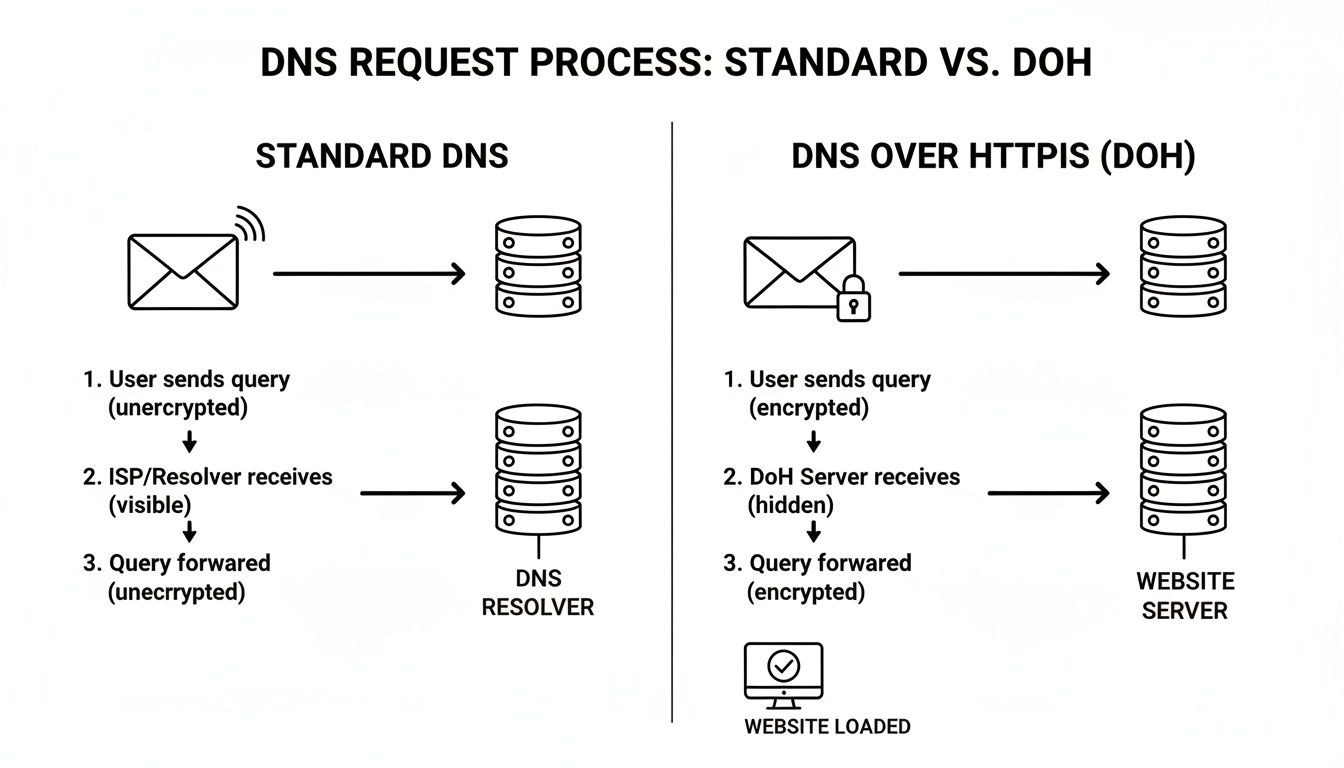
እንደ እርስዎ የሚያዩት፣ የዶኤች (DoH) «የተሠፈረ ቤት ቦታ» ዘዴ ለግላዊነት ሙሉ በሙሉ የተለየ ዘይቤ ነው።
ከመጨረሻው በኋላ፣ ዝግጅትዎ ከመረጠው መልስ ይቀበላል፣ ያፈትatchaል እና ከድር ጣቢያው ጋር ያገናኝዎታል. ገጹ ከበፊቱ የተለመደ ርዝመት ያገኛል፣ ነገር ግን ዲጂታላዊ ምህጻርዎ በመቀጠል ተጠብቆ ነበር። ይህ የደህንነት ማረጋጋት ከሌሎች የግላዊነት መሣሪያዎች ጋር በጣም ጥሩ ሥራ ያበርታል. ተጨማሪ ለማወቅ፣ እንዴት クッキー ማስተዳደሪያ ተጨማሪ ቁጥጥር ሊሰጥዎ ይችላል የሚለውን መመሪያችን ይመልከቱ። ይህ ከመጀመሪያ እስከ መጨረሻ ተመስጥሮ የሚሰጥ ሚስጥራዊነት የግል የበለጠ ኢንተርኔት ወደ ትልቁ እርምጃ ያደርገዋል.
_DoH መጠቀሙ ከ真實ው ዓለም ጋር የሚያዝ ጥቅም ምንድን ነው?
DNS በ HTTPS ላይ (DoH) መሸጠግ ለቀላል የግላዊነት ማስተካከያ ብቻ የማይጨርስ ነገር ነው። የእርስዎን ዴጋማዊ ግልጽነት በእውነተኛና በተግባር የሚቃኙት ቁጥራዊ ተሞክሮዎን ለመከላከል ይሰጥዎታል፣ ከዚህ በፊት የአሮጌ DNS ሥርዓት ከመልኩ ባልተነሳ በሆነ መንገድ የመከላከል የሚችልበት መንገድ ይሰጥዎታል።
ከሁሉም በጣም የሚታይ ተጠያቂነት? ኢንተርኔት ልማት ሰራተኛዎ (ISP) ከመብራት ቦታ ሳይቀር በየትኛውም ድህረ ገጽ ስትጓዙ ሁልጊዜ መዝገብ እንዳይቀር ያስገድዳቸዋል። መደበኛ DNS ጥያቄዎች በቀላል የጽሁፍ ዘዴ ይላካሉ፣ ይህም የመቃኘት ታሪክዎን ክፍት መጻፍያ ያደርገዋል። DoH እነዚህን ፍለጋዎች ያመምጠዋል፣ በዚህም መንገድ ያንን መጻፍያ በእውነት ይዝጋታል።
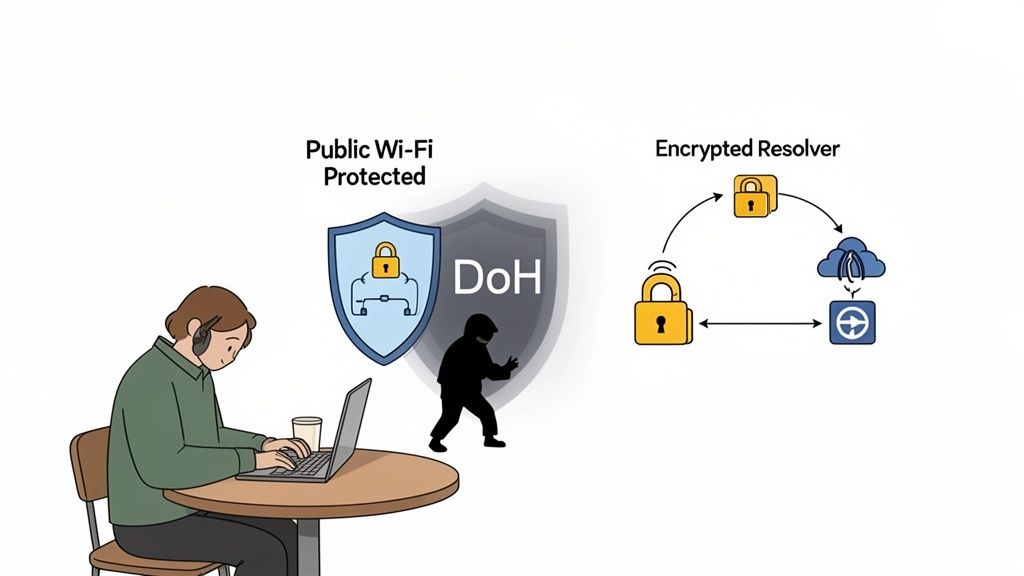
ለ DNS ጥያቄዎችዎ የግል ዞፍ እንደሆነ ያስቡ። እርስዎንም ብቻ እና በሌላ ወገን ያለው DNS ፊን解析器 የት ስትሄዱ ብቻ ያውቃሉ።
በመጨረሻም ደህንነቱ የተጠበቀ የህዝብ ዋይፋይ
እኛ ሁላችንም ባቋቋማችሁ ነን—በኮፈ ሾፕ፣ በአየር ማረፊያ ወይም በሆቴል ነፃ ዋይፋይ እንኝ ሳይቀላልቅ። ግን እነዚህ አውታራት ለተቃዋሚዎች መጫወቻ ሆነው ይሆናሉ፣ በኋላ ያልተመረጠ የመሣሪያ ዝውውርን በቀላሉ ማዳመጥ ይችላሉ። አንድ የተለመደ መርዳት ምክንያት በመሃል ሰው (MITM) ጥቃት ነው.
መንገዱ እንዴት እንደሚሆን፦ ወደ ባንክዎ ድር ጣቢያ ለመሄድ ይሞክራሉ። በተመሳሳይ አውታር ላይ ያለ ተቃዋሚ ያልተመረጠ የDNS ጥያቄዎን ቅጥረን ያዝቶ ወርቅ-ልዩ የሆነ IP አድራሻ ያቀርብልሃል፣ ከእውነተኛው ጣቢያ ያልተመረጠ ቅርጽ ወደ እርሱ ያስተላልፍሃል። በDoH ከዚህ ጥቃት ሙሉ በሙሉ ይፈረጃል። የDNS ጥያቄዎ ተመስጥሮ እና ለእነርሱ ያልተነበበ ይሆናል፣ ሁልጊዜ ወደ እውነተኛው ድር ጣቢያ እንደሚመጣችሁ ያረጋግጣል.
የDNS ዝውውርን በመመስጥር፣ DoH ከDNS መንቃት እና ማምላክ ያሉ የተለመዱ ጥቃቶች ላይ የመከላከል ሀይልዎን ያጠንከራል፣ በህዝብ ዋይፋይ መጠቀምን በጣም ደህንነቱ የተጠበቀ ያደርገዋል.
በደህንነቱ ያልተጠበቀ ግንኙነት ላይ ያሉ ሰዎችን በየቀኑ የሚያስ瞄准 በጣም እውነተኛ ጥቃት ላይ ለቀላል እና ኃይለኛ መከላከል ነው.
የድር ግራ መቋጫዎችንና መ눕ሪያዎችን ማለቀቅ
DoH እንዲሁም ኢንተርኔቱን ክፍት ለማдерж ጥቅም ያለው መሳርያ ነው። በርካታ ቩድሆች፣ ትምህርት ቤቶች እና ሙሉ ሀገሮች ቤተመንግስታዊ ወይም ፖሊሲ ምክንያቱ የመረቃ ጣቢያዎችን በDNS ጥያቄዎችን ማጣቀሻ ይገድባሉ። የተከለከለ ጣቢያ ለመጎብኘት ሲሞክሩ፣ የእነሱ DNS ሰርቨር ትክክለኛውን IP አድራሻ ማህደረ አይሰጥም።
DoH ጥያቄዎችዎን በቀጥታ ለሚታመን ሪዞልቨር ስለሚልካቸው፣ ከበርካታ የአካባቢ DNS ፋይሎች በቀጥታ ይለ.mybatisplus። ይህ የተከለከለ ሊሆን የሚችል ይዘት ማግኘት ይችላሉ ማለት ነው።
ይህ የትኩረት አደረగ የሚሆነው በዚህ ነው፦
- ISP ደረጃ ግንኙነቶችን መ መልከት፦ አንዳንድ አቅራቢያዎች ለንግድ ወይም ፖሊሲ ምክንያት አንዳንድ የመረቃ ጣቢያዎችን ያጣቅሟቸዋል። DoH ከዚህ በላይ ያግዝ攻擊ዎታል።
- የኔትወርክ ገደማዎችን መ መቀላከል፦ የስራ ወይም የትምህርት ቤት ኔትወርክዎ ለምርምር ወይም ለዜና የሚያስፈልግዎ ጣቢያዎችን ካከለከለ፣ DoH በብዛት መዳረሻ ሊመልስ ይችላል።
- የመረጃ ነፃ ፍሰትን ማ ማቀፈል፦ በከባድ የኢንተርኔት ግድግዳ ያለባቸው ቦታዎች፣ DoH ወደ ዓለም አቀፍ ያልተጣራ ድረ ገጽ ለመድረስ ልማዊ መሳርያ ሊሆን ይችላል።
ይህ ለውጥ ከመረብ ጋር ሳይሆን በመስመር ላይ ምን እንደሚያዩ የምትወስኑበት ቅንጅት ይሰጣል፡፡ በደህንነት አገልግሎት ሰጪ Quad9 መሠረት ይህ የተለየ ዕድገት ዘመን አስተዋይ መሆኑን ያመለክታል፡፡ በ 2025 ድር界第一ይ ግልጽ የሆነ የግላዊነት ቀዳሚ የDNS አገልግሎቶች ምስራች እንደሆኑ ይጠቁማል፡፡ የምትፈጥሩትን ችግር ለማሳየት ለምን የግላዊነት ዋና የሆነ የDNS ቁልፍ እንደሆነ ማየት ይችላሉ፡=
DoH ከDoT ከተከላከላ ከ Dawit DNS ጋር ማነጻጸሪያ
የ ኢንተርኔት ግላዊነት ለማሻሻል DNS over HTTPS (DoH) ብዙ ግዴታ ቢያገኘውም፣ በ ተመስጥሮ ምርጥ የሆነ DNS ውስጥ ብቸኛው አይደለም፡፡ ለምን DoH ተለይቷል ለማወቅ ከፍታው ወንድም የሆነውን DNS over TLS (DoT) እና ኢንተርኔቱ የተመሰረተበትን ባህላዊ ምስራች የሆነ ያልተመሰጥረ DNS ጋር አሳይተን ማየት አለብን፡
እያንዳንዱ ፕሮቶኮል ደህንነትን እና ግላዊነትን በተናጠል ያስተናግዳል፣ ይህም አንዳንድ ጠቃሚ ክ衡权衡ን ያመጣቸዋል። ትክክለኛው ምርጫ በተሟላ ሚስጥራዊነት ለፍላጎት ከኔትዎርክ አስተዳደር እና ፕሮቶኮሉ ምን ዓይነት ቀላል እንደሚያስተላልፍ ጋር ማ衡权衡 ላይ ይተኛል።
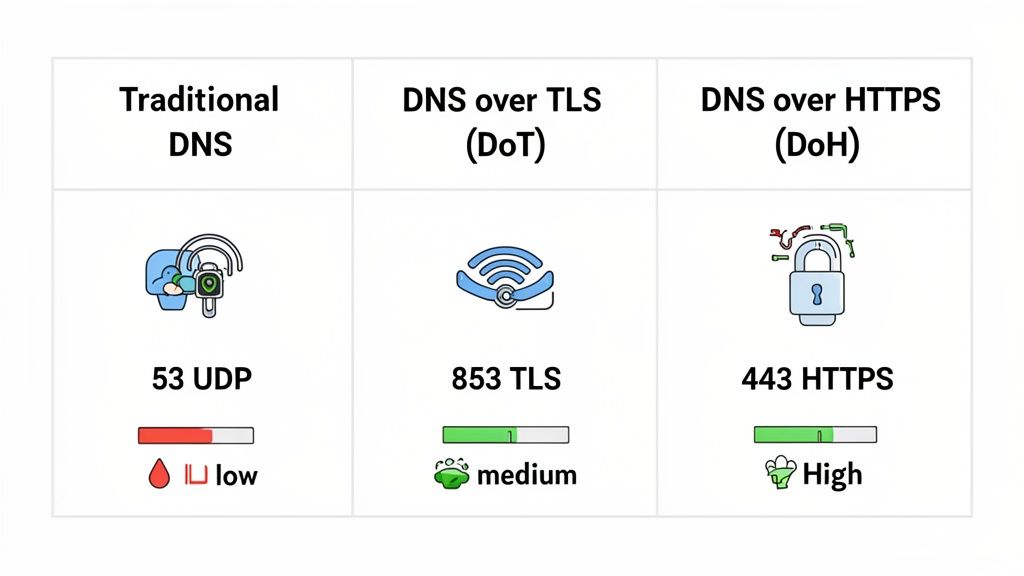
ስለ ልዩነታቸው ለምን እንገባ እንዳይን እና አንዳንድ ብራውዘሮች እና ዘመናዊ የመሠረተ ልማት ሲስትሞች ለ DoH ለምን እየተወሰዱ እንደሆነ እንመርምር።
DNS Over TLS ለሚስጥራዊነት ቀጥተኛ መንገድ
DoH አዲስ መደበኛ ከመሆኑ በፊት፣ DNS over TLS የ DNS lookupsን ለማስቀፈስ ተወዳጅ ነበር። DoT የ DNS queries ጥያቄዎችን በደህንነቱ የተጠበቀ የመተላለፊያ ደረጃ (TLS) ገንባታ ውስጥ በማስቀመጥ ይሠራል — ባለፉት ብርቱ ነገር በ HTTPS ድርጊቶች ላይ የሚስጥር ኃይለኛ ሚስጥራዊነት።
ዋናው ልዩነት ማለት፣ DoT በተወሰነ ፖርት ይሠራል፡ ፖርት 853። ይህ ቀጥታ መንገድ ሁኔታ በክፍል ሆኖ ይሠራል ለ DNS ብቻ ደህንነቱ የተጠበቀ ቻናል ይፈጥራል። በአጠቃላይ ለኔትወርክ ይ ogłos እንደሚል፣ "ሰላም፣ እኔ ምስጥር የተደረገ DNS ጥያቄ ነኝ!"
ለደህንነት ብዙ ጥሩ ቢሆንም፣ ይህ የሆነውም የአችሊስ ጎትል ነው። ልዩ ፖርṭ እንደሚጠቀም፣ ከኔትወርክ አስተዳዳሪዎች በ ፖርት 853 ላይ የሚሄዱትን ተግባራት በቀላሉ ማጣራትና ማገድ ይችላሉ በአካባቢው DNS ማጣሪያ ደንቦችን ለመፈጸም። ይህ የDoT ተጨራሪ DNS ዕንቅፋት ማንቧቧን ብቻ የምትፈልግ ሲሆን ተመስርቶ ብትኖርብት በጣም ጥሩ ምርጫ ነው፣ በተጨማሪም DNS ተግባራትህ ሊታወቀ ይችላል ብለህ አታስventhinksም።
በ DNS ላይ በ HTTPS የሚኖረው ድብቅ ጥቅም
ይህ የDoH ከመንጠቅያው የሚለይበት ቦታ ነው። በተወሰነ ፖርት በምትኩ፣ DoH DNS ጥያቄዎችን በጥበብ እንደሚያጠልቅ፣ በ ፖርት 443 ላይ ይላካል—ሁሉንም መደበኛና ደህንነቱ የተጠበቀ HTTPS ድር ተግባራት ለመጠቀም የሚሄዱት ተመሳሳይ ፖርት።
ያህል አነስተኛ ለውጥ በጣም ብዙ ተፅዕኖ አለው.
DoH ተግባራት እኩልን ብቻ ለማናቸውም ብዙ ድር ጣቢያዎችና መተግበሪያዎች ከሚመጡ ምስጥር የተደረገ መረጃ ተመሳሳይ ቢሆንም፣ DNS ጥያቄዎችህን ብቻ ከመረጃ ማግኘትና ማገድ በጣም ከባድ ሊሆን ይችላል እንዲሁም ሁሉንም ድር ማሰሻ በጣም ይ뿔ስታል.
በይሄ "ማስላስ臓" ነው የDoH ድብቅ ዘመቻ። የመግለጫ ቁልፍ ብቻ ሳይሆን፣ የDoT ሊጠቅምበት የማይችል ደረጃ የድብቅነት ደረጃ ይሰጣል። በይህ ምክንያት በመሠረተ ዲንኬ ማቋቋሚያ እና በጣም ግልጽ የሆኑ የኔትዎርክ ፖሊሲዎችን ለማለፍ አስደናቂ በሆነ ተጽዕኖ ያለው መሳሪያ ያደርገዋል። Chrome እና Firefox እንደ ተመራጭ ደህንነቱ የተጠበቀ DNS ዘዴ ገብቶ ለማድረግ ዋና ምክንያቱ እሱ ነው። እንደ ShiftShift Extensions Domain Checker የመሰሉ የግል ፕራይቫሲ መሳሪያዎችም ህጋዊ ዲንኬ ስርቆትዎችን በሙሉ ዕይታ የተደበቀ እንዲሆን በDoH ላይ ይመራጫሉ.
በቀጥታ ግንኙነት
ለማንኛውም ሁኔታ ለማቅረብ፣ ለበлист የመረጃ ማነጻጸሪያ ዕይታ እንመልከት። በቃላት በሚገለጽ ሰንጠረዥ የአሮጌ ፕሮቶኮል፣ የመጀመሪያ ከመፍጫ ተላማማ ተጋባዦ እና ዘመናዊ ድብቅ መደብ መካከል ያሉ ተግባራዊ ልዩነቶችን ያሳያል.
የDNS ፕሮቶኮሎች ምርጠ ባህሪ ማነጻጸሪያ
ስለ ሶስቱ ዋና DNS ፕሮቶኮሎች ቴክኒካዊ እና ተግባራዊ ልዩነቶች በዕምር ዕይታ.
| ባህሪ | ባህላዊ DNS | በTLS ላይ DNS (DoT) | በHTTPS ላይ DNS (DoH) |
|---|---|---|---|
| መሠረተ ማስተርክን ኤንክሪፕሽን | ምንም (የግልጽ ጽሑፍ) | ሙሉ TLS ኤንክሪፕሽን | ሙሉ HTTPS ኤንክሪፕሽን |
| የሚጠቀምበት ፓርት | ፓርት 53 | ፓርት 853 | ፓርት 443 |
| መገለጫ | ሙሉ በኩል ተገልጧል እና ለመከታተል ቀላል ነው | የተመስርቶ ነው፣ ነገር ግን እንደ DNS ትራፊክ በቀላሉ መለየት ይችላል | የተመስርቶ ነው እና ከመደበኛ የድር ትራፊክ ጋር ይቀላጣል |
| ግልጽነት | የእያንዳንዱ የዶሜን ፍለጋ ይገልጻል | ከይዘት ምርመራ ይጠብቃል | ይዘቱን ይጠብቃል እና ጥያቄውን በሁሉም በኩል ያቀ ActiveForm伪装 |
| መከልከያ | በቀላሉ መከልከል ወይም አማትን መቻል ይችላል | በፓርት በቀላሉ መከልከል ይችላል | ከቻል ከፍተኛ ስብሃት ባይደረግ መከልከል በጣም ከባድ ነው |
| ዋና አጠቃቀም | የድሮ የኢንተርኔት መሠረተ ልማት | በተመከተ የኔትወርክ ላይ DNS መጠበቅ | የተጠቃሚ ግላዊነት ማሻሻል እና መከልከያ መሻሻል |
በመጨረሻ, DoH እና DoT ሁለቱም ከ传统 DNS ይልቅ በደንብ የበለጠ የደህንነት ልማት ናቸው። DoT ጥለቻዎን የሚጠብቁ ለመጠበቅ ቀላልና ተጨባጭ ቻናል ይሰጣል። ግን, DoH ከበverage የሆነ ተሞክሮ ጋር በመቀላቀል ያለው ብልጽግና ጥቅም ያለው ተወዳዳሪ አለው፣ በተለይ በከፍተኛ ዘርፍ ወይም በመ筛选 ላሉ ኔትወርኮች ላይ፣ ዛሬ ለግላዊነት ትኩረት የሚሰጡ መሣሪያዎችና ተጠቃሚዎች ላይ የሚመረጥ ስለሆነ ግልጽ ተወዳዳሪ ነው።
ክርитክ እና የግጭት ሁኔታዎችን መረዳት
DNS over HTTPS (DoH) ለግለሰብ ግላዊነት ትልቅ ድል ሲሆን፣ የትምህርት ባዶ መንጠቅ አይደለም። እንደ ማንኛውም አዲስ ቴክኖሎጂ፣ የራሱ ተግዳሮቶችን እና የግጭት ሁኔታዎችን ይዞ ይመጣል። DoH በመደበኛነት በእድገት ላይ ያለውን ጽኑ እንቅ憂虑ዎች ለመረዳት ሙሉውን ህልም መመልከት አስፈላጊ ነው።
ከፍተኛው መቃወሚያዎች አንዱ የ DNS ማማከል () ስለሆነ አደጋ ነው። በብዛት የድር መቃኛዎች በነጠላ ሁኔታ የ DoH ጥያቄዎችን እንደ Google, Cloudflare እና Quad9 ያሉ ጥቂት ትልቅ አቅርቦች ወደ አጠቃላይ ቀበobao ይላካሉ። እነዚህ ኩንaterns ጠንካራ የግላዊነት ፖሊሲዎች ሲኖራቸውም፣ ይህ ማሰሪያ በተቀጥረ ሁኔታ የኢንተርኔትን የአድራሻ መጽሐፍ በጥቂት ድርጅታዊ ጀiants እጅ ይሟላ።
ይህ ችግርን ለቀው ሌላ ችግር ያቀርባል። የእርስዎ የአካባቢ የኢንተርኔት አቅርቦች (__ISP__) በት䴌 መቃኛ ስለሆነ የሚያይበትን መስኮት በምትርክበት ቦታ፣ ያ ተመልካችነት አሁን ለተለየ ቴክኖሎጂ ድርጅት ይሸplaስል። ለድርጅታዊ መረጃ መከታተላቸው ያልደረጉ ማንኛውም ሰው፣ ይህ ለግዚያ ጥንቅቅ ነው።
የአውታር አስተዳደር ችግር
የአውታር አስተዳደሪዎች—በድርጅት፣ ትምህርት ቤት ወይም በጓሮ የወላይታ ቁጠባ ያላቸው ቤተሰቦች—DoH ለእነርሱ ከፍተኛ ስርቆት ሊሆን ይችላል። የድር አውታራቸውን ደህንነት ለማረጋገጥ የ DNS ዝርዝሮችን መከታተል ዘላቂነት ተጠቅሞአቸው ነበር።
ይህ ዓይነት ቁጠባ ያስፈልጋቸዋል:
- የደህንነት ፖሊሲዎችን መፈጸም: በመርፌ ሶፍትዎች፣ በፋሽን ስ Prostitutas እና በቦትነት መሪ ማዕከላት ለታወቁ መስመሮች ወደ ልውውጥ መገኘትን መከልከል።
- ይዘት ማጣቀሻ: በትምህርት ቤቶችና ቤቶች ውስጥ ያልስማማ ወይም ለአዋቂ ያለው ይዘት ከ网络传播 ማስቀረት።
- ህጋዊ ተገዢነት: የ网络传播 እንቅስቃሴ ከተወሰኑ ሕጋዊ ወይም የኢንዱስትሪ መስፈርቶች ጋር መስማማትን ማረጋገጥ።
DoH በአ낌ም ይህን ሁሉ ባህላዊ፣ በDNS ላይ የተመሰረተ ጠበቃ ሥርዓት ያለፋል። የDNS ጥያቄዎች እንዲመቀይሱ እና እንደ ተለመደ HTTPS ድህረ ገጽ ውጤት ብቻ ሊታዩ ይችላሉ ስለዚህ ከተለያዩ ፋየርዋሎችና ማጣቀሻ መሣሪያዎች ሙሉ በሙሉ ያልተሳዩ ይሆናሉ። ይህ የ网络传播 ግንኙነትን ሊያዝንፍ እና በጥንት የተፈለፈለ የደህንነት ፖሊሲዎች ውስጥ ቦታዎችን ሊሰፋ ይችላል።
እንደዚህ ዋና ግጭት የአስተማማኝ ግጭት ነው፡ የግል ተጠቃሚ ግላዊነት ከማዕከላዊ网络传播 ቁጥጥር ጋር። የተጠቃሚውን ከፀረ-ርዕስ እንዲያድግ የሚያስችልው ባህሪው ሰራተኛ ከከባድ የደህንነት ማጣቀሻዎች እንዲፈላ ያስችላል።
ይህ በኢንዱስትሪው ውስጥ ከፍተኛ ውይይት አድርጓል። የደህንነት ባለሙያዎች የDoH በመልከ ምቹ አህዛብ ቢኖረውም፣ ሊ보호ን የተነነወቹ መሣሪያዎችን ሊያብራ ይችላል ይለዋል። በፋሽን ሶፍት የ communications ለመስውር መጀመሩንም እንታይበታለን፣ ለማግኘትና ለማስተናገድ በጣም አስቸኳይ ማድረግ።
መልመል በሚያገኘው መንገድ
ይህው ሁሉም እርምጃ ለምን እንደሚያሳይ ነው የDoH ለሁሉም ጥቅም የሚሆን መፍትሄ አይደለም ብሎ ያስተዋይቃል። በቡሄ ላይ ባለው ምግብ ቤት ስለምን ተጠላላፊ የአህባብ ኢንተርኔት የሚጠቀም ሰው ላይ፣ ጥቅሞቹ ግልጽ ናቸው። ማንም ሰው ሥራዎን ለመሰረር ያለው አደጋ ከፍተኛ ሲሆን፣ DoH ጠንካራ የበረራ ሥርዓት ይጨመራል።
በማዕከላዊ ሠራተኛ ቤት ወይም ትምህርት ቤት ያሉ የተቆዳજ高速发展 የአካባቢ እንደሆነ ግን፣ ስሌቱ የተለየ ነው። እዚህ፣ የመረብ ሁሉን አቀፍ ደህንነት እና የይዘት ማጣቀሻ አስፈላጊነት ብዙ ጊዜ በ密码化 የDNS ያለው የግላዊነት ተጨመሪያ ላይ ቅድሚያ ይሰጣል። ይህም በትክክል ለምን ብዙ ድርጅቶች የDoH በመረብ ላይ ለመከልከል ይምረጡና ሁሉንም የDNS ጥያቄዎች በብቻቸው ተጠባባቂ ሰርቨሮች ወደ ማለፊያ ያደርጋሉ።
በመጨረሻም፣ DNS በ HTTPS ላይ ምን እንደሆነ በትክክል መረዳት ያለውን ጉልለት እና ድክመት ሁለቱንም ማየት አለበት። የግላዊነትን ለማጠናከር ያስደናቂ መሳሪያ ነው፣ ግን እንዴት እና የት መጠቀሙ ግድ የሚለው ግዴታዊ ሃሳብ ይፈልጋል። ለመረብ አስተዳዳሪዎች፣ ከDoH ጋር የሚመጣውን ዓለም ለማዋሰስ ደህንነት ስልቶቻቸውን ማሻሻል እና በአንባቢ አይነት DNS መረዳታ ላይ በመመስረት ተጠቃሚዎቻቸውን ለመጠበቅ አዲስ መንገዶች መፈለግ ማለት ነው።
DNS በ HTTPS ያዋ.scalajs የሚያን የማን በትክክል እንዴት ነው
የDNS በ HTTPS ላይ እንዲሆን የሚያስቀይቀይ መስራት ከምትחשב የበለጠ ቀላል ነው። ዛሬ በየቀኑ እንጠቀማቸውን አብዛኛዎቹ ድር መቃጫዎች እና የመሣሪያ ሥርዓቶች ያሉት DoH ድጋፍ በውስጣቸው ይገኛል፣ ይህም በጥቂት ጠቋሚዎች ብቻ በመቃጫ ላይ የገንዘብ ዓይነት የግላዊነት ማደመር ይችላሉ።
ምክንያቱም መመሪያው በተለያዩ መስኮታት ላይ የ DNS ዋና መሮጫ (DoH) እንዴት እንደሚያктив ማድረግ ያሳያል። ከተነሳ በኋላ የ DNS መንገድ ማስረሻ በትክክል እንደተመሰጠመ እና ከእይታ እንደተደበቀ ለማረጋገጥ በፍጥነት እንዴት መፈተሽ እንደሚቻል ያቀርባል.
በድር ባROWSER ላይ DoH መቃየት
ለብዙ ሰዎች፣ በድር ባዕሮው ውስጥ በቀጥታ በመቅየት DoH ማንቃት ማስጀመር ቀላል መንገድ ነው። ይህ ዘዴ ጥሩ ነው ምክንያቱም ቢሆንም የኮምፒውተሩ ዋና የኔትዎርክ ቅንብርት ምን እንደሆነ ያለማድረግ ድር ባዕሮው ማድረጊያ ያለመድረኳቸውን ሁሉ ይመስጥራል.
Google Chrome
- በቀይ አሞʒስት ማዕከል ላይ ያለውን ሶስት ነጥብ ምልክት የምርት ማድረጊያ ጠቅ ያድርጉ እና ወደ ቅንብሮች.
- ከዚያ ወደ ግላዊነት እና ደህንነት ይሂዱ፣ ከዚያም ወደ ደህንነት.
- ወደ "የላይ ከፍ ያለ" ክፍል ይሄዱ እና ደህንነቱ የተጠበቀ የ DNS ይጠቀሙ አማራጭ ይፈልጉ.
- ይቀይሩት እንዴት ይጠቀሙት። በነባሪ ሁኔታ፣ Chrome ከDoH ድጋፍ ካለው አሁን ያለውን የኢንተርኔት አቅርቦች አገልግሎት ለመጠቀም ይሞክራል። ለተሻለ ግልጽነት፣ "ከ" በመምረጥ እና እንደ" ለምሳሌ ምርጫ አቅርቦች እንደ".cloudflare" ማንኛውንም ምርጫ ማረጋገጥ እመክራለሁ። .cloudflare (1.1.1.1) ወይም Google (ሰላማዊ የ DNS).
Mozilla Firefox
- ከላይ በቀኝ ጠርዝ ላይ ያለውን ሦስት መስመር "ሃምበር" የምትለው ምናምን ይጫኑ እና ይምረጡ ማስተካከያ.
- በ አጠቃላይ ፓናል ውስጥ ቆይ እና እስከ በታች በጣም ተንከባክብ የአውታር ማሰሪያዎች፣ እና ይጫኑ ማሰሪያዎች... ቁልፍ።
- በመገኘቱ በአዲሱ መስኮት ውስጥ፣ እስከ ዝቅተኛው ይtraîn እና ለ DNS በ HTTPS ላይ ያመቻቹ.
- ከዚያ በኋላ ከዝርዝሩ ውስጥ ማספקን መምረጥ ወይም ባለውልይ ካለ ማስተካከያ ማስገባት ይችላሉ።
በቃላችሁ ውስጥ DoH ማመቻቸት ለግላዊነት ፈጣን ማሻሻያ ነው። ከሶፍትዌሩ ወደ ውጪ ምርጡ መተግበሪያዎችን መቀየር ሳይፈልግ የድር እንቅስቃሴዎችዎን እንዲሁም ይጠብቃል።
በአን операцион ስርዓት ላይ DoH ማስቻል
ከድር በራስጌ በቻ ሳይሆን ሌሎች መተግበሪያዎችንም ያገናኛል ዘንድ ጥበቃ ከፈለጉ፣ በአን操作系统 ደረጃ ላይ DoH ማስቻል ይችላሉ። እርስዎ ይህ በ ዊንዶውስ 11 ላይ መደበኛ ምክር ነው ቢሆንም፣ ወደ ዊንዶውስ 10 በመንገድ ባይደርስ አልተደረገም መሆኑን ታውቃሉ.
ዊንዶውስ 11
- አሁን ምርጫዎችን ክፈቱ እና ወደ የበርነት እና ኢንተርኔት. ይሂዱ
- እርስዎ እየተጠቀሙበት ያለውን ግንኙነት ይምረጡ፣ በ ዋይ-ፋይ ወይም ኢዘርኔት.
- በ የሀርድዌር ባህሪዎች. ላይ ጠቅ ያድርጉ
- የDNS ስርቨር ስምድרוש ይፈትሽው እና ከጥላው በኋላ ያለውን ማስተካከያ ቁልፍ ጠቅ ያድርጉ.
- ምርጫውን ከ"አዲሱ (DHCP)" ወደ 手动. ይቀይሩ
- IPv4 ያብሩ እና ለእርስዎ DoH አቅራቢያ የIP አድራሻዎችን ያስገቡ (ለክላውድፍሌር፣ ይህ ነው
1.1.1.1እና1.0.0.1). - አሁን፣ Preferred DNS encryption የተዘረዘረ ምናምን ላይ Encrypted only (DNS over HTTPS) ይምረጡ። Save ይምቱ፣ እና ተጠናቅቋል።
DoH እንደሚሠራ መረጋገጥ
DoH ካል拂 በኋላ፣ በእርግጥ እንደሚሠራ መረጋገጥ ጥሩ ሐሳብ ነው። ፈጣን ለመመርመር የእርስዎ DNS ጥያቄዎች በትክክል እንደሚመሰረቱ ሰላም ይሰጣል።
ለዚህ ታማኝ መሳሪያ Browsing Experience Security Check ነው። ገጹን ብቻ ይከፍቱ፣ በተጨማሪም ግንኙነትዎን ላይ በራስ-ሰር ጥቂት ሙشتሮች ይሠራል። የሚፈልጉት "Secure DNS" ነው— አረንጓዴ ምልክት ጥያቄዎችዎ በመመስረት ቻናል ላይ እንደሚላኩ ያሳያል።
አረንጓዴ ብርሀን ካላዩ፣ ሁሉም ዝግጁ ነው። ካልሆነ፣ ተመለስ ማስተካከያዎን በትክክል ይፈትሹ ወይም ሌላ DoH አቅራቢያ ይሞክሩ። ድካም ያለው ግንኙነት አንዳንድ ጊዜ የሙሽሮ ውጤቶችን ሊቀይር ይችላል፤ እንዴት መረጃ ይወዳደራሉ በተለይ test internet speed accurately በተወሰነ መመሪያ ውስጥ ተጨማሪ መረጃ ማግኘት ይችላሉ።
በDover HTTPS ላይ በተደጋጋሚ የሚነሱ ጥያቄዎች
ተጨማሪ ሰዎች በDover HTTPS እንዲጠቀሙ ከጀመሩ በኋላ، የተለያዩ የተለመዱ ጥያቄዎች ሁልጊዜ ይነሳሉ። እነዚህን በመመልከት መረዳት፣ DoH በትግል መሳሪያዎችዎ ውስጥ ትክክለኛውን ቦታ እንዴት ይይዛል እና ቁልፉን ሲቀይሱ ምን መጠበቅ እንደሚችሉ ይረዳዎታል። ዝርዝር የተደጋጋሚ ጥያቄዎችን እንመልከት።
DoH መጠቀም የኢንተርኔት ግንኙነቴን ያሽከርክራልን?
በተለይ አይደለም። DoH በቃላችሁ ፍስሃ ላይ ያለው ተፅዕኖ እንደው ብዙውን ጊዜ ምንም ያልተሰማ በጣም አነስተኛ ነው። ብልጫ መጨመር በlyphical አይነት ለእያንዳንዱ DNS ጥያቄ ትንሽ እ RouteServiceProvider ሳያስቀር ቢጨምርም፣ ዘመናዊ ሞብ እና አውታረ መረቦች ይህን እንዲያስተናግዱ በጣም ፈጣን ናቸው::
በ የተለያዩ ሁኔታዎች፣ ፍስሃ ⬆️ ሊያዩ ይችላሉ። የኢንተርኔት አቅራቢያችሁ የDefault DNS ሰርቨሮች ቀላል ቢሆኑ፣ ከ Cloudflare ወይም Google ያሉ ተጠቃሚዎች በ高性能 DoH አገልግሎት ላይ መቀየር በእውነቱ ድር ጣቢያዎችን ፈጣን እንዲጫወቱ ሊያደርግ ይችላል። ከብልጫው የመጪው በጣም አነስተኛ ዘገነት ለከፍተኛው ግላዊነት እና ደህንነት ማሻሻያ ሊከፍለው የሚችል ትንሽ ዋጋ ነው።
መሠረታዊው ነገር፦ ለብዙ ሰዎች ለምን እንደሆነ በአስፈጻሚነት ልዩነቱ በጣም ጥቂት ነው። በመግለጫ የተደረገ DNS በሚያስገኘው ደህንነት በጣም ይመጣቸዋል.
DoH ሙሉ በሙሉ VPN መተካት ይችላልን?
ሦስተኛም አይደለም። DoH እና የመስላቸኛ የግል መረብ (VPN) በተለያዩ መንገዶች በብሩህነት አብረው የሚሠሩ ሁለት ተለያዩ መሳሪያዎች ናቸው። የኦንላይን ግላዊነትን ማjuana ከሚፈጥሩት ግምቶች ውስጥ ልዩ ግን በዙህነት ጠቃሚ ተስፋፎችን ያፈርሳሉ.
ስራቸውን እንዴት እንደሚያዩ ምንጊዜም ያ那么简单 መንገድ እንደሚከተት ተመልከቱ፦
- በHTTPS የተደራጀ DNS (DoH): ይህ ብቻ DNS ዕይታው—የድር ጣቢያው የIP አድራሻን በሚጠይቅበት ጊዜ—ይመለከታል። ማንኛውንም ሰው የምትጎበኙበትን ድር ጣቢያዎች ለማየት ይከላከላል.
- የመስላቸኛ የግል መረብ (VPN): ይህ ሁሉንም የኢንተርኔት ዝውውርዎን ያመለጣል እና ከሚያገኙበት ድር ጣቢያዎች ቅርንጫፍ ያለውን ትክክለኛ የIP አድራሻዎን ይደብቃል። ለምንም ቢሆን የምትሰሩት ሁሉ ለከፍተኛ ግላዊነት ግርኝ ነው.
ተመሳሳይ ማበልፃጊ መርህ ሊኖር ይችላል፤ DoH የትኩረት ቦታዎን በተለያዩ ችግሮች ለመደበቅ ማሰሪያ ሆኖ ይሠራል። VPN ግን የመንገድ ተጓዦ ሆኖ፣ መኪና ሁሉንም በትምህርት ቤት ወይም በስራ ቦታ መስጠት አይችልም።
በመሬት ላይ ከተመረጡ ሰዎች ጋር የምተናገሩት ማን ነው?
DoH ቢያብሩም እንኳን፣ በንግድ ወይም ትምህርት ቤት አውታር ላይ መርጧ ሳይታይ መሆንዎን አይጠንቅቁም። ጥላቻ የተጫነውን መረዳት በቀላሉ አይችልም፣ ነገር ግን በሙሉ ለመከላከል በቂ አይደለም።
የስራ ባለቤት ተቃራኒውን መረጃ ማየት ይችላል። የDNS ፍለጋዎች ቢደበቁም፣ በጥበበኛ የአውታር አስተዳዳሪ በተገናኙ መለያ አድራሶች በመመልከት የእርስዎን ተግባራት በደንብ መረዳት ይችላል። ከዚህ በላይም ብዙ የስራ መስጠት ዘዴዎች ላይ የተከላከሉ መሣሪያዎች በቀጥታ ተፈጥሯቸዋል፣ ይህም DoH እንኳን ከመጀመሩ በፊት የምታደርጉትን ሁሉ ይመልከታል። DoH ለግል ፕራይቪሲ ጥሩ እርምጃ ነው፣ ነገር ግን የኩባንያው የይ愭ት ስርዓቶችን አያቃጥልም።
በቃሪአ ማሰራጫ መረብ የመከላከል ቁልፍ እና የስራ መስሪያ በቀላሉ ለማቀዝቀዝ ዝግጁ ነዎት? ShiftShift Extensions ስብስብ አሰራር የሚያቀርባቸውን ጥቅማተናណነት ያላቸውን መሣሪያዎች በቀጥታ በቃሪአ ውስጥ ያቀርባል፣ ከነዚህም ውስጥ ሌንላ መለያ ለግል መረጃ እንዲያገኝ የሚያገለግል Domain Checker ይጠቃል። ዛሬውኑ ShiftShift Extensions በማውደም በነጠላ፣ በአንድ አመቻ ትዕዛዝ ፓሌት የዲጂታል ህይወትዎን ይ掌控።