እንዴት የአይነት ፍጥነትን በትክክል ለማረጋገጥ፡ አነሱ እና የታመነ መመሪያ
እንዴት የአይነት ፍጥነትን በትክክል ለማረጋገጥ ግምገማ እና የተግባር ምክር ጋር በግልጽ ደረጃዎች ይማሩ፣ እና የተለመዱ ስህተቶችን ለመከላከል መመሪያ ይይዙ እና የታመነ ውጤት ይወጣ።

የተመነጨ ማስተካከያዎች

የእርስዎን የኢንተርኔት ፍጥነት በትክክል ለማንሳት ከአንድ ጠቅታ በላይ መሄድ ያስፈልጋል። ምስጢሩ የሰው ሰራሽ ኢዘርኔት ግንኙነት መጠቀም፣ ሌሎች በስፋትዎ ላይ የሚያድጉ ሁሉንም ማጥፋት፣ እና ተጨባጭ ምትክክለኛ መሠረት ለመገንባት በርካታ ጊዜ መተንተን ነው። በዋይፋይ ላይ አንድ ጊዜ ብቻ ማከናን ማለት በተቀል ሊጠርት ይችላል እና የእርስዎ የኢንተርኔት ፕላን በʵ際 ምን ሊሰጥ ይችላል አይያያცም::
ፍጥነትዎን ትክክለኛ ማድረግ ለምን እንደሚያስፈልግ
የእርስዎን ትክክለኛ የመረብ ፍጥነት ማወቅ በጉግል ውስጥ የመጀመሪያ የመመርመር ጣቢያ ሲያዩ ላይ "ይሂዱ" ብለው የሚያደርጉት እንደ那样 ቀላል አይደለም። ውጤቶች ከተሳሳቱ ሁኔታ ከሆነ፣ ችግሩ ዋናው በመሆኑ በእርስዎ ማቀናበሪያ ላይ ያለ ነው ብለው አቅራቢያዎን ይፈናቃሉ፣ ወይም ከዚህም በላይ ችግር መ존ሱን አይሰማቸውም።
ትክክለኛ የመመርመር ሂደት ከአቅራቢያዎ ውስጥ ያለውን የመረብ ጭብጥ እስከ ህይወቱ ያለፈ ረውተኛ ሪውተር ድረስ ሁሉ ሊያሳይ ይችላል። በየወሩ የሚፈቅዱትን ፍጥነት እንደሚያገኙ ለማረጋገጥ ያለ ሌላ መንገድ አይደለም። በጣም ይገርማል፣ 36% የአሜሪካውን በመሆኑ ፕላኑ ምን ፍጥነት መሆን አለበት አያውቁም፣ ይህም ብዙ የአ PERFORMANCE ችግሮች ሙሉ በሙሉ አይታወቁም።
ከዚህ "አንድ ጠቅታ" ሃሳብ ጋር ያለው ችግር
እኛ በዚህ በርካታ ነን: ከዋይ ፋይ ጋር እንገናኝ፣ አንድ ብቻ ሙከራ እንፈጽም፣ እና ወዲያውኑ በመመልከት ላይ ያለውን ቁጥር እንቀበላለን። ግን ይህ በአደጋ የሆነ ዘዴ ችግር አለው፣ የእኛን ውጤቶች ሊያጠቃ ከሚችሉ ብዙ ተለያዩ ሁኔታዎችን በመተው ስለሆነ። ለምሳሌ፣ ዋይ ፋይ በጣም ከባድ የሆነ ተቀባይነት አለው። ስምንጥሮች በግድግዳዎች፣ በርcroftoch እንዲሁም ከየኔትዎ ሬውተር ወይም ሽሮ የመጣ ጸረ-ግንኙነት በተጨማሪ በመቀነት ሊዋክ ይችላል፣ ይህም የመጨረሻውን ቁጥር በከፍተኛ ሁኔታ ሊያዘከር ይችላል.
በተጨማሪም، ከምንጊዜው ጋር ረድተን ባለን የኮምፒዩተር ውስጥ በተለያዩ መንገዶች በመሠራት ላይ ይሆናል። የመ.ul ቤቶች መቃላት፣ በራስ-ሰር የሆኑ የሶፍትዌር ማሻሻያዎች፣ ወይም በ50 ታቦች ተከፍቶ የሚገኝ ብራውዘር ሁሉ በጠባቂነት በሽውዋንድ ላይ መጽ住房和城 ይችላል። ይህ ከየቤትዎ ውስጥ ኢንተርኔት አገልግሎት ተጋባዦ (ISP) በእውነት በሚያስረክበው ከፍተኛ በሆነ ፍላጎት የታነዘነ ስብስብ ይሰጣል.
ይህ ኢንፎግራፍ ሁሉንም ተለያዩ በአደጋ የሆኑ ሁኔታዎች ለማጥፋት እንዲሁም ንጹህ እና ትክክለኛ ስብስብ ለማግኘት ያለውን ዋና ሦስት ደረጃዎች ሂደት ይቀያRank ነው.
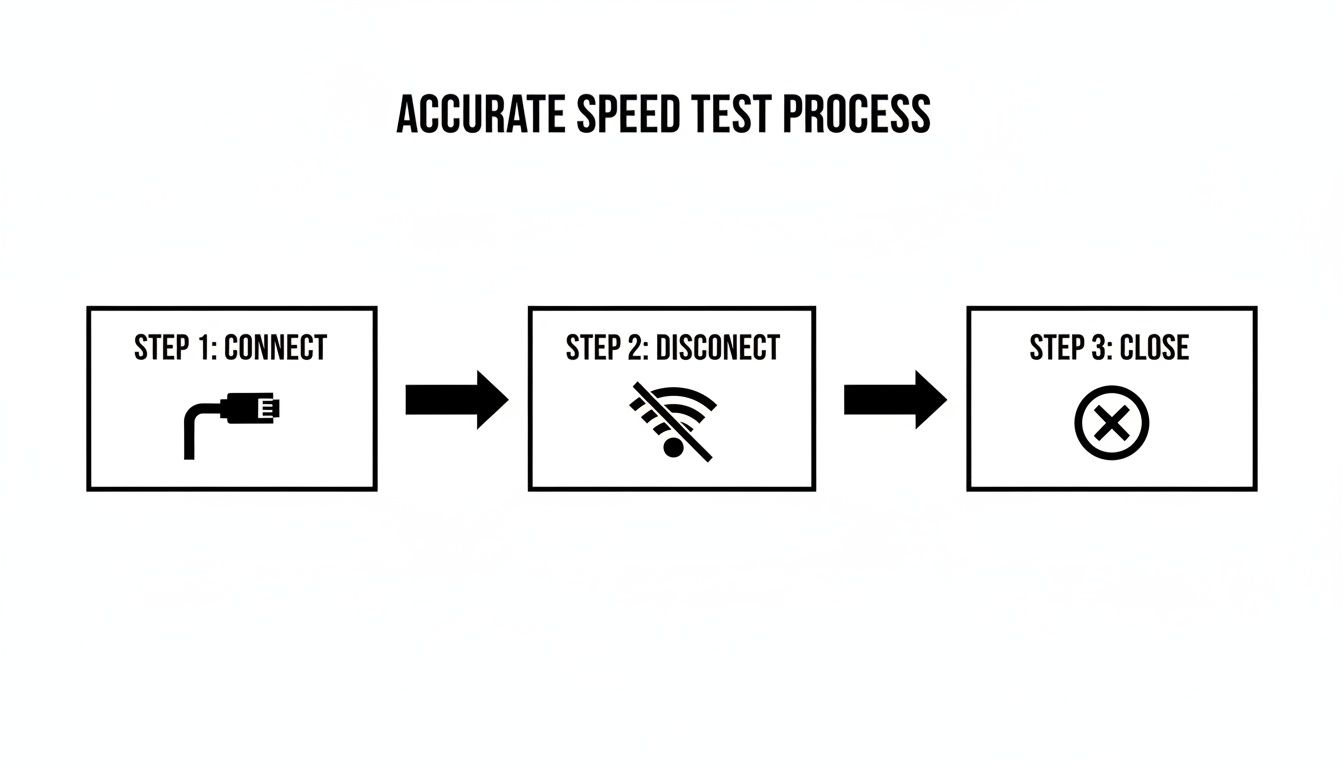
በኢዘርኔት ቀለ ከሮተርዎ ጋር በቀጥታ በመገናኘት እና ሌሎች መተግበሪያዎችን በመዝጋት የተቆጣጠረ አካባቢ እንዲኖርዎ ነው የምትሠራው። ማመከል የሚችሉትን ውጤቶች ለማግኘት ያለው መKeyName ነው።
በያዝነው በቅንነት እንዲያቀኑ ለማድረግ፣ ከዚህ በታች በፍጥነት የሚያስተከል ሰንጠረዥ አለ።
ለትክክለኛ ፍሬም ሙከራ በፍጥነት የሚያመለከተው
| ተግባር | ለምን አስፈላጊ ነው | ተከትሎ ካልተሠራ ሊሆን የሚችል ተጽዕኖ |
|---|---|---|
| የኢዘርኔት የሰንሰለት ግንኙነት ይጠቀሙ | ከሮተርዎ ጋር በቀጥታ፣ የተቆለለ ግንኙነት ይሰጣል፣ Wi-Fi ግጭትን ያስቀጭቷል። | ዋይ-ፋይ የመ.internet ፍጥነትን 20-50% ወይም ከዚያ በላይ ሊቀንስ ይችላል፣ ምክንያቱም የসንሰራ መቀረት ወይም ጭንቀት ሊኖር ይችላል። |
| ሁሉንም የጀርባ መተግበሪያዎች ይዝጉ | ክላውድ ስንቅ፣ የስትሪሚንግ አገልግሎቶች ወይም የሶፍትዌር አዘምናቸው የበረዝ መጠን ይጠቀማሉ:: | የፈተና ውጤትዎች በመተግበሪያ አጠቃቀም ብቻ የተቀነሱ ከመሆን ይልቅ ሊሆኑ ይችላሉ:: |
| ሮተር/ሞደምዎን እንደገና ይጀምሩ | የሬኔርዎን የአ暂时 አስታውስ (ካሽ) ያስወግዳል እና ለጊዜ የሚያስተካክሉ ስህተቶችን ሊፈቱ ይችላል:: | በሮተር ውስጥ ያሉ ረዥም ስህተቶች ወይም የMemoryWarning ስፍራ የግንኙነትዎን መቀነት ሊያስከትል ይችላል:: |
| በቀን የተለያዩ ሰዓታት ይፈተኑ | በአካባቢዎ የኢንተርኔት አጠቃቀም ይለያያል፣ የፍጠኝ ጊዜ (ማታ ሰዓት) ብዙ ጊዜ ቀላል ይሆናል:: | አንድ ፈተና የግንኙነትዎን በጥሩ ቀን ሊያዝ ይችላል፣ ጭንቀት ያሉ ችግሮችን እንዲደብሩ:: |
| ብዙ ፈተናዎች ያድርጉ | ይህ ለበለጠ ታማኝ መሠረት ማዕከል ከፍተኛ የኔትዎርክ ለውጦችን ለማስተካከል ያገorent ነው። | አንድ ጊዜ የተገኘ ውጤት ሊሆን ይችላል፤ በርካታ ሙከራዎች ተስተካክሎ ቆይቶ የሚታይ አመለካከት ያረጋግጣሉ። |
ይህን ደረጃ በመከተል ከግምት ወደ ትክክለኛ ሁኔታ መጠን መሻሻል ያደርጋችሁ።
እውነተኛ መሠረት ማዕከል መፈለግ
የቀን ጊዜውም ውጤቶችን ሊበልጥ ይችላል። የስራ ቀን መካከል ብትሞክሩ ፈጣን ፍጥነት ማየት ትችላላችሁ። ነገር ግን በምሽቱ ጊዜ ብትሞክሩ—በአብዛኛው ሰዓት ከሰዓት 7:00 እስከ ሰዓት 11:00 ከአን利用您的 ሰዎች ሁሉ ትዕይንት ሲያስቀሩ—ከኔትዎርክ ግጭት ምክንያት ትልቅ መቀነስ ማየት ትችላላችሁ። አንድ ሙከራ ይህን አይያዝም።
የዚህ ዓላማ አንድ ሊሆን የሚችል ስህተተኛ ቁጥር ላይ መመስረትን ማቆም ነው። በምትኩ ከዕለት ወደ ቀን ጥቅም ላይ የሚችልበትን ትክክለኛ እና ሙሉ ገጽታ ማ_BUILDING ነው::
የኢንተርኔት ፍስሃን በትክክል እንዴት መለመን እንደሚችሉ ሲያውቁ፣ ከእርስዎ መረጃ ጋር ተነሳ曙ና ከአገልግሎት ባለቤትዎ ጋር በጣም ፍፁም ስለሆነ ውይይት ማድረግ ይችላሉ። ይህ በመባል "የኢንተርኔቴ ዘ.runners slow ይመስላል" በማለት ስለሚሆን ነገር እና "ይህ እውነት ነው" በማረጋገጥ መካከል ያለው ልዩነት ነው። የምርመራ መሳሪያዎች መረጃዎን እንዴት እንደሚያከናውኑ ለተጨማሪ መረጃ፣ እባክዎን የኛን በግላዊነት የተመሰረተ ዘዴ .
በመረዳዳት ይፈትሹ።ለልዩ ምርመራ የሚያስፈልገውን የማሰቻ ሥራ ማከናወን
ዕይታን ወደ በር መጫን ሳይሹ ከመሄድዎ በፊት፣ ጥቂት የምርመራ ሥራ መስራት አለብን። ይህን ክፍል በመዝ.literal የሚፈንጠው ከንብረት ማንረከር ወቅት የውሃ መጠን መለማመን ይሞክራል—ምርመራዎ ሁሉም አቅጣጫ ይሄዳል እና በጣም አይጠቅምም። እኛ የምንፈልገው ከኮምፒዩተርዎ ወደ ሮተር በቀጥታ የተገነባ ትክክለኛ ቀጥታ መስመር ነው፣ ከሁሉም የአከባቢ ሰዎች ችግር እንዳይፈጥር ነገር ለማንሳት።
የኢንተርኔት ግንኙነትዎን እንደ ተወሰነ አቅም ያለው የውሃ ቧንቧ ያስቡ። እያንዳንዱ ክፍት ቅርጭት—ቪዲዮ ማሳየት፣ ጨዋታ ማውረድ ስልክ ማዋቀር—አ的压力ን ይቀንሳል። ቧንቧውን ሙሉ አቅም ለመለማመን ሌሎችን ሁሉ ቅርጭቶች መዝጋት አለብን።
በነ栉ር ይቀላቀሉ ወይም ወደ ቤት ይመለሱ
እኔ ያለቀ ችግር ያየሁት በቃል አንድ ነው፡ Wi-Fi በመጠቀም የኢንተርኔት ፍጥነትን መሞከር። ምቹ ነው፣ እነዚህን ስለ ስም እናውቃለን፣ ነገር ግን Wi-Fi ለምን ይልቅ አልተወካይ መሆኑ ይታወቃል። እንደዚህ አይነት ሁሉ ጣልቃ ገብቶ ሊያጐድል የሚችል አለም ውስጥ ነው::
ግድግዳ፣ ዕቃ እንዲሁም የእርስዎ ማይክሮዌቭ ያሉ የፊዚክ ነገሮች ምልክቱን ሊያመለኩ ወይም ሊያቃጥሏቸው ይችላሉ። የበርን ጎረቤት ወይም የእርስዎ Bluetooth ስፔከሮች የምልክት ጫጫታን ሊፈጥሩ ይችላሉ፣ በዚህም በቃላዊነት ማድረግ ያሳድጋል::
በየቤቱ ውስጥ የሚገባውን ፍጥነት ትክክለኛ መጠን ለማግኘት፣ በእርግጠኝነት እርስዎን ኮምፒዩተር በኢዘርኔት አውታር በቀጥታ በሮፒተሩ ጋር መያዝ አለብዎት። ይህ የተሟላ ግንኙነት ሁሉንም የመስመር ላይ ያልሆኑ ክ хаotic ያልፋል። ልዩነቱ ማስጠንቀቂያ ይሆናል፤ በጊቢት ፕላን ላይ፣ Wi-Fi ፍጥነቶች ከተሟላ ግንኙነት 15% እስከ 30% ዝቅተኛ��ሆናቸው የተለመደ ነው::
የምትሞክሩትን መሣሪያ ብቻ ያስወግዱ
እሺ፣ ተያይዞ ነው። አሁን የመረኩን ቂማ ጸጥታ ማድረግ ጊዜ ነው። ከእርስዎ ኢንተርኔት ጋር የተገናኙ ሌሎች ሁሉም መሣሪያዎች—ከጓደኛዎ ስልክ Instagram ሳይሱ እስከ በቀንድ ቤት ውስጥ ያለው ስማርት ቲቪ—ነፃ መስመሩን ከተመሳሳይ በሽታ መAWN ላይ ናቸው::
ትክክለኛ ማንነት ለማግኘት፣ ከምትሞክሩት ማሽን ጋር የጥርነት ጎን ማፍጠን ያለብዎት ነው። ለጥቂት ደቂቃዎች ማቋረጥ ወይም ማጠፍ ያለብዎት ነገሮች እርስዎን ያቀርባል፡
- ሌሎች ሴትና ዴስክቶፕ ኮምፒュተሮች፡ በተለይ በበርካታ ማሻሻያዎችን በመመስረት በመኩራት ቢታወቁ ከሆነ::
- ስማርት ስልኮች እና ታብሌቶች፡ ያነሳሱዋቸውን ከዋይፋይ የሚያቁ ብቻ::
- ስማርት ቲቪዎች እና ስትሪሚንግ ስቲኮች፡ የእርስዎ ፕል አፕል ቲቪ፣ ሮኩ ወይም ፋየር ስቲክ መጥፍቀር አለበት::
- የጫዋች ማዕከላት፡ እነዚህ ሰው የማይጠብቀው ጊዜ ትልቅ የ游戏装备 ፋይሎችን የሚጠቅም ቢሆንም::
- ስማርት የቤት መሣሪያዎች፡ የደህንነት ካሜራዎች፣ ስማርት ስፔከሮች እና ሌሎች የአይኦቲ መሣሪያዎች አስደናቂ በሆነ መልኩ በመደበኛነት ይነግግራሉ::
የምርመራ ኮምፒዩተርዎን በብርሃን ማዕለቅ በማድረግ፣ ሙከራው ወቅት ግንኙነቱን ብቻ በሚጠቀምበት ብቻ መሆኑን እርግጥ ታደርጋሉ::ተቀናሽ::
እነዚህን መሣሪያዎች ለመቃረን ደቂቃ ማቃረን የሚያስፈልግ እንደሆነ ሊመስል ይችላል፣ ነገር ግን ኢንተርነት ፕላንዎን ከፍተኛ ፍጥነት ለመለካት ብቻ መንገድ ነው፣ ስማርት ፍርឃርዎ ሽፋን የማሻሻያ ኅብረት በመፈተшение ቀርቶ ቀርቶ ብቻ መሆኑን አይደለም::
በውሳኔ ሥርዓት የሚያስፈልጉ መተግበሪያዎችን ያቁ::
በመካከለኛ ተከልከለ ኮምፒዩተርዎ ላይ ብትሆኑም፣ የጀርባ መተግበሪያዎች ሰም ባይታዩ በውሳኔ ሥርዓት ማቃኛ ሊሆኑ ይችላሉ። ሙከራውን ከመፈተ stripslashes በፊት፣ ማንኛውንም ጥቅም ያልሆነ ነገር ማቋረጥ አለበት::
በምን የሚያሰብ አካላት ይንቀሳቀሱ በሚል ላይ በትኩረት ይርዱ፡
- ክላውድ ማጣቀሻ፡ Dropbox, Google Drive እና OneDrive ለፋይሎች ለውጥ በቃይ ይፈትሻሉ።
- ምርጥ ዘመናዊ መልእክት ማስተላለፊያ፡ ከSpotify፣ YouTube ወይም Netflix የሚመጡ ማንኛውም ዕ giú ን በትጋት መዝጋት አለባቸው።
- ቪዲዮ ውይይት መተግበሪያዎች፡ ከZoom፣ Microsoft Teams ወይም Slack ሙሉ በሙሉ እንዳይወጡ ያረጋግጡ።
- ሶፍትዌር አፕዴትዎች፡ የስልክ መሠረተ ልክዎ ወይም ሌሎች መተግበሪያዎች በከፋ ጊዜ ይሄኑ እንደሆነ አፕዴት ሊያስፈጽሙ ይችላሉ።
በእርግጥ፣ ንጽህና ያለው መመልከት ለማግኘት ቀላል መንገድ የእርስዎ ኮምፒዩተርን በመፈተን ቀድሞ ማጠፍ ነው። ዝርዝር ያልተፈለጉ ሂዶችን ያፋጥናል እና ፈፅሞ የመለያ ስክ መተግበሪያ ሙሉ በሙሉ ትኩረት እንዲሰጥ ያረጋግጣል። ይህ ጥንቃቄ ያለው ዝግጅት የደረጃ ቁጥር ከተመከተ በልዩነት የሚለይ ነገር ይሠራል።
ለስራው ትክክለኛውን መሳሪያ መምረጥ
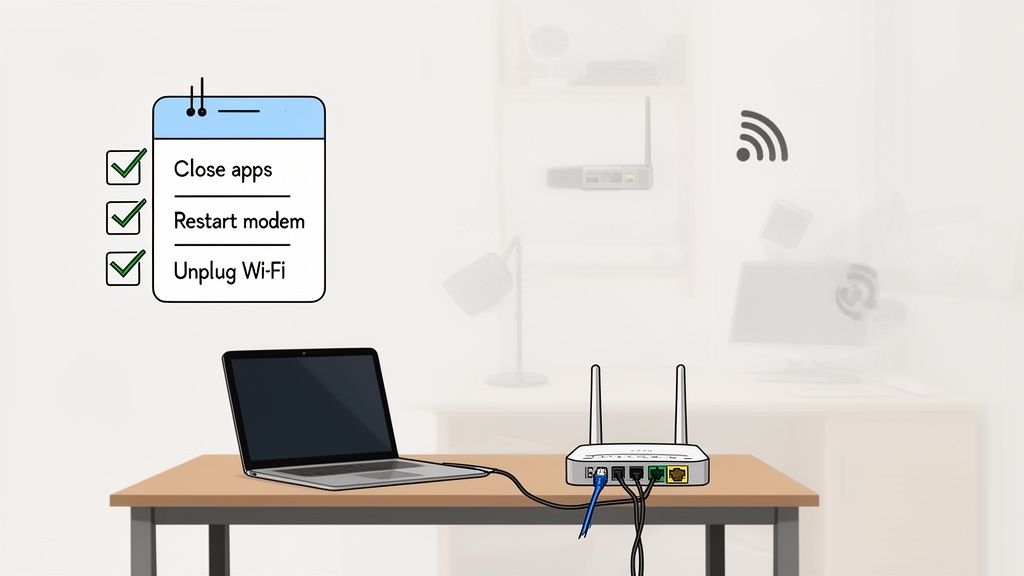
እሺ፣ የምርመራ የአካባቢ ማመቻቸትን በሙያ ደረጃ አድርገዋል። አሁን ያሳላችሁ ክፍል ይመጣል፡ ትክክለኛውን መሳሪያና ዘዴ መምረጥ። የፍጥነት ምርመራ ዓለም አንድ መጠን ለሁሉም ትስስር አይደለም፣ ስለዚህም የምትመርጡት መሳሪያ የምታዩትን ቁጥሮች በቀጥታ ሊጠቅም ይችላል።
የመጀመሪያው ትልቅ ምርጫ ምርመራውን በቀጥታ ከድር ባROWSerዎ መፈጸም ነው ወይስ ልዩ የ.desktop መተግበሪያ መጠቀም። በ.browser ላይ የተመሰረቱ ምርመራዎች በእርግጥ ምቹ ናቸው—አንድ ጠቅታ ብቻ እና ይጀምራሉ። ግን በ.browser ውስጥ የሚሠሩ ስለሆነ እና በጊዜው ትንሽ ተጨማሪ ክፍል ሊያክል እና ውጤቶችን ሊያዛ porrf ይችላል።
በሌላ ወገን ግን በቃ ተጭኖ ለተጫኑ ተMOTE መተግበሪያዎች ሰዎችን በተደጋጋሚ ሁኔታ በተሻለ ለቅ曙 እና በቀጥታ የሚለመጥ ለውጥ ይሰጣቸዋል። በቀላሉ የመስርቅ ሃይሎችን ተጠቅሞ የቋንቋውን ነውር ቁጠባ ያለውን ቁጥር ሊሰጥዎ ይችላል። ለእርስዎ በጣም ጥሩ ነው፣ በጣም ከፍተኛ መጠን ቢኖርህ ግን ምንም ዓይነት መስልት ሊያስፈልግህ ይችላል። ለአብዛኛው ሰዎች ዘመናዊ ብራውዘር ሙከራ በጣም ጥሩ ነው። ግን እርስዎ በግিগาቢት ስለሆነ እና ለመጨረሻ ምርጡ መጠን ትሠርሳችሁ ከሆነ ከመተግበሪያ በተጨማሪ መስኮት ይሰጥዎታል::
በብራውዘር ላይ የተመሰረተ እና ተMOTE መተግበሪያ ፍጥነት ሙከራ
በመሣሪያ መሳሪያ እና ተMOTE መተግበሪያ መካከል ያለው ምርጫ በቃ ተጭኖ እና ቁጥጥር ብቻ ላይ ይመጣል። እያንዳንዱ ምን ለማድረግ እንደሚሞክሩ በእርስዎ ላይ ይወሳል::
| ባህሪ | በብራውዘር ላይ የተመሰረተ ሙከራ (ምሳሌ፣ Ookla, Fast.com) | ተMOTE መተግበሪያ (ምሳሌ፣ Speedtest Desktop App) | ለምን ይመቻቸዋል |
|---|---|---|---|
| ምቹነት | በጣም ከፍተኛ። የሚያስፈልግህ ነገር URL ጎብኝት ብቻ ነው:: | ፈጣን እና አንድ ጊዜ የሚሆን ጭረት እና ማስстановকት ይፈልጋል:: | ፈጣን፣ በመስመር ላይ ሆነው በሚደረጉ ለመረመሮችና በአጠቃላይ አመለካከት ቻንኮች. |
| ትክክለኛነት | በአጠቃላይ ጥሩ ነው፣ ነገር ግን ውጤቶቹ በቃሳ ተቃራኒዎች ወይም በም echang ክፍሎች ሊጠቃም ይችላል። | በዕድገት ረጅም ፍጥነት ያላቸውን (1 Gbps+). | በተደጋጋሚ ጊዜ ትክክለኛ ለሆኑ ግንኙነት የተቀናበረ አመለካከት መሰረት ለመፍጠርና ለማጽደቅ. |
| ባህሪያት | አናት ዝርዝር እንደ ወረርሽኝ፣ ወደ ላይ ማንሳት እና ስትን መሰረታዊ ማስታወሻዎችን ይሰጣል። | ከ服务员 ምርጫ፣ የፈተና ታሪክ እና ሌሎች ተጨማሪ ስለ ባህሪያት ሊያቀርብ ይችላል። | ዝርዝር መረጃና ታሪክ ተከታይ የሚፈልጉ ተጠቃሚዎች። |
| ተስማሚ አጠቃላይ ጥቅም | "መስመሬ አሁን ቀስ ነውን?" | "የእኔ ኢንተርኔት ሰፋሪ በተከፈለው ፈንዳ ፍጥነት በተቻለ መጠን ይ所提供之 ነውን?" | ተደጋጋሚ ወይም ውስብስብ ግንኙነት ችግር ለመፈተሽ የሚሞክር ማንኛውም ሰው። |
በመጨረሻም፣ ለፈጣን ምርመራ የቃኘ ቴስት በጣም ጥሩ ነው። ከአንቺ አገልግሎት ሰጪ (ISP) ጋር መደወል ለመቻል ወይም ለባህታዊ ምርመራ ጥቅም ላይ ለመዋል፣ ተፈጥሮ ባለው መተግበሪያ መጠቀም በጣም ተስፋፋ ነው።
የትምህርት ሰርቨርን አለማስተካከል
አብዛኛው ሰው የሚያስተውለው ነገር እንደህ ነው፤ የትምህርት ሰርቨር ቦታው ያለው ሁኔታ ያስፈልጋል። በጣም ያስፈልጋል። የመጀመሪያ ልናደርገው ከሆነ ምርመራ ሲያደርጉ፣ መሣሪያዎ በዓለም ዙሪያ ባለው ሌላ ኮምፒዩተር ብቻ መልሶ መላክ ነው። ከእርስዎ እስከ ባህታው ክፍል የሚሆነው ርቀት ከምርመራዎ ውጤት በጣም ትልቅ ምክንያት ነው።
ወይም ዝግባት ማድረግ ያስቡት። በተመሳሳይ ክፍል ላለው ሰው መናገር ወዲያውኑ ይሆናል። በመርዝ ማዕከል ላለው ሰው መናገር ትንሽ ቅጽበት ያቀርባል። ያ ቅጽበት latency ነው፣ እና ግንኙነትዎን በእውነቱ ያለው የበለጠ ፈጣን እንደሆነ ማድረግ ይችላል።
ከአንቺ አገልግሎት ሰጪ (ISP) ስኬት ሊሆን የሚችልውን ትክክለኛ መጠን ለማየት፣ ከእርስዎ አጠገብ የሚገኝ ቅርበት ያለው የትምህርት ሰርቨር መምረጥ ይፈልጋሉ። ጥሩ መሣሪያዎች አብዛኛው አውቶማቲክ እንደሚሠሩ በጣም ታዋቂ የሆኑ በሚችሉት መካከል ማንኛውንም ቢሆን ዝግጅት ያደርጋሉ፣ ነገር ግን ማመላለስ አያምንም። የአካባቢ ሰርቨር ከእርስዎ ጋር ያለውን ግንኙነት ለማስተካከል ምርጥ ሁኔታ ይሰጣል።
ተመራጭ ምክር: ከISP በተለየ ከተማ ወይም ከמדינה ላለው ሰርቨር ጋር ማểmዛዝ ታማኝ ምርመራ ቁልፍ ሊሆን ይችላል፣ በመቶ እና በጣም ጥሩ ሆኖ የሚታይ በአካባቢ ላለው ሰርቨር ፍጥነት ከተቀየረ ጋር። በአካባቢ ላለው ፍጥነቶች ግሩም ቢሆኑም፣ ከ 먼 ሰርቨር ጋር ያለ ፍጥነት ግን በጣም ስርጭት ላይ ሊሆን ይችላል—ጥገናን ችግር የማይኖረው በሰፊው ኢንተርነት ላይ በጠቅላላ ቦታ ላይ የሆነ ስብሰባ ግንኙነት ችግር ሊሆን ይችላል።
ነጠላ እና በብዛት የተቀጠቀጡ ግንኙነቶች
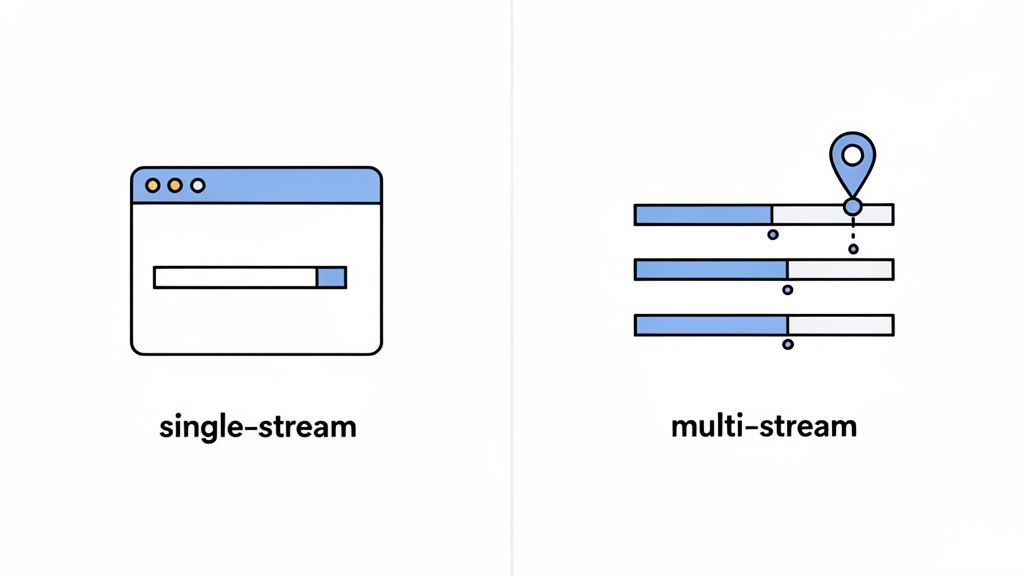
ይህ ትንሽ ቴክኒካዊ ነው፣ ነገር ግን ዘመናዊ ኢንተርነት አመለካከትን ለመረዳት ቁልፍ ነው። የፍጥነት ሙከራዎች ከባንድዋይድ ያለ ፍጥነትን ለ đo የእርስዎን አንድ ግንኙነት (ነጠላ ሀረግ) ወይም በአንድ ጊዜ በብዛት ግንኙነቶች (በብዛት የተቀጠቀጡ) መጠቀም ይችላሉ።
- ነጠላ ሀረግ ሙከራ: ይህ እንደ አንድ ትልቅ ፋይል መውረድ ያህል ነው። አንድ ጥልቅ መስራት ምን ያህል ሊሆን ይችላል የሚለውን ጥሩ ሙከራ ነው።
- በብዛት የተቀጠቀጡ ሙከራ: ይህ ዛሬ በእውነቱ እንዴት ኢንተርነቱን እንደምንጠቀም የበለጠ ምርጥ የሚያምን ነው—4K ቪዲዮ በማጋ⸝ህ ሳለ ሌላው በኦንላይን ሲጫወት ሦስተኛው በቪዲዮ ጥሩ ላይ ሲሆን። የእርስዎ ግንኙነት ምን ያህል መቀበል እንደሚችል ለመገመት በአንድ ጊዜ በርካታ ግንኙነቶችን ይከፍታል።
ፈጣን የኢንተርኔት ግንኙነት ካለዎት ( 100 Mbps ከሆነ በላይ)፣ የነጠላ ምንጩ ሙከራ ሙ㎛ር አቅምዎን ሙሉ አለመጠቀሙ ብዙ ጊዜ ይከሰታል፣ ይህም ስለ ትክክለኛው ሁኔታ ለምን显得 ያለ ውጤቶችን ሊያስከትል ይችላል። የብዙ ምንጭ ሙከራ ስለ ግንኙነትዎ ሙሉ አቅም በጣም ትክክለኛ ሥዕላዊነትን ይሰጣል። ይህ የተመራጭ ቃል ብቻ አይደለም፤ ብሔራዊ ብሮድባንድን የሚከታተሉ ድርጅቶች የሚከናወኑ ምርምሮች ለፍጣን ግንኙነቶች የነጠላ መስመር ሙከሮች ፍጥነትን በ 15-30% በመቀነስ ሊያሳዩ ይችላሉ፣ ይህም የISP አ.performance ደረጃዎችን በ 25-40% በማዛባት ሊያስከትል ይችላል። ስለ ፍጥነት ሙከራ ስህተቶች ያለውን ዝርዝር ምርምር እዚህ .
በዝርዝር ማንበብ ይችላሉ።የተደጋጋሚ ሙከራ ኃይል
የነጠላ ፍጥነት ሙከራ ምቹ ቆይታ ብቻ ነው። የኢንተርኔት አperformances ሙሉ ታሪክን ለማግኘት በጊዜ በእስከ ብዙ ሙከሮች መፈተን አለብዎት። የኔትወርክ ትራፊክ ሁልጊዜ በመቀየር ላይ ነው.
ከፍተኛ መነሻ ብዕድመ ለማግኘት ቢያንስ ሦስት እስከ አምስት ሙከሮችን በተከታይ ይፈተኑ። ከዚያ በኋላ ትክክለኛው ግንዛቤ በቀን በተለያየት ጊዜ ሙከራ መንደር ነው.
- ማለተኛ ሰዓት (ከፍተኛ ሰዓት በቃል): በአዋላላ በ真正 wake up ሳይደረግ 8-10 ከጠዋት በኋላ ምንም ሙከራዎችን ይፈትኑ።
- ከሰዓት በኋላ (ከመካከለኛ ሰዓት): ከሰዓት በኋላ 1-3 ከሰዓት በኋላ የቤት ሥራ ማድረግ ጉዞ ሊሆን ይችላል ስለዚህ እንደገና ይፈትኑ።
- ማታ ሰዓት (ከፍተኛ ሰዓት): ይህ በጣም ጠቃሚ ነው። 7-11 ከማታ በኋላ በসব ሰው ሲቀጥል፣ ሲጫወት እና በመቃኘት ላይ ሳለ ይፈትኑ። ይህ የአውታር ጭበንብ በጣም እንደሚሆን ወቅት ነው።
ይህ ቀላል የመክሰት መስፈርት አንድ ጊዜ የተፈተነ የማይታይ ዕርፍታዎችን ያሳያል፣ ችግርን ለማግኘት እንዲፈልጉት የሚያስፈልግ እውነተኛ መረጃ ይሰጣል። ሁልጊዜ ለመጫን ችላ ብለህ የሚችል ታማኝ መሳሪያ ከፈለግክ፣ የተቀናበረው የኢንተርኔት ፍጥነት ሙከራ መሳሪያ በሳይትህ ውስጥ ከነጭ በፍጥነት ለማድረግ ፍጹም ነው።
የፍጥነት ሙከራ ውጤቶችን መረዳት
ፈስτ ቴስት ማግኘት ቀላል ነው። ትክክለኛው ስለ ዕለት ተዕለት የመብረቃችን አቃታ እንደ መቻል ቁጥሮች በትክክል ምን ማመናቸው መቼ መረዳት ነው። ልክ ቀጥታ ከተከፈተው ፋይል ቁጥር በላይ ትኩረት መስጠት ይኖርብናል::
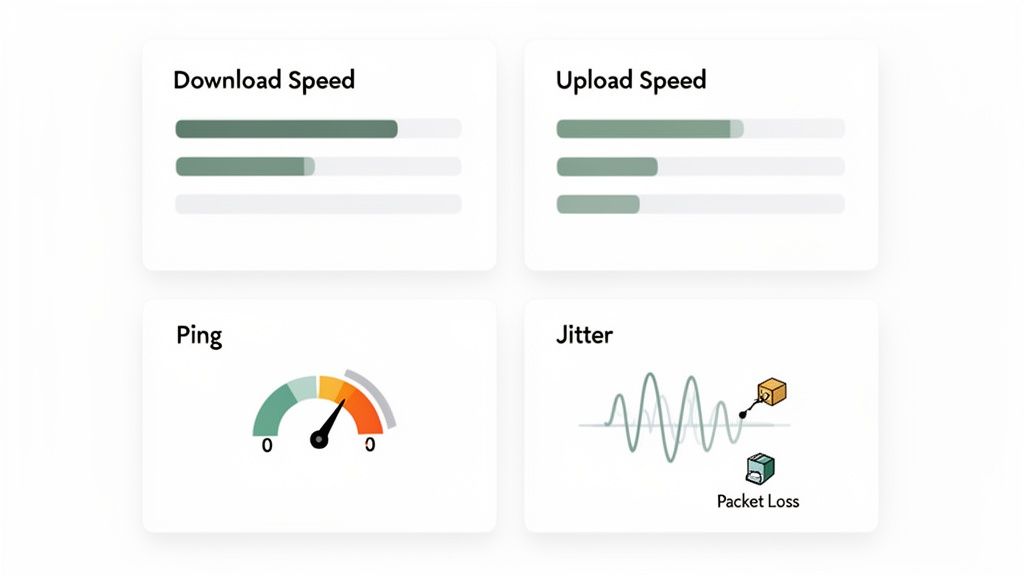
ነዚህ ውስን ቁጥሮች ብቻ አይደለም፣ ወዲያውኑ በቪድዮ ጥሪዎችዎ ሰላም እና በከፍተኛ ተመዝጋቢ ጊዜ የኔትፍሊክ ስትሪም ጥራት፣ እንዲሁም በመጠን እርስዎ በኦንላይን ጨዋታ የሚሆን ጥቅም ላይ ለመውጣት ይተርሳሉ። እያንዳንዱ መለኪያ በእውነት ምን ማለት እንደሆነ እንመልከት::
የውርድ እና የመጫኛ ፍሬስቶች ትርጉም
የውርደት ፍጥነት ሁሉም ሰው የሚያውቀው እና የሚያሳብረው ነው። በሜгибት በሰከንድ (Mbps) የሚመ计量ከው፣ መሣሪያዎ ከኢንተርኔት ማንታ መረጃ ምን ፍጥነት ማውረድ እንደሚችል ይነግርዎታል። ይህ ድህረ ገጾች ምን ፍጥነት እንደሚከፈቱ፣ ቪዲዮዎች ምን ፍጥነት እንደሚ缓冲 እና ትልልቅ የเกม ፋይሎች ምን ፍጥነት እንደሚወርዱ ይወሰናል።
የመጫን ፍጥነት በ同样的方式 (Mbps)፣ ከእነዚህ ምንጮች ሌላ አንድ ገጽ ነው። የውጪ ማውጫ መሣሪያዎ ምን ፍጥነት መረጃ ወደ ኢንተርኔት ማስាហከር እንደሚችል ይወሰናል። የደንበኛ ስራ ስብስቦች ከመጫን በላይ ብዙ የመጫን ፍጥነት እንደሚሰጡ ቢሆንም፣ ለቪዲዮ ኮንፈረንስ፣ ፋይሎችን ወደ Dropbox መጫን ወይም በTwitch ቅርጽ ቀጥታ ማሳየት ያሉ ነገሮች ለእርሱ በጣም ጠቃሚ ነው። በስራ ጥሪ ላይ ያለዎት ፒክሰሌት የሆነ፣ ከባድ ቪዲዮ? ድክክሮ የመጫን ፍጥነት ማንኛውም ጊዜ በቂ ዝርዝር ነው።
ከፍጥነት በላይ የሚሄድ
የውርደት እና የመጫን ፍጥነቶች ሁሉም ጭብጥ ቢያዝም፣ ጥቂት ሌሎች መለኪያዎች ብዙ ጊዜ የግንኙነት ጥራት እና፣ ከዚያ በላይ፣ የ穩定ነቱን በጣም ግልጽ ምስል ይሳላሉ። በመጪ ኢንተርኔት የሚጫወቱ ወይም እንደ Zoom ያሉ በቀጥታ መጠቀም ያሉ መተግበሪያዎች ላይ የሚ依赖 ለማንኛውም ሰው، እነዚህ ቁጥሮች ከፍጥነት በላይ ከባድ እንደሆኑ ማለት ይችላል።
ፒንግ (ይዘት ጊዜ): ይህን ማለት የእርስዎ ማገናኛ ምላሽ ጊዜ ነው፣ በሚሊ ሰከንድ (ms) ይመሠከራል። ከ компьютер ወደ ሰርቨር እንደምን ቀርቦ ወደ እርሱም በሚመለስ ላይ ባለው አነስተኛ የውሂብ ቅጥያ መጓязና ይወስዳል። በታች ያለው ሁሌም ጥሩ ነው። ለመታጫወቻ ጨዋታ እርስዎ 40ms በታች ባለው ፒንግ ይፈልጋሉ። ሲያልፉ 100ms ከተሻሻሉ፣ ምን ያህል አፉ የሚያሳልፍ ማህ屺ን ለመቀመጥ ይጀምራሉ.
መንቀጥቀጥ: በ ms ብቻ ከተመሰረተ ነገር፣ መንቀጥቀጥ የእርስዎ ፒንግ ያለው ለውጥ ነው። የተቀናበረ ማገናኛ ውጤታማ 20ms ፒንግ ሊኖረው ይችላል፣ የመንቀጥቀጥ ችግር ዝቅተኛ ይሆናል። ግን የእርስዎ ፒንግ ከ 20ms ወደ 80ms እና ከዚያም ወደ 40ms እየተዘዋወረ ከሆነ፣ የእርስዎ መንቀጥከጥ ከፍተኛ ይሆናል። ከፍተኛ መንቀጥከጥ የጸንሔት ገዳይ ነው፣ ስለ በቃ የቪዲዮ ጥሪዎችን ስለ ማንሳንሣን እና በጨዋታዎች ውስጥ ስለ ተስፋ በማይቋምጥ መቅደም ያስፈልጋቸዋል፣ አማካይ ፒንግ ቢመለከቱም::
ፐኬት ስብስብ መጥፋት፡ ይህ በጉዞው ውስጥ ቆርጦ የሚሄድና ለብቻው የማይደርስ የውሃ መረብ መረጃ (ፐኬት) መጥፋት ያለበት የመጠን መጠን ነው። በፍጹም ዓለም ውስጥ፣ ይህ ቁጥር ሁልጊዜ 0% መሆን አለበት። ምን ያህል ጥቂት የፐኬት መጥፋት እንኳን ሆነ (1-2%)፣ እንደ ቆለላ የ𝐕𝐈𝐃𝐄𝐎 ፕሮግራሞች፣ ለኩላ የሚሰማ ድምጽ ወይም ከ_GAME ሰርቨር መፈናቀል ያህሉ አለመቻል ሊፈጥር ይችላል።
ፒንግ፣ ጀይተር እና ፐኬት መጥፋትን በአንድ ቦታ በመመልከት፣ የመረብ ጥንካሬ ሙሉ ምስል ያግኛሉ። የመረብ ጥንካሬ ከመጓዝ ማጓጓዣ ሁልጊዜ መረጃ ከሚያጣ ከሆነ ፈጣን የማውረድ ፍሬም ምንም ትርጉም የለውም።
በምርመራ ውጤቶችዎ ውስጥ ያሉ ምልክቶችን መተንተን
እውነት የመቃኘት ኃይል በጊዜ ላይ መረጃ በማከማቸት ይመጣል። አንድ ብቻ ሙከራ የምሽት ፎቶ ብቻ ነው። የተደራጀ ሙከራ ቁጥር ረገን ያለውን ችግር ማንሳት የሚችል ምልክቶችን ያሳያል።
ለምሳሌ፣ በቀን ማንኛውም ጊዜ ፍሬምዎ ሁልጊዜ ቀላል ነውን? ይህ አብዛኛውን ጊዜ በእርስዎ ዳርቻ ያለውን ችግር ያመለክታል—ምናምን ችግሩ ማን ያይቶት ከመሆን የተነሳ አሮጌ ራውተር ወይም ክፉ የኢዘርኔት ዘንግ ነው።
የተለያዩ ስርዓት ሊታወቃችሁ ይችላል፡ በጠዋት ፍራስታችሁ ጥሩ ነው ነገርም ቢሆን ከከፍተኛ ሰዓት 7 እስከ 11 በምታችሁ ወቅት ይቀንሳል። ይህ የበዓላት ግንባታ ምልክት ነው። ባ鱾ርባሪ አገልግሎት ሰጪ ሥርዓቱ ከአከባቢ ጉዳዩ በጣም ተጠቃሚ ሆኖ ሊያስቸግረን ይችላል፡ ምክንያቱም ማህበረሰቡ በማታ ወቅት በሙሉ ሲያጫወτ ስለመረጡ በቂ የሆነ ቦታ የለውም።
የሚያስተዋይ መሣሪያዎች ትክክለኛውን ምስል ለማሳየት የተሟላ ዘዴዎችን ይጠቀማሉ። ለምሳሌ፡ Ookla's Speedtest ውጤቶችን ብቻ አያቀምም። ለፍራስ መልክ (70%)፣ ለማስገባት (20%) እና ለተሟላ ሥርዓት (10%) የተሻሻለ የሚወስን ዘዴ ይጠቀማል። እንዲሁም ከነጠላ ሁኔታ ለመገደብ ከ10ኛው ከ50ኛው እና ከ90ኛው ቦታ ውጤቶችን ይመረምራል። በመቶ ሁሉ በቀላሉ ለማድረግ ከሚቻለው በላይ በ/10-20% መጠን ትክክለኛነቱን ሊያስapult ይችላል። እነዚህ ሂሳቦች ምን መንገድ ትክክለኛ ምስል እንደሚሰጥ ለማረጋገጥ የሙከራ ዘዴውን .
ያንብቡ።በዚህ ጥልቅ ገባርነት በተገነባበት ሁኔታ፣ ለመቻል በቂ ከሆነ የመገናኘትዎ ፍጥነትን ብቻ ከመረጋገጥ አልፎ የሚያስፈልግዎትን "ምንድነው" በመፈረጅ የአገናኝዎን አርይalent ማመለከት ይችላሉ.
የተመረተ ሙከራ መረጃዎን ወደ ድርጊት መቀየር
እሺ፣ የማያ ማመቂያ ሥራዎን ተከታይ አደረጋችሁ እና ጠንካራ የፍጥነት ሙከራ ውጤቶች አሉአችሁ። ከዚያ በኋላ? ትክክለኛው ዋጋ በቁጥራት ብቻ አይደለም፣ ነገሩ ምን እንደሚነግርዎ ነው። የምርምር ኮፍያዎን ያድርጉ እና ከዚህ መረጃ በመጠቀም ከገናኝዎ ጋር ምን እንደሚሆን በትክክል ለመረዳት ጊዜው ነው.
የইንተርኔትዎ አይሆንም ወይም ለተጠበቀው መልኩ አልሰራም ሲል ያገኘው ችግር በመደበኛነት በሦስት ዓይነት ቦታዎች ሊሆን ይችላል፡ የቤትዎ አካባቢ አውታር፣ የኢንተርኔት አገልግሎት ሰጪዎ (ISP) ወይም ሰፊው ኢንተርኔት። አስተሳሰቡ ከቤትዎ ጋር የበለጠ ቅርቦቹን በተከተለ መልኩ ማስወገድ ነው—የቤትዎ ውስጥ ያሉትን ማሸን መሣሪያዎች።
ከቤትዎ አካባቢ አውታርዎ ጀምር
ድጋሚ መስከሪያዎን መጠየቅ ከቻሉ በፊት ችግሩ በቤትዎ ውስጥ አለመሆኑን መረጠግ አለብዎት። በተለያዩ ጊዜያት "ደንቅ የሆነ ኢንተርኔት" ስለ ችግር የሰሙት በመደበኛነት ከሮ텨ር ጋር የሆነ ቀላል ግጭት ወይም ከፎና ጋር የሆነ ግጭት ሆኖ ተፈትናል። ይህን በመጀመሪያ ማስተካከል ለእርስዎ ብዙ ጊዜን ይቆጣጠራል እንዲሁም ሊያፍረዎ ይችላል የድጋሚ መስከሪያ ውይይት።
ማሸን መሣሪያዎችን በፍጥነት ማየት ይጀምሩ። ሮተረርዎን የፋይርዋል ዘመናዊ ማድረግ መጨረሻ ስር ምን ጊዜ አደረጋችሁ? ለመረስረስ ቀላል ነው፣ ነገር ግን ተቀራጮቹ እንደ ተስተካከሉ የሚያሳዩ እርምጃዎችን በየጊዜው ይለያሉ። ይህ አምስት ደቂቃ የሚቆይ ሥራ እውነትም ሊያመጣ ይችላል ለውጥ።
ከዚያ በኋላ ፎናዎችን ይመልከቱ። ቴሌሪድ መስመሩ ከሞ뎀 ጋር በነጻ የተሰጠው ነውን? የግድፍ መስመር ሊሆን ይችላል። ለምትከፍሉት ፍጥነት ትክክለኛውን ፎና (Cat 5e ወይም ከዚያ በላይ) መጠቀምዎን ያረጋግጡ።
እነሱ ያለፍሩት በጣም የሚረጋገጥ ዝርዝር ስርጭት እንዲሆን:
- የሩター ፊርምዌር ያዘምኑ: ወደ ሩター በማድረግ የምትሠራው ኩባንያ ድህረ ገጽ ይሄዱ እና የመጨረሻ እትም ይውሰዱ።
- የኢዘርኔት ገበን ይፈትሹ: አንድ ጊዜ ረክተው የሄዱ ወይም ጥርጣሬ የሚፈጥሩ ገበኖች ካለዎት፣ ከሦስተኛ ክፍል Cat 6 ጋር ይቀይሷቸዋል።
- የተለየ መሣሪያ ይፈትሹ: ከተቻለ በሌላ ኮምፒዩተር ከመስመር በቀጥታ ፍጥነት ይፈትሹ። እንደ አውታር ችግር ወይም ከተወሰነ ማሽን ብቻ የሆነ እንደሆነ ለማወቅ ይረዳል።
- የኮርዴም ምልክት ደረጃዎችን ይፈትሹ: በበለጠ ጥልቀት ለመፈተሽ ብቁ ከሆኑት፣ ወደ ኮርዴምዎ አድሚኒ ገጽ መግባት ይችላሉ። የፓወር ደረጃዎችን እና ምልክት-ወደ-ም鱾 ተስፋፋ ደረጃ (SNR) የመሳሰሉን ይፈትሹ። ለኮርዴምዎ ዘይቤ እና «ተስፋፋ የሆነ ምልክት ደረጃ» ፈጥሮ የሚፈልጉት በአጠቃላይ ቁጥሮችዎ ጤናማ ለምን እንደሆኑ ይነግርዎታል።
ይህንን ሁሉ ካለፉት በኋላ ከመስመር በቀጥታ የሚሠሩት ፍጥነቶችዎ አሁንም ቢቀር ችግሩ እርስዎ የሆኑት አይደለም ብለው በቃ ማመን ይችላሉ። አሁን፣ ወደ ምዕራባቸው ማመልከት ጊዜ ነው።
የበረታ ኢንተርኔት አገልግሎት ሰጪዎን ማሳወቅ
ከመደበኛ በሆነ መልኩ በተመዝገቡ የፍሬንሲ ሙከራዎች መዝገብ ጋር፣ ከኢንተርኔት አቅራቢያዎ ጋር ትርጉም ያለው ውይይት ለማድረግ ዝግጁ ነዎት። ይህ ነገር ወገን አድርጓል። ያህል ግን ል ብሎ "ኢንተርኔቴ ቀ素敵 ይመስላል" ብሎ በመጠራት ይልቅ ከባድ ማስረጃ አላችሁ። መረጃ ነገር ያስኬታል.
ምክንያቱም ከድጋፍ ተማሪ ጋር በችላ ላይ ሲሆን በዝርዝር ዝግጁ ይሁኑ.
"ሰላም፣ የኔ የመገናኛ ፋይር ፋይል ፍሬንሲዎችን እየተመዘገብ ነበር። የኔ ስልችት ለ 400 Mbps ነው፣ ግን ከ 8 ሰዓት ከቤታችን እስከ 10 ሰዓት ከቤታችን ውስጥ፣ የኔ ማውረድ ፍሬንሲዎች በተከታታይ ወደ አንድ 95 Mbps ዓይን ይቀንሳሉ። የጠዋቱ ሙከራዎቼ ከታወቀው ፍሬንሲ በጣም ቅርብ ናቸው።"
ይህ ለተማሪው ምንም ሳይሆን የሚገምተው መሆንዎን ወዲያውኑ ያሳያል። ከመደበኛው የጠገናмот ስክሪፕት ለመዝለል ይረዳቸዋል እና የከፍተኛ ትክክለኛነት ተቆጠሮ የሚያስረክቡትን በየከተማው አካባቢ የሆነ አስተዳደር ድብርት ወይም በፊደል ይፋ ስሜት ምክንያቶችን በሚመርምር የድርጅት ቴክኒካሊን ትኬታዎ ያስገባል.
የእይታ መዝገብ መያዝ ይልቅ ጥሩ ነው። ውጤቶችን ለማስቀመጥ ቀላል መንገድ ከፈለጉ፣ ሙሉ ገጽ ስክሸት እንዴት እንደሚወስዱ ተማర. ሙሉውን የውጤት ገጽ ለማሳየት.
ከውሃት ባህርይ ማግለጫ ችግሮች
አንዳንድ ጊዜ፣ ችግሩ የእርስዎ ማቀናበሪያ ወይም የአየር ማስገượng አገልግሎት ተቋም ከቤትዎ ጋር ያለው ቀጥታ መስመር አይደለም። በቃል በዝግግም የሚኖረው ማሳሸት ሊሆን ይችላል በመላው ኢንተርኔት ውስጥ ከእርስዎ ቁጥጥር ሩቅ የሆነ ቦታ ላይ። ይህ ለመጠየቅ ከባድ ክፍል ነው፣ ነገር ግን ምልክቶቹን መጠን በማወቅ ብዙ ጭንቀት ሊያስቀጥልዎ ይችላል::
የተለመደው ምልክት ማለት ከአካባቢ ሰርቨሮች ጋር የኩባንያ ሙከራዎችዎ ድንቅ ሲሆኑ፣ በመላው ሀገር ላይ ባለው ልዩ ጨዋታ ሰርቨር ወይም ድህረ ገጽ ጋር ያለዎ ግንኙነት ህመምተኛ በሆነ ሁኔታ በፍጥነት መቀንጨር ነው::
ለጥቂት ተጨማሪ ቴክኒካዊ ልምድ ያላቸው ሰዎች፣ ትራስራውት መሄድ እጅግ በጣም ግልጽ ሊያደርግ ይችላል። ይህ ት 명령 ውሃት ወደ መድረሻው ለመድረስ ያ┒ እያንዳንዱን "ድልድይ" እንዲሁም በእያንዳንዱ ፐ የመገኛ ጊዜ ያሳያል::
ይህንን ችግር ራስዎ መጠገን አይችሉም፣ ግን መለየት እርժ አስፈላጊ ነው። የአየር ማስገượng ተቋም መገናኘት አይረዳዎም ብሎ ያሳያል። ብዙ ጊዜ፣ ምርጡ የሆነው እርምጃ ድ⚒ ⏳ ጊዜውን ቆጥር ወይም መረጥ የሚጠቀሙበት አገልግሎት ሌላ ሰርቨር እንዲኖረው መመልከት ነው። ይህ ተከታታይ ሂደት የተሳሳተውን ችግር እንዲከታተሉ አይደረግዎትም እንዲል ያረጋግጣል::
በብዛት የሚጠየቁ ጥያቄዎች
ምር指导意见ም ቢሆንም፣ የኢንተርኔት ፍጥነትዎን በሚያስቃይ ጊዜ አንዳንድ ልዩ ጥያቄዎች ሁልጊዜ ይነሳሉ። እነዚህን በጣም የተለመዱ ጥያቄዎች መልስ እንስጥ፣ ዛሬ ለምታዩት ውጤቶች ትርጉም እንዲስጠው ሁሉም ግራ ጥርስ በማባከክ
የኢንተርኔት ፍጥነቴ ለም Atatür የክፍለ ገንዘብ በጣም ለምን ዝቅተኛ ነው?
ይህ ሰዎች ያላቸው ማንኛውም ቁጥር አንድ ቁጥር ችነት ሊሆን ይችላል። የኢንተርኔት ትምህርት ሰዓት ላይ ብዙ ብርጭቆ ቁጥር ያያቸዋል፣ ምርምር ምርምር ሰዎች ግን ብዙ ዝቅተኛ የሆነ ነገር ያሳያሉ። እውነቱ ደግሞ፣ ኢንተርኔት ሰዓት ሰዓት ሰዓት ሰዓት ለእርስዎ "ከፍተኛ" የሆነ ፍጥነት ይሸጣሉ—በመሬት ላይ በጣም በተሻለ በሆነ ሁኔታ በሚደረግ ሞ الفندق ላይ የሚደረግ ነው፣ ለቤት ሰዓት የተጠበቀ መነሻ አይደለም.
በእውነተኛ ዓለም የሚኖሩ ነገሮች ሁልጊዜ መንገድ ይ堵塞 ነው። ኢንተርኔት ተጨባጭ ማንነት ትልቅ ነው፣ በተለይ በፍቅር ጊዜ በ[7 ሰዓት እስከ 11 ሰዓት] ጊዜ በአካባቢዎ ሰዎች ሁሉ ቪዲዮ ተመልከተው፣ ተጫወተው እና ተሰልፈው ሳለ። የእርስዎ የራስ መሣሪያዎችም ሊሰድዱ ይችላሉ። ዘመናዊ የዋይ-ፋይ መስፈርቶችን የማይደግፍ የተሟላ ሮተር በግጭት በጣም አይችልም።
መደምደም ከመጀመርዎ በፊት ሁልጊዜ በኢзерኔት ቀለበት ኮምፒዩትርዎን በቀጥታ ወደ ሮተር ይያዙ። ይህ የዋይፋይን ችግር ያስወጣል። የገንኙ ፍጥነት እንኳን ሆኖ የተወገደ ከሆነ፣ ምርኮ ያመለከቱትን የተመዘገቡ የፈተና ውጤቶች በእጅ አቅ利用您的 ISPs ማሳወቅ ጊዜ ነው።
VPN መጠቀም የፍጥነት ማከም ምርኮን ይረሳል?
በእርግጥ አይ። VPN ያለውን ግንኙነት ሁልጊዜ ያቃልቃል። ከVPN ጋር ሲገናኙ፣ ሁሉንም የኢንተርኔት ዝውውር ይመልከራል እና ከባድ አገልግሎቱ በአንዱ ድንጋጌ ያስተላልፋል። ይህ ሂደት በተጨማሪ እርምጃዎች ያከልባል እና ዳታዎን ብዙ ጊዜ በረጅም ርቀት ያብራራል።
ይህ ተጨማሪ ሥራ በተፈጥሮ ዝቅተኛ የ/downloads/uploads ፍጥነቶችን እና ከፍተኛ latency (ping) ያመጣል። የአስተዋይነት ጉዳዩ በጣም ጥቂት ሊሆን ይችላል፣ ምናልባት 10% ብቻ ይሆናል፣ ወይም 50% ወይም ከዚያ በላይ የሚሆን ትልቅ ዝርዝር ሊኖረው ይችላል። ሁሉም ነገር VPN ድንጋጌው ምን ዓይነት ርቀት ላይ እንደሚገኝ፣ ምን ዓይነት ተጫዋች እንደሆነ እና ምን ዓይነት ቅርጸ-ኩራት እንደሚጠቀም ይወሰናል።
የየንትወር ቅርጎን በትክክል ለማየት፣ በፍፁም ሙከራ ሳይሄድ የኔትወርክ ቻናላችሁን ቪፒኤን (VPN) መታጠፍ አለብኝ
በእርግጥም "ጥሩ" የሚባለው የንትወርክ ፍጥነት ምንድን ነው?
እርሱን የሚወስነው ማንኛውም ተወሰነ ቁጥር አይደለም። "ጥሩ" የሚባለው ሙሉ በሙል እርስዎና ቤተሰብዎ በመመርኮዝ ምን እንደሚሠሩ ላይ የተመሰረተ ነው። የኢሜይል መልስ ብቻ የሚሰጥ እና በቃ ሌላው እና እና ሌላው ከ Netflix የሚመለከተው የነጠላ ሰው ለሚኖረው በጣም ጥሩ የሆነው ፍጥነት፣ በ4K ቲቪዎች፣ በመመርኮዝ በሚሰሩ ተጫዋቾች እና ከቤት ውስጥ በሚሠሩ ሰዎች በመካከል የሚኖረው ለአንድ ቤተሰብ ያለ ስ Hindered ሊሆን ይችላል።
በተጨማሪ ግንኙነት ለማግኘት፣ እነዚህ ሰፊ መ基准 አሉ:
- መሠረታዊ አገልግሎት (1-2 ሰዎች): በዋና የመረብ መቃኛ መሆን ከቻሉ፣ ኢሜይሎች መላክ እና በአንድ ወይም ሁለት መሣሪያዎች ላይ HD ቪዲዮ መመልከት ከፈለጉ፣ 25-50 Mbps የመጫኛ ፍጥነት በጣም ይበልጣል።
- የቤተሰብ እና ከባድ ስትሪሚንግ (3-4 ሰዎች): በብዙ ሰዎች 4K ቪዲዮ የሚመልከቱ፣ ቪዲዮ ጠቃ ጥሪዎች የሚያደርጉ እና በመስመር ላይ የሚጫወቱ ቤተሰቦች ላይ፣ ነገሮች በቀላሉ እንዲሄዱ 200-500 Mbps የሆነ ፍስራ መጠን መፈለግ ያስፈልግዎታል።
- ብልሃተኞች እና ገamesist አ嫂ንዎች: ከባድ ገamesist ከሆኑ፣ በመቀጠል ትልቅ ፋይሎችን የሚያውርዱ ወይም በቤታችሁ ልክ ያሉ ሣማርት መሣሪያዎች ካሉዎት 500 Mbps እስከ 1 Gbps (1,000 Mbps) መድረስ በቃ ነው።
እንዲሁም የመጫኛ ፍስራ መጠንን አይርሱ! ይሄ ነው ቪዲዮ ጠቃ ጥሪዎችን በንጹህ እና በግልጽ የሚያሳይው። ለጥሩ ተሞክሮ 10-20 Mbps ቢያንስ ይፈልጉ። ለጌAMESISTS ግን፣ ሁሉም ስለ ላተንሲ—40ms በታች የሆነ ፒንግ ለተለመዱ እና ለፍፁም ሳይያብረቅርቅ ገAMESist አላማዎት ነው።
ፍላን መፈጸም ሳይሞክረኝ የቃፅ ፍስሬን እንዴት ማሻሻል እችላለሁ?
ብዙ ጊዜ የኢንተርኔት ፕላኑ ችግር አይደለም—የቃፅ ምልክትዎ ነው ችግሩ። የሚያስከፍለውን ፕላን ለመከላከል ከመቀረጣቀጥዎ በፊት፣ ትልቅ ልዩነት ሊፈጥር የሚችሉትን እነዚህን ቀላል ለወጥ ቅን.jacksons ይሞክሩ።
የመጀመሪያው፣ የሮተር አቀማመጥ ሁልጊዜ ማለት ነው. እርስዎን ኪኒያ ወይም የቤተሰብ አዳራሽ የሚገኝበት አቅጣጫ ላይ አታስቀምጥትም። ጠንካራ እና በቂ በሆነ ምልክት ለማግኘት፣ ሮተርዎን ከመሬት ግድግዳዎች እና ግጭት ሊያስከትል የሚችሉ ምክንያቶች እንደ ማይክሮዌቭ መሣሪያዎች ርቀት ላይ በመሃል ቦታ ያስቀምጡት።
ሁለተኛው፣ የሮተርዎን ዕድሜ ይመልከቱ። ከሦስት ወይም ከአራት ዓመት በላይ ቢሆን፣ ያሻሽሉት ጊዜ ሊሆን ይችላል። የዋይፋይ ቴክኖሎጂ በፍጥነት ቀይቷል፣ እና ዘመናዊ ሮተር የፍጥነት እና መስክ ወሰን ሁሉንም አስደናቂ ለማሻሻል ይችላል። ትልልቅ ቤቶች ካሉ ድምጾች ባልሞሉ፣ የፒን ዋይፋይ ስርዓት በሙሉ ቦታዎን በጠንካራ ምልክት ለመልመል ድንቅ ለሆነ ኢንቨስትመንት ነው።
ከመጨረሻውም በፊት፣ ብዙ ባልታወቀ አ.webdriver ነው የዋይፋይ ቻናል መቀየር። በስልክዎ ላይ ነፃ የዋይፋይ ቻናል ተብሎ የሚጠራውን መተግበሪያ ተጠቀም እና ከ сосед መስርቃ አቅራቢያ ያሉ መረቶች የሚጠቀሙትን ቻናሎች ይመልከቱ። የሮተር ማሰሪያዎች ውስጥ በመግባት እና በተጨማሪ የሚያክል ቻናል ተቀይሮ ማንኛውንም ጊዜ የግጭት መቀነስ በማድረግ የፍጥነት ማሻሻያ በቀጥታ ማግኘት ይችላሉ።
ሳይቱ ነት ወደ ኢንተርኔት መግቢያ ሲሆን፣ በትክክል መሣሪያዎች በቀጥታ በውስጡ የተሠራዉ ሲሆን፣ ችግሮችን ለመፈረጅ ቀላል ያደርገኛል። በ ShiftShift Extensions ኢኮስስቲም ውስጥ፣ በቀላል ትዕዛዝ ፓሌት ውስጥ የሚገኙ የተቀናኑ ፈጣን ሙከራ እና ከመቶ በላይ ሌሎች ሥልጠና መሣሪያዎች ያሉዎታል። ግንኙነትዎን ወዲያውኑ ይፈትሽው፣ JSON ያቀርብ ወይም ፋይሎችን ለውጥ እንዲችሉ በแทቡ ከመውጣት ሳይቀር