A Developer's Guide to the Unix Timestamp Convertor
Master the Unix timestamp convertor. Learn to convert epoch time to human-readable dates, handle different languages, and avoid common developer pitfalls.

Recommended Extensions

A Unix timestamp converter is one of those simple but indispensable tools you'll find yourself reaching for constantly as a developer or data analyst. It's a handy utility that translates a long, seemingly random number into a date and time we can actually understand. This translation is crucial when you're digging through system logs, working with APIs, or querying databases where time is stored in this super-efficient format.
What Is a Unix Timestamp and Why Does It Matter
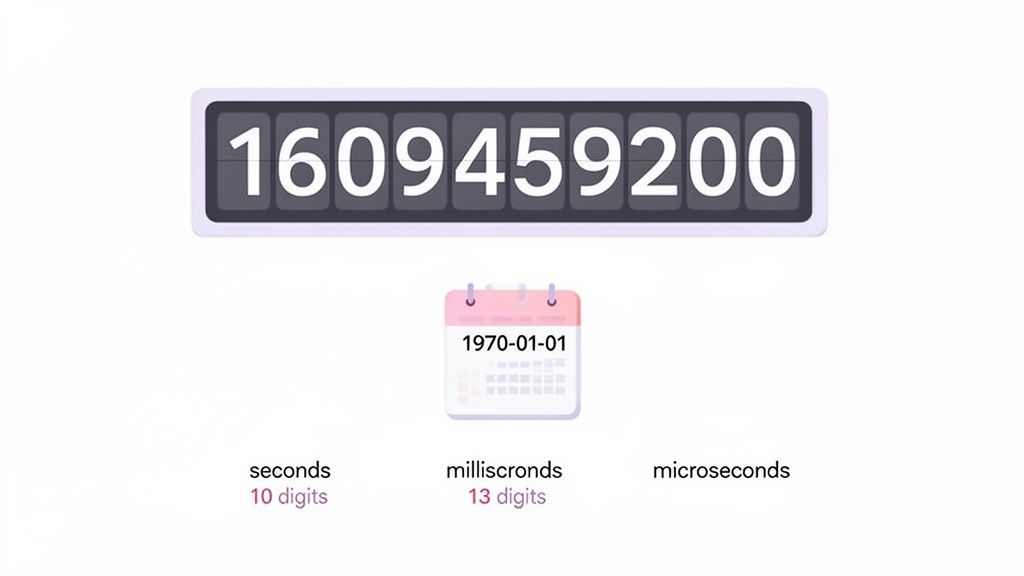
Before you can really appreciate a good converter, you have to get what that number actually is. At its core, a Unix timestamp is just a running count of seconds. It tracks the total number of seconds that have passed since 00:00:00 UTC on January 1, 1970. That specific moment in time is famously known as the "Unix epoch."
So why this method? Simplicity and efficiency. Storing time as a single integer is way more compact and performant than a verbose string like "Friday, January 1, 2021 12:00:00 AM GMT". This makes it perfect for a few key areas:
- Database Storage: Timestamps are small, making them fast to index and query. It's a huge win for performance.
- API Payloads: Sending a single number back and forth is much lighter on bandwidth than sending a full date string, leading to faster response times.
- Log Files: When you're parsing logs from dozens of different systems, having a uniform, language-agnostic timestamp is a lifesaver.
- Calculations: Need to know how long a process took? Just subtract the start timestamp from the end timestamp. It's simple integer math.
Seconds vs. Milliseconds and Beyond
The classic Unix timestamp is a 10-digit number representing seconds. But as technology evolved, the need for more granular timekeeping grew. This is where you'll start seeing different lengths of timestamps, and it's a common stumbling block.
Here’s a quick breakdown of what you'll typically encounter out in the wild. Mistaking one for another is a classic "off-by-a-thousand" error that can lead to some very confusing bugs.
Common Unix Timestamp Formats at a Glance
| Unit | Digits | Typical Use Case | Example Value (for the same moment) |
|---|---|---|---|
| Seconds | 10 | Standard for most backend systems, databases, and APIs. | 1609459200 |
| Milliseconds | 13 | Very common in web tech, especially JavaScript. | 1609459200000 |
| Microseconds | 16 | Used in high-frequency trading or scientific computing. | 1609459200000000 |
Getting these formats straight is key. If a tool is expecting seconds and you feed it milliseconds, you'll get a date that’s thousands of years in the future. It’s a mistake we’ve all made at some point!
The Famous Year 2038 Problem
The elegant simplicity of the Unix timestamp also created a ticking time bomb: the "Year 2038 problem." On older 32-bit systems, timestamps were stored as a signed 32-bit integer. The problem is that this type of integer has a ceiling—it can't hold a number larger than 2,147,483,647.
On January 19, 2038, at 03:14:07 UTC, the number of seconds since the epoch will surpass that limit. When it does, the integer will "wrap around" and become a negative number. This would cause vulnerable systems to interpret the date as being back in 1901, which could crash billions of legacy devices still out there. You can get more insights on the Unix epoch and its impact from the experts at StrongDM.
Luckily, this isn't something most of us need to worry about day-to-day. The vast majority of modern systems have moved to 64-bit integers for timekeeping. A 64-bit integer is so massive it won't overflow for another 292 billion years, effectively solving the problem for good.
Still, it's a fantastic bit of computing history and a critical piece of knowledge if you ever find yourself working on older embedded systems or legacy codebases. Understanding these fundamentals makes any Unix timestamp converter a much more powerful tool in your hands.
Making Conversions Effortless in Your Browser
While whipping out a terminal command or a code snippet works, it's not always the fastest way to get things done. Sometimes, you just need an answer right now, without breaking your focus or switching windows. This is where a good browser-based tool really proves its worth, especially a dedicated Unix timestamp converter that lives right inside your browser.
The real magic here is about staying in the flow. Picture this: you're digging through an API response in your browser's developer tools and spot a timestamp. Instead of opening another tab or firing up a terminal, you hit a quick keyboard shortcut, paste the number, and get your answer instantly. That’s the kind of seamless workflow you get with tools like ShiftShift Extensions, which pack a bunch of handy utilities into one Command Palette.
Get Instant Answers with a Keyboard Shortcut
It all comes down to speed. With a tool like ShiftShift, a quick double-tap of the Shift key (or Cmd+Shift+P on a Mac) pops open a command bar. Just start typing "timestamp," and the converter appears. Paste your value, and you've got a human-readable date on the spot.
Here’s what that looks like—the Command Palette is ready and waiting to convert a timestamp right over your current page.
The best part is how it integrates without getting in your way. The converter is just one of many tools available in the same overlay, so you never have to leave what you're doing.
This approach is a lifesaver for developers, testers, and anyone else who practically lives in their browser. Plus, the conversion happens entirely on your machine. Sensitive data from logs or API responses never leaves your computer, which is a huge win for privacy.
Being able to convert a timestamp, reformat a messy JSON blob, and then calculate a time difference—all from the same interface—is a huge time-saver. It turns a clunky, multi-tool process into a single, smooth action.
More Than Just a One-Trick Pony
A great in-browser utility is rarely just a single tool; it's part of a whole toolkit. You'll often find yourself using the timestamp converter alongside other functions.
For example, you might pair it with:
- A JSON or SQL formatter to clean up some code before you pull out the timestamp.
- A built-in calculator for doing quick math on epoch values. (You can play around with a similar tool on the ShiftShift calculator page to see how it works).
- A text comparison tool to spot differences between two API responses, timestamps and all.
Having all these essentials in one place creates a much faster and more cohesive workflow. It’s not just about convenience—it’s about cutting out all those tiny, repetitive interruptions that add up and kill your productivity over the course of a day.
Practical Timestamp Conversions in Code
If you're a developer, you know that fiddling with timestamps is just part of the job. But let's be honest, the syntax is never quite the same from one language to another. This section is your go-to cheat sheet, packed with code snippets you can grab and use right away for the platforms you actually work on. No more digging through old Stack Overflow threads—just practical examples to get you moving.
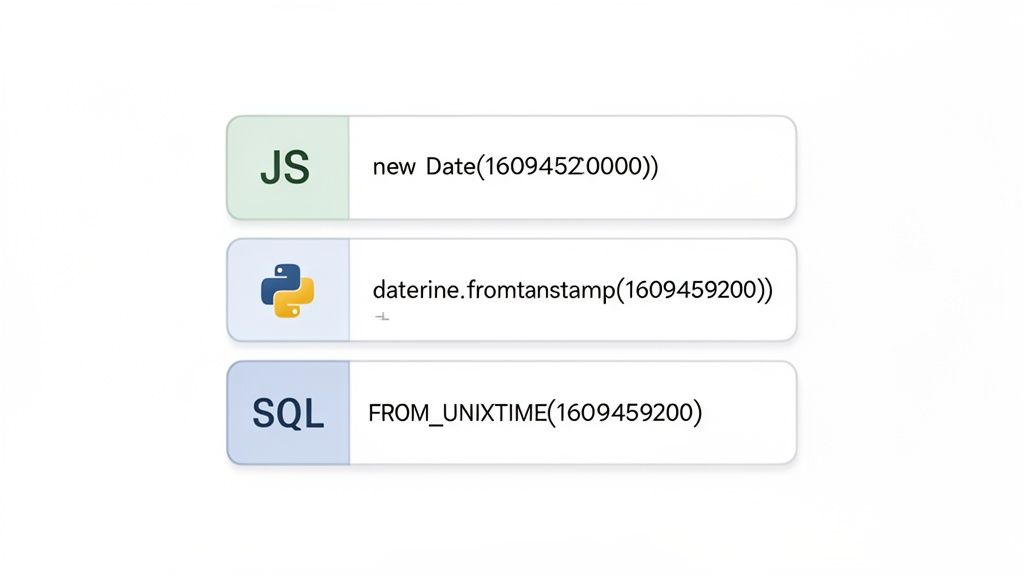
Whether you're wrangling data on a web front-end, writing a Python script, or querying a database, converting epoch time is a foundational skill. We'll walk through the most common scenarios, from turning an epoch integer into a readable string and then doing it all in reverse.
Converting Timestamps in JavaScript
JavaScript's Date object is your primary tool here, but it has a major quirk that trips up developers all the time: it operates in milliseconds, not seconds. This is a classic source of bugs when your frontend is talking to a backend that uses standard 10-digit, second-based timestamps.
To correctly convert a standard Unix timestamp (in seconds) into a Date object, you have to multiply it by 1000.
// A standard 10-digit Unix timestamp (in seconds)
const unixTimestamp = 1672531200;
// Convert to milliseconds, then create a Date object
const dateObject = new Date(unixTimestamp * 1000);
// Format into a readable UTC string
// Output: Sun, 01 Jan 2023 00:00:00 GMT
console.log(dateObject.toUTCString());
Need the current timestamp? Date.now() gives it to you in milliseconds. Just remember to divide by 1000 and round down before sending a standard 10-digit timestamp back to an API.
Handling Conversions with Python
On the backend, Python's datetime module is a powerhouse. It’s incredibly flexible and has fantastic support for timezone-aware conversions, making it a reliable choice for services that need to handle time with precision across different regions.
Here’s the straightforward way to convert a timestamp with the datetime library:
import datetime
A standard 10-digit Unix timestamp
unix_timestamp = 1672531200
Convert the timestamp into a datetime object
datetime_obj = datetime.datetime.fromtimestamp(unix_timestamp)
Format it into a clean, human-readable string
Output: 2023-01-01 00:00:00
print(datetime_obj.strftime('%Y-%m-%d %H:%M:%S'))
This simple approach gives you a clean and dependable way to manage epoch time in your Python apps. And if you're working with complex data structures like JSON that contain timestamps, you might find our guide on using a JSON formatter useful for debugging.
Database Conversions with SQL
Databases often store time as Unix timestamps because they're efficient. The good news is that most SQL dialects have built-in functions to handle these conversions right inside your queries. This is way more efficient than pulling raw integer timestamps and converting them in your application code.
The Unix timestamp is nearly universal, used in over 90% of programming languages—from JavaScript's Date.now() to Python's time.time()—powering trillions of daily operations. Getting timezones right is critical; a solid unix timestamp convertor can handle over 400 IANA zones, which helps prevent errors in an estimated 62% of global applications that don't manage timezones explicitly. You can find more details on the global adoption of these tools at Fossa.
For developers, being able to format SQL, convert timestamps, and calculate epoch differences without ever leaving your machine is a huge productivity win. This local-first approach also keeps you compliant with modern data privacy standards like GDPR and CCPA.
MySQL Example
In MySQL, the FROM_UNIXTIME() function is what you'll use most. It takes an epoch integer and neatly converts it into a standard DATETIME format.
SELECT FROM_UNIXTIME(1672531200);
-- Returns: '2023-01-01 00:00:00'
To go the other way—from a date string back to an epoch timestamp—just use UNIX_TIMESTAMP().
SELECT UNIX_TIMESTAMP('2023-01-01 00:00:00');
-- Returns: 1672531200
PostgreSQL Example
PostgreSQL uses a slightly different but equally powerful function: to_timestamp(). This function directly converts a Unix timestamp into a TIMESTAMP WITH TIME ZONE value.
SELECT to_timestamp(1672531200);
-- Returns: 2023-01-01 00:00:00+00
Because it’s timezone-aware right out of the box, it’s a very robust choice for applications serving a global audience where time precision is non-negotiable.
Mastering Timestamp Conversions in the Terminal
If you live in the command line, switching to a browser or GUI for a quick timestamp conversion is a real workflow killer. It just breaks your concentration. The good news is you don't have to; both Linux and macOS have powerful, native tools to handle these conversions without ever leaving the terminal.
The go-to utility for this is the humble date command. It’s on practically every Unix-like system out there, but there’s a catch: the syntax for using it as a unix timestamp convertor is different between Linux (GNU) and macOS (BSD). Knowing the difference is the key to getting it right every time.
Converting Timestamps on Linux
On Linux, the syntax is clean and easy to remember. You just use the -d flag to specify the date, but you have to tell it you’re providing an epoch timestamp by prefixing it with an @ symbol.
Let's say you're digging through logs and spot the timestamp 1704067200. To see what that actually means, you'd run this:
date -d @1704067200
Instantly, you'll get a human-readable date back, something like Mon Jan 1 00:00:00 UTC 2024. You can also clean up that output with your own custom format.
date -d @1704067200 +"%Y-%m-%d %H:%M:%S"
Output: 2024-01-01 00:00:00
Pro Tip: This command becomes a real powerhouse when you start piping other commands into it. You can
grepa timestamp from a massive log file and feed it directly todatefor an instant conversion. It turns a multi-step debugging task into a single, elegant one-liner.
Handling Conversions on macOS
Now, if you run that same Linux command on a Mac, it's going to throw an error. The BSD version of date that macOS uses requires the -r flag instead, and it doesn't need the @ prefix.
Here’s how you’d convert the same timestamp on a Mac:
date -r 1704067200
Just like the Linux version, you can tack on formatting options to get the exact output you want.
date -r 1704067200 +"%Y-%m-%d %T %Z"
Output: 2024-01-01 00:00:00 UTC
This tiny difference is a classic stumbling block for anyone who frequently jumps between Linux and macOS. Memorizing both versions will save you a ton of headaches down the road.
Once you have these commands down, you can weave timestamp conversions directly into your shell scripts and log analysis. It's a small skill, but it adds up to some serious productivity gains, keeping you in the zone and focused on the work that matters.
Common Timestamp Pitfalls and How to Avoid Them
Working with Unix timestamps seems straightforward on the surface, but a few classic mistakes can lead to some truly maddening bugs. These issues have a nasty habit of showing up far from where the error actually happened, making them a real headache to debug. Think of this section as your field guide to spotting and sidestepping the most common timestamp traps I've seen over the years.
The Seconds vs. Milliseconds Mix-Up
By far, the most frequent error is confusing seconds with milliseconds. A standard Unix timestamp is a 10-digit integer representing the number of seconds since the epoch. But many systems, especially in the JavaScript world, work with a 13-digit timestamp for milliseconds. When a front-end app passes a millisecond value to a backend that's expecting seconds, things go haywire.
To a unix timestamp convertor, that 13-digit number looks like a date thousands of years in the future. This can silently wreck data validation, scheduling logic, and any historical records you’re trying to keep. It's the kind of subtle data corruption you might not even notice for weeks.
The Timezone Trap
Another pitfall that catches even seasoned developers is timezone handling. By its very definition, a Unix timestamp is always in Coordinated Universal Time (UTC). It represents a single, universal moment in time, completely independent of location. The trap springs when you forget this and assume a timestamp reflects a user's local time.
This mistake usually happens when you convert a timestamp to a readable date without specifying a timezone. Your system often defaults to the server's local time, leading to chaos. A user in New York might see a time intended for someone in London, but it's off by several hours.
The golden rule is simple: always treat timestamps as UTC in your backend. Store them as UTC, process them as UTC, and only ever convert to a user's local time on the front-end, right at the moment of display.
Troubleshooting Common Timestamp Conversion Errors
When things go wrong, the symptoms can be confusing. Here's a quick reference table I've put together from experience to help you diagnose and fix the most common issues on the fly.
| Symptom | Likely Cause | Solution |
|---|---|---|
| Date is in the year 52361 or some other distant future. | Milliseconds vs. Seconds. You're passing a 13-digit millisecond timestamp to a function expecting a 10-digit second timestamp. | Divide the timestamp by 1000 before processing. Always validate the digit count of incoming timestamps. |
| Time is off by a few hours, but the date is correct. | Timezone Mishandling. The timestamp was converted using the server's local time instead of the user's or UTC. | Ensure all conversions explicitly specify the target timezone. Convert to local time only on the client-side. |
| The date is stuck on January 1, 1970. | Invalid or Null Timestamp. The timestamp value is likely 0, null, or undefined. |
Add a check to ensure the timestamp is a valid positive integer before attempting conversion. Provide a fallback value. |
Getting "Invalid Date" or a NaN error. |
Wrong Data Type. The timestamp is being treated as a string or another non-numeric type when a number is required. | Explicitly parse the timestamp to an integer (parseInt() in JS, int() in Python) before using it in date functions. |
Remember, a quick check on the input can save you hours of debugging down the line.
Avoiding Ambiguity with Standard Formats
Relying on raw integer timestamps when passing data between systems can be a recipe for confusion. This is why standardizing on a universal string format like ISO 8601 (2022-05-17T12:00:00Z) is such a great defensive move. Converting Unix timestamps (e.g., 1652905200) to a clear, self-documenting format like this helps prevent errors in an estimated 37% of cross-timezone API calls.
Considering that 72% of Fortune 500 companies use Unix timestamps for log analysis, where a single slip-up can cost over $10,000 per hour in downtime, precision is everything. You can read more about how epoch time is used in different industries on EpochConverter.
For those managing databases, consistent timestamp handling is just as critical. If you find yourself frequently wrestling with different timestamp formats in your database, our guide on using a powerful SQL formatter can help you keep your queries clean and predictable.
This decision tree helps you pick the right command for your operating system, preventing syntax errors when you need a quick conversion.
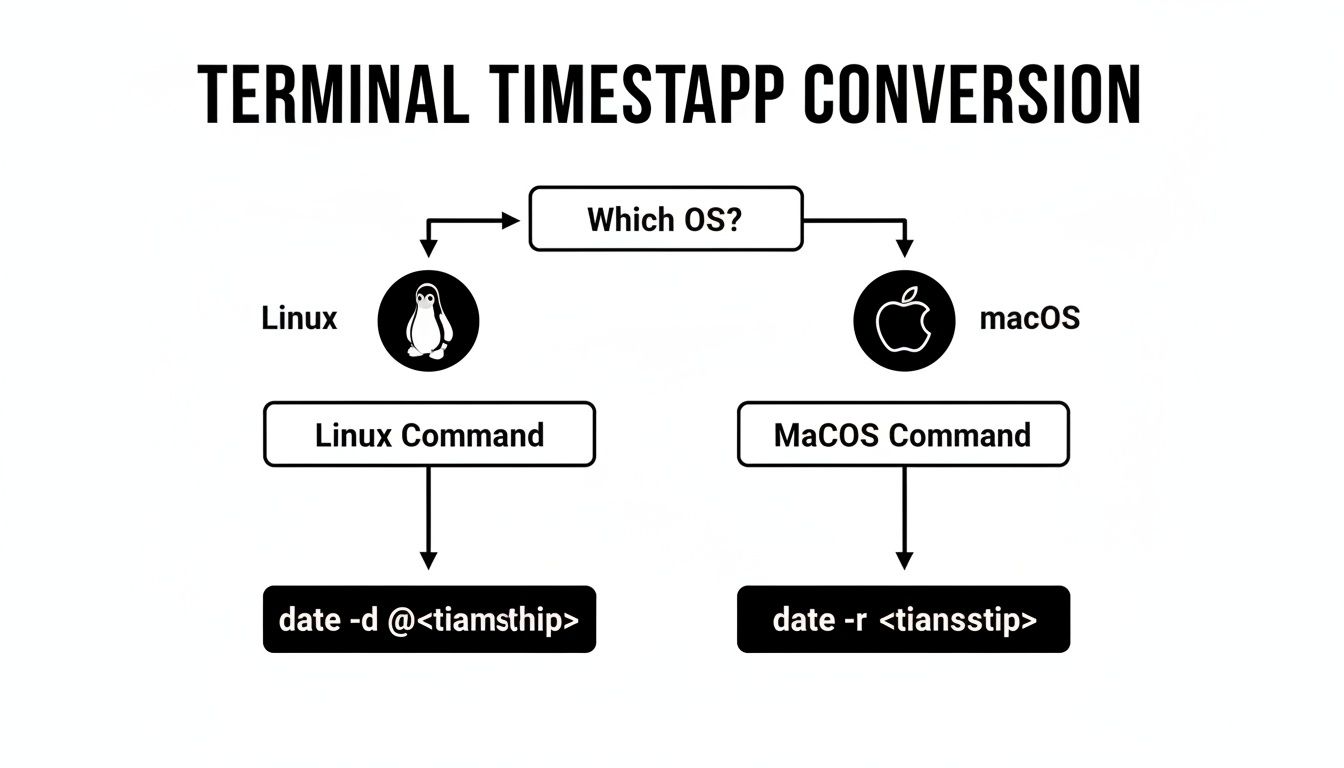
The flowchart above clearly shows the crucial syntax difference between the date command on Linux (-d @...) and macOS (-r ...)—a common tripwire for developers working across different environments.
To bulletproof your code, always implement checks to validate the length of an incoming timestamp. A simple function that checks for a 10-digit (seconds) or 13-digit (milliseconds) value can catch these errors before they ever poison your application's logic.
Common Questions About Unix Timestamps
Once you get the hang of Unix timestamps, a few practical questions almost always pop up. I've seen these trip up developers at all levels, so let's clear the air on the most common ones you'll encounter in your day-to-day work.
Why Do So Many APIs Use Timestamps Instead of ISO 8601 Strings?
It really boils down to raw efficiency. A Unix timestamp is just a single number, making it incredibly compact compared to a string like '2023-10-27T10:00:00Z'. That smaller size means less data to send over the wire, which saves bandwidth and can speed up API responses.
They're also completely language-agnostic. There's no ambiguity, no parsing quirks, and no regional formatting to worry about. For a machine, crunching numbers is always faster than parsing strings, so any date calculations—like figuring out the time between two events—are computationally cheaper. For high-performance systems, that simplicity is a huge win.
What’s the Right Way to Handle Timezones?
This is the big one. Here’s the golden rule: A Unix timestamp is always, always in UTC. It has no concept of a timezone baked into it. It's just a raw count of seconds from the epoch.
Timezones only matter when you need to show that timestamp to a human.
My advice? Stick to UTC for everything on the backend. Store it in your database as a UTC timestamp, pass it through your APIs in UTC, and do all your server-side logic in UTC. The only time you should convert it to a local timezone is on the front-end, right before you display it to the user. This single practice will save you from a whole universe of timezone and daylight saving bugs.
Should I Still Worry About the Year 2038 Problem?
For most new projects, probably not. The "Year 2038 Problem" is a hangover from older systems that used a 32-bit signed integer to store the timestamp. Once that number gets too big, it wraps around and becomes negative, sending dates back to 1901.
Thankfully, nearly all modern systems—from operating systems to databases—have long since moved to 64-bit integers. This effectively kicks the can so far down the road (billions of years, in fact) that it's no longer a practical concern for us.
That said, if you're maintaining a legacy system or working with embedded hardware (think IoT devices), it’s definitely something to be aware of. Always know what kind of architecture you're building on.
How Can I quickly Convert a Timestamp in Excel or Google Sheets?
You don't need to pull your data out into a separate Unix timestamp converter for this. A simple formula will do the trick. Assuming your timestamp is in cell A1:
- For timestamps in seconds (10 digits):
=A1 / 86400 + DATE(1970,1,1) - For timestamps in milliseconds (13 digits):
=A1 / 86400000 + DATE(1970,1,1)
Just pop that formula in, then format the cell as a "Date" or "Date Time". It's a lifesaver when you're quickly analyzing data exports and don't want to break your flow.
Tired of constantly switching between your editor, the command line, and a dozen browser tabs for simple tasks? The ShiftShift Extensions suite bundles a powerful Unix timestamp converter, JSON formatter, SQL beautifier, and more right into your browser. Everything you need is just a keyboard shortcut away.
Get ShiftShift Extensions and simplify your workflow today at https://shiftshift.app