Kā pārbaudīt domēna vārda pieejamību: ātri atrodi savu ideālo domēnu
Uzziniet, kā pārbaudīt domēna vārda pieejamību ar šo ātro ceļvedi. Izmantojiet tūlītējās rīkus, reģistratoru meklēšanu un WHOIS meklējumus, lai iegūtu savu domēnu.

Ieteicamās paplašinājumi

Pareiza domēna iegūšana ir pamats jebkā veidošanai tiešsaistē. Pirms varat izdomāt logotipu vai uzrakstīt kaut vienu teksta rindiņu, jums ir jāzina, kā pārbaudīt, vai domēna vārds ir pieejams. No pirmā acu uzmetiena tas ir gluži vienkāršs uzdevums — vienkārši ievadiet savu ideju reģistratora meklēšanas joslā, veiciet WHOIS uzmeklēšanu vai izmantojiet pārlūkprogrammas rīku, lai ātri saņemtu atbildi "jā" vai "nē".
Taču patiesi gudra domēna meklēšana sniedzas daudz tālāk par vienkāršu noskaidrošanu, vai nosaukums tehniski ir "brīvs". Šis ceļvedis jūs iepazīstinās ar visu stratēģisko procesu.
Jūsu domēns ir vairāk nekā tikai adrese
Uztveriet savu domēna vārdu kā savu digitālo rokasspiedienu. Tas bieži vien ir pats pirmais, ar ko saskaras potenciālais klients vai apmeklētājs, nosakot toni visam, kas tam seko. Uzņēmējdarbībā tas ir jūsu zīmola pamats. Radītājam tā ir jūsu personīgā karogs, kas stingri iesakņojies tīmeklī.
Lielisks domēna vārds veic lielāko darbu jūsu vietā — tas rada tūlītēju atpazīstamību un uzticamību jau pirms kāds ir noklikšķinājis uz jūsu vietni. Neticami pārpildītajā tiešsaistes pasaulē neaizmirstams un atbilstošs domēns var būt izšķirošais faktors starp to, vai jūs viegli atrod vai pilnībā nepamana.
Šeit nav runa tikai par tāda nosaukuma atrašanu, kurš vēl nav aizņemts; runa ir par tāda aktīva iegūšanu, kas aktīvi strādās jūsu labā. Domēnu nozare ir karstāka nekā jebkad agrāk, un kopējais globālo reģistrāciju skaits nesen ir pieaudzis līdz 378,5 miljoniem. Šis skaitlis vien jau pasaka, cik kritiski svarīga ir unikāla tīmekļa adrese ikvienam, kurš nopietni vēlas atstāt savu zīmi tiešsaistē.
Laba domēna stratēģiskā nozīme
Spēcīgs domēna vārds ir daudzfunkcionāls instruments jūsu zīmolam. Tas paveic daudz vairāk nekā tikai nogādā cilvēkus uz jūsu vietni.
Lūk, ko tas patiešām sniedz:
- Veido zīmola autoritāti: Godīgi sakot,
yourbrand.comvienkārši šķiet uzticamāks un profesionālāks nekā jebkad varētu būt kāds vispārīgs apakšdomēns. - Uzlabo iegaumējamību: Vienkārši, lipīgi nosaukumi paliek cilvēku prātā. Tos ir vieglāk atcerēties, ierakstīt un dalīties, kas nozīmē vairāk tiešās trafika jums.
- Uzlabo SEO potenciālu: Lai gan tas nav burvju līdzeklis augstākām rangā vietām, domēns, kas skaidri atspoguļo jūsu nišu, jau no paša sākuma palīdz gan lietotājiem, gan meklētājprogrammām saprast, ar ko jūs nodarbojaties.
Lielisks domēna vārds ir kā pirmšķirīgs nekustamais īpašums. Tas jūs novieto pareizajā apkaimē, padara jūs viegli atrodamu un jau no pirmās dienas pievieno vērtību visam jūsu digitālajam uzņēmumam.
Vairāk nekā vienkārša pārbaude "Vai tas ir pieejams?"
Tas, ka domēns ir pieejams, automātiski nenozīmē, ka tā ir pareizā izvēle. Patiesi efektīva meklēšana ietver dažus papildu pienācīgas rūpības slāņus, lai pārliecinātos, ka neesat mantojis kāda cita problēmas vai iedzinis sevi strupceļā.
Piemēram, jums vajadzētu padomāt par to, kā jūsu domēns izskatīsies uz vizītkartes vai sociālo mediju profilā. Jūs pat varētu vēlēties noskaidrot kā ģenerēt QR kodu savam jaunajam URL, lai nemanāmi savienotu savu bezsaistes un tiešsaistes mārketingu.
Šis ceļvedis aptvers visu — no sākotnējām ātrajām pārbaudēm līdz dziļākai izpētei, kas nodrošina, ka jūsu izvēlētais domēns ir ne tikai pieejams, bet arī patiesi ideāls pamats jūsu projektam.
Pārbaudiet domēnus uzreiz, tieši no savas pārlūkprogrammas
Ja jūs, tāpat kā es, pavadāt lielāko dienas daļu pārlūkprogrammā, vislabākie rīki ir tie, kas liek jums mainīt darba gaitu. Tā vietā, lai pārtrauktu savu darba plūsmu, atvērtu jaunu cilni, dotos uz reģistratoru un ierakstītu savu ideju, pārlūkprogrammā iebūvēts pārbaudītājs ļauj jums izvērtēt domēnu tajā brīdī, kad tas iešaujas prātā. Viss ir par ātrumu un spēju noturēties darba ritmā.
Iedomājieties: jūs lasāt rakstu, un tas izraisa spožu ideju par blakus projektu. Tas sākotnējais iedvesmas uzplaiksnījums ir trausls. Ja jums ir jāpārtrauc tas, ko darāt, šī ideja var vienkārši izgaist. Šeit patiesi izceļas moderns pārlūkprogrammas paplašinājums, piemēram, ShiftShift Domain Checker.
Izmantojot ātru tastatūras saīsni, jūs varat atvērt meklēšanas joslu tieši tajā lapā, kurā atrodaties. Šī tūlītējā atgriezeniskā saite ir milzīga priekšrocība ikvienam, kas paļaujas uz radošo impulsu — izstrādātājiem, uzņēmējiem, mārketinga speciālistiem, kuru vien vēlaties.
Saglabājiet savu darba plūsmu nepārtrauktu
Lielākais ieguvums šeit ir izvairīšanās no konteksta pārslēgšanas. Mēs visi zinām, cik nogurdinoši ir pastāvīgi lēkāt starp cilnēm. Tas sagrauj jūsu fokusu un nogalina produktivitāti. Pārlūkprogrammā iebūvēts rīks ļauj jums saglabāt koncentrēšanos uz to, ko darāt.
Lūk, kā izskatās tūlītēja pārbaude, izmantojot ShiftShift Domain Checker.
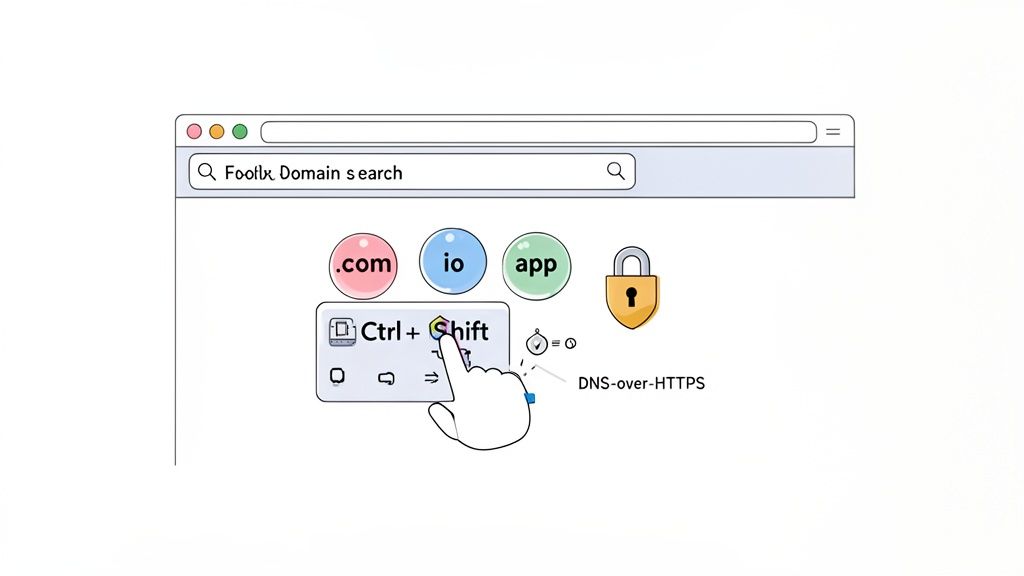
Šis vienkāršais uznirstošais logs ļauj meklēt simtiem TLD, nepametot lapu. Jūs uzreiz saņemat atbildi. Ja tas ir pieejams, varat to pierakstīt; ja nē, bez liekas kavēšanās pārejiet pie nākamās idejas.
Piezīme par privātumu, izmantojot DNS-over-HTTPS
Papildus ērtībām šai modernajai pieejai ir arī nopietns drošības ieguvums. Lielākā daļa tradicionālo domēnu meklējumu jūsu vaicājumus nosūta vienkāršā tekstā. Tas nozīmē, ka jūsu ISP — vai jebkurš cits, kas pārlūko tīklu — var redzēt katru jūsu izcilo (un ne tik izcilo) domēna ideju.
Labāki pārlūkprogrammas rīki izmanto DNS-over-HTTPS (DoH), protokolu, kas šifrē jūsu meklēšanas vaicājumu. Uztveriet to kā savas idejas nosūtīšanu aizzīmogotā, privātā aploksnē, nevis uz pastkartes, ko visi var redzēt.
Izmantojot rīku ar DNS-over-HTTPS, jūs saglabājat savu domēnu meklēšanu pilnībā privātu. Tas novērš datu izspiegošanu un aizsargā jūsu intelektuālo īpašumu, pirms jums pat ir iespēja to reģistrēt.
Šis privātuma līmenis ir obligāts, ja domājat par nosaukumiem jaunuzņēmumam, kas darbojas 'stealth' režīmā, vai konfidenciālam projektam. Tas nodrošina, ka jūsu lieliskā ideja paliek jūsu un tikai jūsu. Jūs varat dziļāk iedziļināties šajā metodē šajā ceļvedī par to, kā pārbaudīt domēna pieejamību, izmantojot drošus rīkus.
Šis ātruma, darbplūsmas integrācijas un privātuma apvienojums padara pārlūkprogrammas pārbaudi par daudz labāku veidu, kā jebkuram nopietnam profesionālim atrast savu nākamo domēnu. Tas pārvērš to, kas agrāk bija apnicīgs uzdevums, par nemanāmu, radošu ieradumu.
Tradicionālo domēnu reģistratoru meklēšanas rīku izmantošana
Jūsu pirmais pieturas punkts gandrīz vienmēr ir milzīgā meklēšanas josla domēnu reģistratora sākumlapā. Tas ir visizplatītākais un tiešākais veids, kā pārbaudīt, vai domēns ir pieejams iegādei. Mēs visi to esam darījuši — dodamies uz tādu vietni kā GoDaddy, Namecheap vai Google Domains, ievadām savu izcilo ideju un skatāmies, kas notiek.
Šī metode ir populāra viena iemesla dēļ: tā ir neticami vienkārša. Reģistrators veic lielāko darbu, acumirklī pārbaudot centrālo domēnu reģistru, lai sniegtu jums ātru apstiprinājumu vai noraidījumu.
Taču šī sākotnējā meklēšana ir tikai sākuma līnija. Rezultātu lapa ir vieta, kur sākas īstā lēmumu pieņemšana, jo reģistratori piedāvā daudz vairāk informācijas nekā vienkāršu "jā" vai "nē."
Meklēšanas rezultātu izpratne
Kad nospiežat meklēšanu, jūs parasti iegūsit vienu no trim rezultātiem par vēlamo nosaukumu. Atšķirību zināšana ir būtiska, lai izlemtu, ko darīt tālāk.
- Pieejams: Tas ir tas, uz ko cerat. Tā ir zaļā gaisma. Domēns nav reģistrēts un ir gatavs, lai jūs to nekavējoties varētu pieprasīt.
- Aizņemts: Kāds cits jūs apsteidza un jau ir īpašnieks tieši tādam domēnam, kādu vēlaties. Jūs to nevarat reģistrēt, taču nepadodieties vēl—tas ne vienmēr ir strupceļš.
- Premium: Domēns tehniski ir pieejams, bet tam ir augsta cena, kas bieži sākas no simtiem līdz desmitiem tūkstošu dolāru.
Premium domēni parasti ir īsi, viegli iegaumējami nosaukumi, kas bagāti ar vērtīgiem atslēgvārdiem (piemēram, coffee.club vai travel.pro). Reģistri vai investori nosaka šīs augstās cenas, jo viņi zina, ka nosaukumam ir iekšēja vērtība un tas būs ļoti pieprasīts.
"Premium" birka nav tikai mārketinga triks. Tas bieži nozīmē, ka domēnam ir nopietns zīmola potenciāls vai pat jau esoša autoritāte. Pirms jūs atsakāties cenas dēļ, padomājiet par tā ilgtermiņa vērtību jūsu projektam.
Kā orientēties alternatīvu jūrā
Ja jūsu galvenā izvēle ir aizņemta, reģistrators nekavējoties jūs pārpludinās ar alternatīvu iespēju sarakstu. Šeit jums ir jāuzvelk stratēģa cepure. Lai gan daži ieteikumi var būt noderīgi, daudzi ir tikai mēģinājumi pārdot jums mazāk izplatītus vai mazāk vēlamus augšējā līmeņa domēnus (TLD).
Pirms ķeraties pie alternatīvas, izvērtējiet to pēc šī saraksta:
- Vai tas joprojām izklausās pareizi? Tāds nosaukums kā
getmyproject.comvar darboties, bet kaut kas līdzīgsmy-project-online-now.netvienkārši šķiet neveikls un neprofesionāls. - Vai TLD ir piemērots? Tehnoloģiju uzņēmumam
.iovai.apppaplašinājums šķiet moderns un atbilstošs. Savukārt.bizvai.infodažkārt var justies novecojis vai mazāk uzticams. - Vai tas var radīt zīmola neskaidrību? Šis ir svarīgs jautājums. Ja
yourbrand.comjau ir izveidojies konkurents,yourbrand.coreģistrēšana praktiski nozīmē, ka jūs mudināt savus klientus kļūdaini nonākt viņu vietnē.
Šajā posmā jūsu mērķis nav tikai atrast jebkuru pieejamu nosaukumu—tas ir atrast īsto. Neļaujiet spiedienam piespiest jūs no neapmierinātības satvert neveiklu alternatīvu. Ir vērts veltīt laiku, lai atrastu nosaukumu, kas faktiski stiprina jūsu zīmolu.
Dziļāka izpēte ar WHOIS uzmeklēšanu
Tātad, jūs esat veicis meklēšanu pēc sava ideālā domēna, un reģistrators jūs sagaida ar baiļoto "aizņemts." Ir viegli justies, it kā būtu atsities pret sienu, bet nepadodieties vēl. Uztveriet to kā neliela detektīvdarba sākumu. Jūsu nākamais solis ir WHOIS uzmeklēšana, kas būtībā ir kā publisko īpašuma ierakstu izvilkšana domēna vārdam.
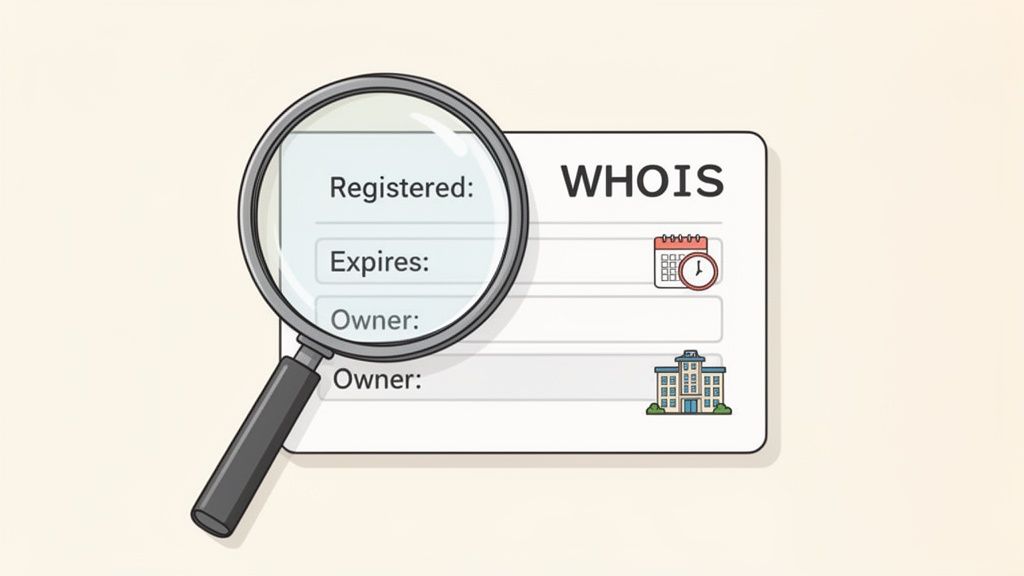
Vienkārša pieejamības pārbaude dod tikai jā vai nē. Savukārt WHOIS ieraksts sniedz stāstu aiz šī "nē." Šī publiskā datubāze, ko pārvalda ICANN (Internet Corporation for Assigned Names and Numbers), ir bagāta ar informāciju, kas var palīdzēt jums izdomāt, ko darīt tālāk.
Ko meklēt WHOIS ierakstā
Uzmeklēšanas veikšana ir vienkārša. Daudzas vietnes piedāvā bezmaksas WHOIS meklēšanas rīkus—vienkārši ievadiet domēna nosaukumu un skatieties, kas parādās. Rezultāti sākumā var izskatīties nedaudz tehniski, bet jūs patiesībā tikai meklējat dažas svarīgas informācijas daļas.
Lūk, uz ko jums vajadzētu pievērst uzmanību:
- Reģistrācijas datums: Tas parāda, cik ilgi domēns ir reģistrēts. Domēns, kas pirmo reizi reģistrēts pirms vairāk nekā desmit gadiem, visticamāk, ir izveidots aktīvs, un to, iespējams, nebūs viegli iegūt.
- Derīguma termiņš: Tas ir zelts. Ja domēnam drīz beigsies derīguma termiņš, jums var būt iespēja to paķert, ja pašreizējais īpašnieks aizmirst vai nolemj neatjaunot. Atzīmējiet kalendārā!
- Reģistratora informācija: Tas norāda, kurš uzņēmums glabā reģistrāciju (piemēram, GoDaddy vai Namecheap). Tas noder, ja nolemjat mēģināt rezervēt domēnu.
- Īpašnieka kontaktinformācija: Pateicoties privātuma noteikumiem, piemēram, GDPR, šī informācija bieži tiek slēpta aiz privātuma pakalpojuma. Bet dažreiz paveicas un atrodat kontaktpersonas e-pastu, kas dod tiešu iespēju painters par pārdošanu.
Kā pārvērst WHOIS datus stratēģijā
Ar šīm detaļām rokā jūs varat pārtraukt minēšanu un sākt stratēģiski darboties.
Teiksim, WHOIS ieraksts rāda, ka domēns tika reģistrēts pirms desmit gadiem nozīmīgā uzņēmumā un tam nav jābeidzas vēl piecus gadus. Reālistiski, jūsu iespējas to iegūt ir no niecīgām līdz nekādām. Ir pienācis laiks atgriezties pie zīmēšanas dēļa pēc alternatīvām.
Bet ko darīt, ja atrodat domēnu, kuram beidzas derīguma termiņš pēc divām nedēļām un šķiet, ka tas vienkārši atrodas uz apturētas lapas, neizmantots? Tagad jums ir īsta iespēja. Jūs varat veikt backorder, kas ir pakalpojums, kas mēģina reģistrēt domēnu jūsu vietā uzreiz, kad tas tiek atbrīvots.
WHOIS dati pārveido jūsu meklēšanu no vienkārša jā/nē jautājuma par stratēģisku novērtējumu. Tie jums parāda ne tikai to, ka domēns ir aizņemts, bet kā tas ir aizņemts, sniedzot kontekstu, lai to vai nu turpinātu, vai efektīvi mainītu virzienu.
Šis papildu izmeklēšanas slānis ir svarīgāks nekā jebkad. Domēnu pasaule nepārtraukti paplašinās ar jauniem vispārīgajiem augšējā līmeņa domēniem (ngTLD), piemēram, .app, .shop un .dev. Tie ir kļuvuši par milzīgu nozares izaugsmes virzītāju, jo cilvēki sāk vairāk novērtēt atbilstību nekā tradicionālo .com.
Jūs varat uzzināt vairāk ieskatu par šo tendenci, apskatot jaunāko domēnu aptauju un tās atklājumus. Šādas zināšanas palīdz jums izlemt, vai ir vērts dzīties pakaļ tam aizņemtajam .com, ja daudz aprakstošāks ngTLD varētu būt pieejams jau tagad.
Zīmola aizsardzība pirms reģistrācijas
Tātad, jūs atradāt domēna vārdu, kas ir pieejams. Fantastiski! Tas ir milzīgs pirmais solis, taču pagaidiet vēl ar "pirkt" pogas nospiešanu. Īstā uzvara nav tikai brīva nosaukuma atrašana; tā ir stabila, ilgtermiņa aktīva nodrošināšana jūsu zīmolam, kas vēlāk jums neradīs problēmas.
Tagad ir īstais laiks nelielam detektīvdarbam. Slēpts preču zīmju strīds vai aizdomīga domēna vēsture var pilnībā izjaukt projektu pēc mēnešiem vai pat gadiem. Dažas papildu pienācīgas uzmanības minūtes šodien var izglābt jūs no veselas kaudzes dārgu juridisku problēmu un pārzīmola murgu nākotnē.
Meklējiet esošās preču zīmes
Pirmā lieta vispirms: pārliecinieties, vai jūsu sapņu nosaukums jau nav kāda cita reģistrēta preču zīme. Nosaukuma lietošana, kas aizskar cita uzņēmuma intereses—īpaši līdzīgā jomā—ir ātrs ceļš uz pārtraukšanas un izbeigšanas vēstuli. Lai patiešām to apgūtu, ir vērts saprast ko ietver intelektuālā īpašuma aizsardzība.
ASV Patentu un preču zīmju biroja (USPTO) tiešsaistes datu bāze šeit ir jūsu labākais palīgs. Ātra meklēšana pateiks, vai kāds cits jau ir izvirzījis juridiskas tiesības uz šo nosaukumu. Jebkuram nopietnam biznesa projektam tas ir absolūti obligāti.
Domājiet par preču zīmes pārbaudi kā fona pārbaudi jūsu zīmola nosaukumam. Tas ir pats svarīgākais solis, lai neveidotu visu savu digitālo klātbūtni uz juridiski nestabilas pamatnes.
Izziniet domēna vēsturi
Tas, ka domēns šodien ir pieejams, nenozīmē, ka tas ir pavisam jauns. Tam var būt vēsture, un jums ir jāzina, vai tā ir laba. Domēns, kas iepriekš izmantots surogātpastam, krāpniecībai vai citam apšaubāmam biznesam, var būt SEO katastrofa, jo meklētājprogrammas to, iespējams, jau ir iekļāvušas melnajā sarakstā.
Vispiemērotākais rīks tam ir Internet Archive Wayback Machine. Vienkārši ievadiet domēnu un skatieties, kā vietne izskatījās gadu gaitā. Ja pamanāt kaut ko aizdomīgu, uzskatiet to par milzīgu brīdinājuma signālu un ejiet prom.
Pārbaudiet sociālo mediju saskaņotību
Jūsu zīmola mājvieta nav tikai vietne; tā ir vesela ekosistēma, kas ietver sociālos medijus. Nekas neizskatās tik neprofesionāli kā nekonsekventi lietotājvārdi dažādās platformās. Iedomājieties, ka jūs iegūstat brightfuture.com, bet esat spiesti izmantot @bright_future_official_24 Instagram. Tas izskatās nekārtīgi un apgrūtina cilvēku iespēju jūs atrast.
Pirms apņemties reģistrēt domēnu, veiciet ātru pārbaudi visās galvenajās platformās:
- Instagram: Vai
@yourbrandir pieejams? - X (agrāk Twitter): Vai varat iegūt tīru, atbilstošu lietotājvārdu?
- Facebook: Vai uzņēmuma lapai ir pieejams personalizētais URL?
- TikTok un LinkedIn: Neaizmirstiet šīs platformas, īpaši, ja tur uzturas jūsu auditorija.
Nodrošinot savu nosaukumu visur, jūs jau no paša sākuma veidojat profesionālu, vienotu zīmolu. Tas veicina uzticību un padara ļoti vienkāršu jūsu auditorijas iespēju ar jums sazināties.
Kad sākat veidot šos kontus, ir svarīgi tos droši nostiprināt. Noteikti ievērojiet paroļu drošības paraugpraksi, lai aizsargātu šos jaunos zīmola aktīvus.
Jūsu pirmsreģistrācijas kontrolsaraksts
Jūs esat paveicis darbu, un nosaukums izskatās labs. Pirms pieņemat galīgo lēmumu, izskrieniet šo ātro kontrolsarakstu, lai pārliecinātos, ka nekas nav palaists garām.
| Pārbaude | Kāpēc tas ir svarīgi | Ieteicamais rīks |
|---|---|---|
| Preču zīmju meklēšana | Palīdz izvairīties no dārgiem tiesas procesiem un nepieciešamības vēlāk mainīt zīmolu. | USPTO TESS datubāze |
| Domēna vēsture | Nodrošina, ka nemantojat sliktu reputāciju vai SEO soda sankcijas. | Internet Archive Wayback Machine |
| Sociālo mediju lietotājvārdi | Veido konsekventu un profesionālu zīmola identitāti visās platformās. | Manuāla pārbaude Instagram, X, Facebook u.c. |
| Pareizrakstība un salasāmība | Vai nosaukums ir viegli izrunājams, uzrakstāms un atcerams? Izvairieties no dīvainiem rakstības veidiem. | Pajautājiet draugam vai kolēģim |
| Alternatīvie TLD | Pārbaudiet, vai konkurenti nav paņēmuši .net, .org vai citas populāras versijas. | Reģistratūras meklēšana |
Šo soļu veikšana pārvērš jūsu domēnu no tikai "pieejama" nosaukuma par patiesi dzīvotspējīgu, aizsargājamu zīmola aktīvu nākotnei.
Jūsu jautājumi par domēnu pieejamību ir atbildēti
Tātad, jūs esat veicis dažus meklējumus un noskaidrojis, vai jūsu sapņu domēns ir pieejams. Taču tas bieži vien ir tikai sākums. Izdomājot, ko darīt ar šo informāciju, var rasties vesela virkne jaunu jautājumu. Iedziļināsimies dažos no visbiežāk sastopamajiem šķēršļiem, ar kuriem cilvēki saskaras domēnu medību laikā.
Ko darīt, ja mans ideālais domēna nosaukums ir aizņemts?
Tā ir nepatīkama sajūta, bet "aizņemts" domēns automātiski nenozīmē, ka tas ir zaudēts uz visiem laikiem. Pirms padodaties, veiciet ātru WHOIS uzmeklēšanu. Tas jums pateiks, kam tas pieder un, vēl svarīgāk, kad tam beidzas derīguma termiņš. Ja šis datums tuvojas, jūs, iespējams, varēsiet to iegūt, veicot rezervēšanu.
Ja tas ir aizsargāts uz ilgu laiku, ir pienācis laiks kļūt radošam. Daži vienkārši pielāgojumi bieži vien var novest pie lieliskas alternatīvas:
- Pievienojiet darbības vārdu: Piemēram,
getyourbrand.comvaitryyourproduct.io. Tas ir klasisks solis, kas pievieno skaidru aicinājumu uz darbību. - Pievienojiet savu atrašanās vietu: Vietējam uzņēmumam
yourbrandnyc.comvaiyourbrandsf.comvar būt ļoti efektīvs. - Skatieties tālāk par .com: Ja veidojat tehnoloģiju jaunuzņēmumu,
yourbrand.aivai.appvar būt pat neaizmirstamāki un atbilstošāki nekā neveikla.comalternatīva.
Vai ir laba ideja reģistrēt vairākus domēnu paplašinājumus?
Jebkuram nopietnam uzņēmumam es teiktu — jā, absolūti. Sava zīmola nosaukuma iegūšana galvenajos augšējā līmeņa domēnos (piemēram, .com, .net un jūsu vietējā valsts koda TLD) ir gudrs, aizsardzības solis.
Šī vienkāršā darbība neļauj konkurentiem vai domēnu spekulantiem reģistrēt šīs variācijas, lai mulsinātu jūsu klientus vai kaitētu jūsu zīmola reputācijai. Uztveriet to kā lētu zīmola apdrošināšanu. Tas nedaudz palielina jūsu gada izmaksas, bet digitālās pēdas nostiprināšana ir tā vērta. Es parasti iesaku klientiem vispirms iegūt primāro TLD un pēc tam iegādāties pārējos, tiklīdz budžets to atļauj.
Vairāku TLD iegūšana patiesībā nav par lielāka datplūsmas apjoma iegūšanu; tas ir par jau esošās datplūsmas aizsardzību. Tas novērš zīmola izplūšanu un nodrošina, ka jūsu klienti vienmēr atrod jūs, nevis kādu citu.
Kā es varu pārbaudīt domēna vēsturi pirms pirkšanas?
Šis ir solis, kuru jūs absolūti nevarat izlaist. Jūs nevēlaties nopirkt domēnu, lai vēlāk atklātu, ka tam ir apšaubāma pagātne, pilna ar surogātpastu, kas sabojās jūsu SEO jau no pirmās dienas. Jūsu labākais palīgs šeit ir Internet Archive Wayback Machine, kas ļauj redzēt momentuzņēmumus par to, kā vietne izskatījās iepriekš.
Pēc tam vienkārši veiciet ātru Google meklēšanu domēna vārdam pēdiņās (piemēram, "yourdomain.com"). Tas var atklāt vecus foruma ierakstus vai negatīvas atsauksmes, kas saistītas ar šo nosaukumu. Dažas pienācīgas rūpības minūtes šeit var jums ietaupīt daudz nepatikšanas nākotnē.
Šī shēma sniedz lielisku vizuālu pārskatu par drošības pārbaudēm, kas jāveic pēc tam, kad esat apstiprinājis, ka domēns ir tehniski pieejams.
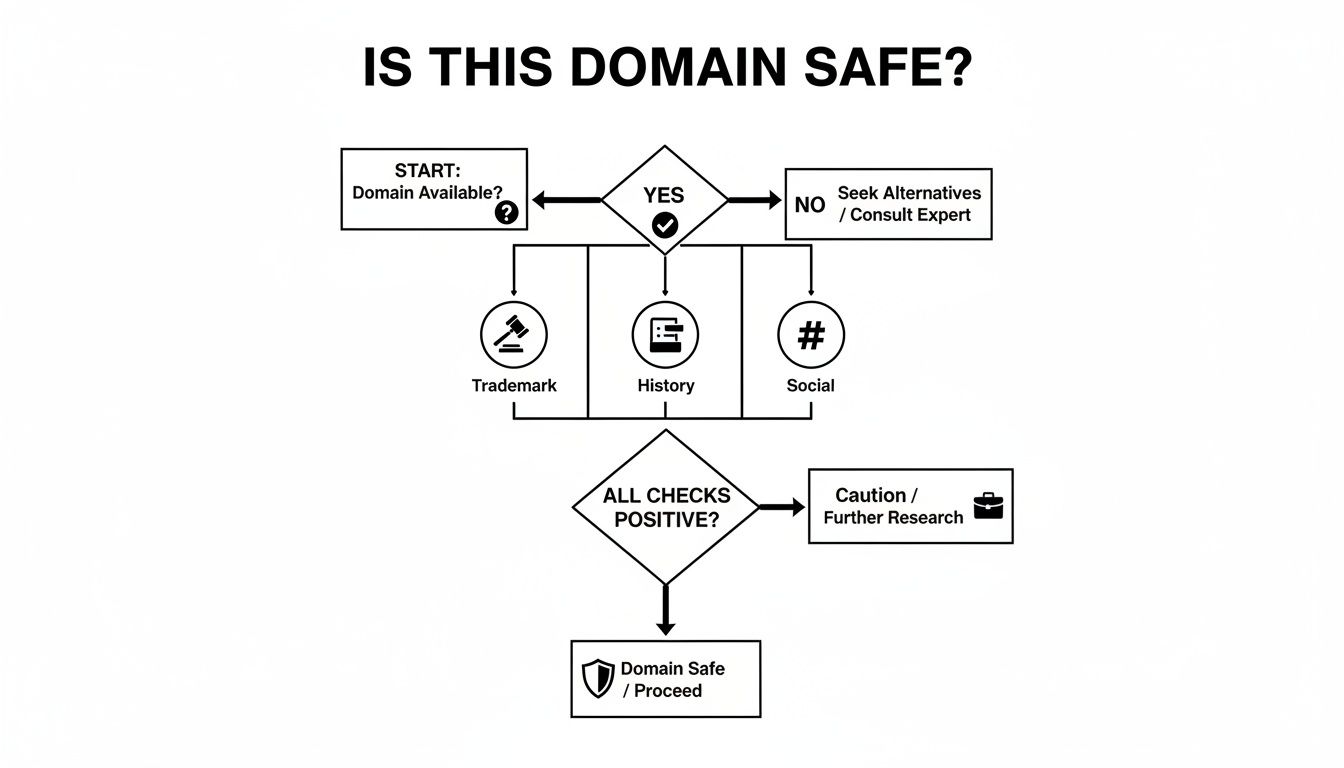
Kā redzat, pieejamība ir tikai pirmais solis. Tā vēstures, juridiskā statusa un iepriekšējās tiešsaistes klātbūtnes pārbaude ir tikpat svarīga, lai izveidotu veselīgu zīmolu.
Vai mana TLD izvēle ietekmē SEO?
Īsā atbilde ir nē, ne tieši. Google ir skaidri norādījis, ka pats TLD nav galvenais ranga faktors. Jūsu rangs daudz vairāk ir atkarīgs no jūsu satura kvalitātes un pieredzes, ko sniedzat lietotājiem.
Tomēr TLD var būt netieša ietekme, ietekmējot to, kā cilvēki uztver jūsu vietni. Neaizmirstams, atbilstošs paplašinājums — piemēram, .dev izstrādātāja portfolio vai .store e-komercijas vietnei — var veidot uzticību un pat palielināt klikšķu skaitu no meklēšanas rezultātiem. Šos pozitīvos lietotāju signālus meklētājprogrammas noteikti pamana. Galvenais ir izvēlēties TLD, kas šķiet autentisks un uzticams jūsu konkrētajai auditorijai.
Kad esat atradis lielisku domēnu un to rūpīgi izpētījis, pēdējais solis ir padarīt to par savu. Ja vēlaties ceļvedi šai ceļojuma daļai, šis raksts par to, kā reģistrēt izvēlēto domēna nosaukumu, to lieliski izskaidro.